2026-10-09 · 22 min · world-models · video-generation · 3d · creative-tools
Why read this
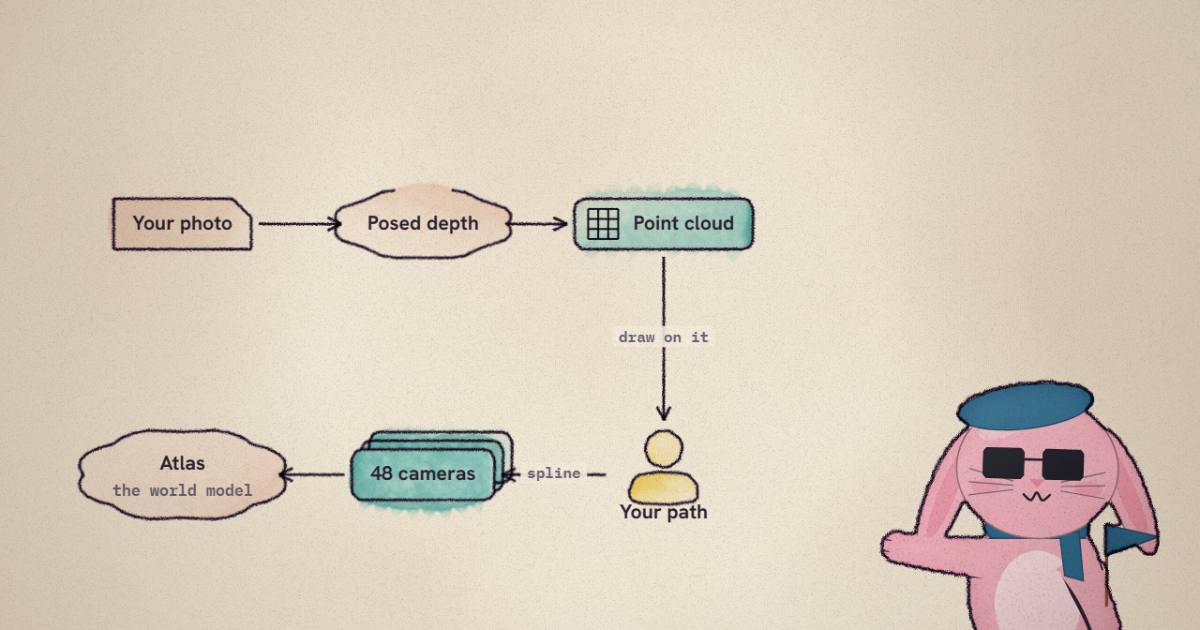
Notabletop 60%The 'Marble' camera app renders no splats: depth preview, 48 spline-sampled cameras, Atlas-painted frames, with its path maths in a live editor.
- Analysis found nowhere else
- Interactive explanations
- A new technique
Image & video generationAPI onlyMITPractitioner tool
How this was scored
- Is it new?
- 2 of 3: A real new idea, method or capability
- Can I trust it?
- 2 of 3: Measures key facts from files, code or configs
- Can I run it?
- 1 of 3: API-only, gated or restrictive licence
- Will I understand it?
- 3 of 3: Mechanism carried by interactives built from real code or data
- Can I act on it?
- 2 of 3: A concrete recipe, numbers or comparison
- Will it last?
- 1 of 3: Relevant for months
- Does it affect many?
- 1 of 3: A specialist community
- Only here?
- 3 of 3: The only place this analysis exists
Score 67 of 100, ranked 147 of 476 rated articles. Each question is answered 0–3 by hand, and a 3 is rare. How articles are scored
On 8 October Jos van der Westhuizen, who builds at World Labs, posted that he had open-sourced "the vibe-coded app that helped me create this video with our API. If you want camera control for your image/video, try this out!" The video it quotes is his "what did Ilya see?" clip from 1 September, which has 406,620 views on the fxtwitter mirror: four seconds of a camera drifting around a group on a sofa and out onto a balcony, where the city behind them is full of robots.
I opened the repository expecting a Gaussian splat tool. The product is called Marble, Marble's worlds are splats, World Labs maintains the Spark splat renderer, and the top reply under the post asks when "3DGS ply generation" will be available. A camera app built on that stack would load a splat world, let you fly keyframes through it, and render frames. I have written about that kind of pipeline before, in SOG and the capture-to-map guide.
That is not what this is. No code path loads, renders or writes a splat. The word
appears once, in a leftover attribute (data-camera-preview-renderer="dense-splats")
on a component that draws the point cloud from a selected camera. The preview
is a point cloud unprojected from a single depth map, and the video is not rendered
from any 3D representation at all. Every frame is generated by a model, Atlas, at a
camera the app computes. The app is a camera rig for pixels that do not exist yet.
- license
- MIT
- branch
- main
- tests
- 10 files
- source
- 456.7 kB
- commit date
- 2026-10-08
by size of tracked source at this commit, file counts in brackets; docs, data and vendored trees excluded
Read at 445594a (8 October 2026). The post links worldlabsai/marble-camera-studio; the README and .env.example call it atlas-camera-studio, and both names resolve to the same HEAD.
local clone, 2026-10-09 at 445594a — branch, commit, commitDate, fileCount, hasTests, languages, license, licenseFile, shallow, testFileCount
shallow clone: counts describe the pinned tree, not the history
Two APIs wearing one name
Part of the confusion is the naming, so it is worth settling first.
World Labs sells two different things under the Marble name. The public World API (docs.worldlabs.ai) is the one that makes splat worlds. You send text, an image, a panorama, several images or a video; it builds a panorama if it needs one, then a 3D world. Its export spec lists an SPZ at "about 2M splats" and a low-res one at "about 500k", the same two as PLY, a 100-200k-triangle collider GLB, and an HQ mesh that "takes up to an hour". Pricing is public: credits are $1.00 per 1,250, a world generation event on Marble 1.1 costs 1,500 credits, a draft costs 150, and an HQ mesh export costs 3,500. That is $1.20 for a world and 12 cents for a draft.
The app does not call that API. It calls https://api.atlas-beta.worldlabs.ai/api/v2,
whose OpenAPI document titles itself "Marble 2 Developer API", whose docs pages are
headed "Marble 2 beta", and whose README line in this repo says "the Marble 5 API".
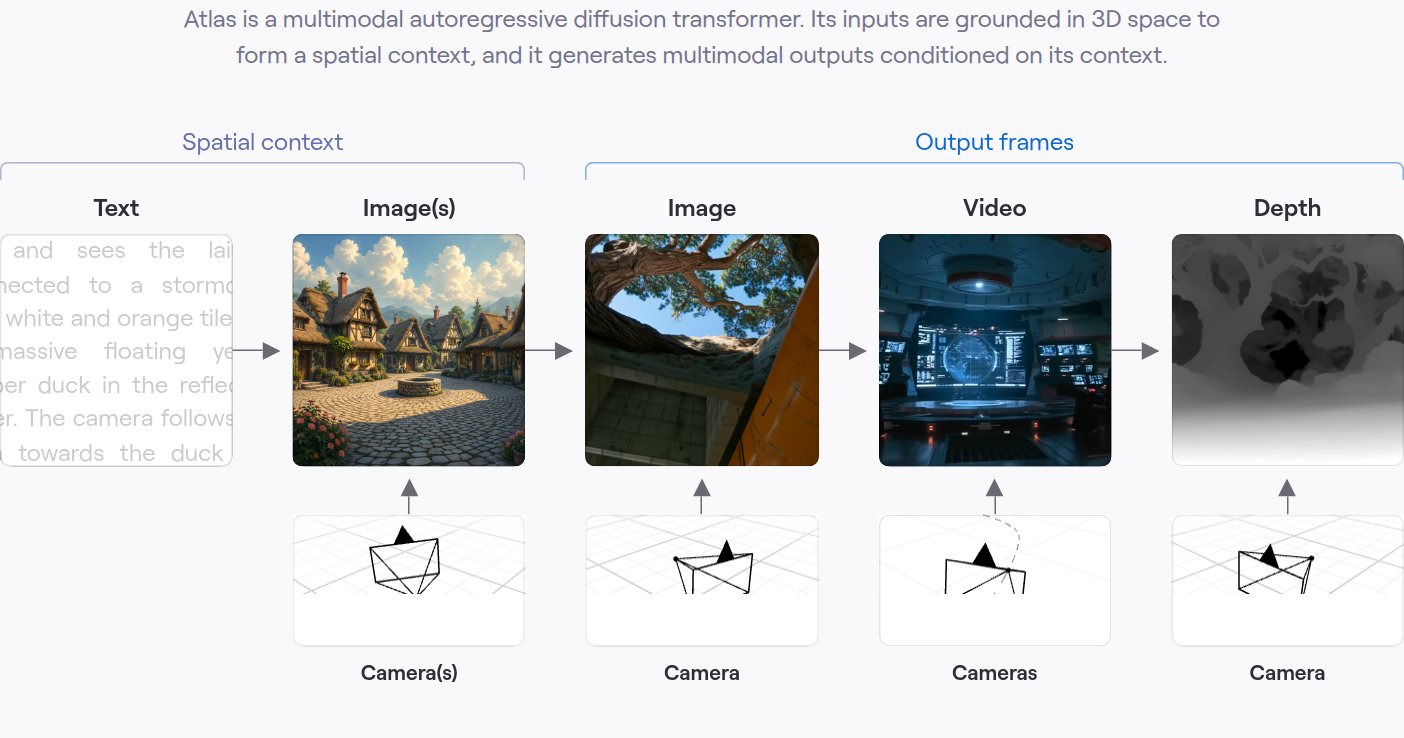
Three names for one endpoint. Behind it is Atlas, the model World Labs announced
on 1 September as "a multimodal autoregressive diffusion transformer", and the tasks
are image-shaped rather than world-shaped: images2PosedRGBD, atlasGenerate,
atlasMasked, atlasChisel, atlasTextToImage and splats2Mesh. The beta billing
page gives "1,000 credits per US dollar" and then declines to print a price per task:
"Use the current rate card shown in the platform when estimating task costs rather
than embedding model prices in client code." The rate-limit page is a table whose
every row says "To be announced". So I cannot tell you what one generated shot costs
World Labs' API customers. I can tell you what the hosted demo charges, which comes
later.
The pipeline, hop by hop
Seven hops, two of them on World Labs' servers. In order:
The browser cover-crops your upload to 1280 by 720 and re-encodes it as a JPEG at
quality 0.92 (src/trajectory/pose.ts, fileToPoseBlob). Nothing else about the
photo is touched.
The server sends it to images2PosedRGBD with targetResolution: [1280, 720]
(server/jobs.ts:64-78). This task takes images only (a frame that carries its own
camera "is rejected rather than ignored", per the schema) and returns a posed RGBD
view: the image, a pinhole camera estimated for it, and a linear-depth EXR. The docs
say the reconstruction is always gravity-levelled. For the bundled igloo example the
returned camera sits at height 1.067, pitched less than two degrees off level,
and focal lengths of 1211.95 pixels, which is a vertical field of view of 33.09
degrees. The app's FOV box defaults to 33, so the target cameras start out with the
lens the photo was estimated to have.
The browser downloads the image and the EXR and builds the preview (below). You draw a path. The browser samples it into cameras (further below). The server checks the request against a strict schema and forwards it:
// server/jobs.ts:94-107
body = {
  contextFrames: [
    {
      imageAsset: context.imageAsset,
      camera: context.camera,
      depth: context.depth,
    },
  ],
  targetCameras: p.cameras,
  prompt: p.prompt || null,
  modelParameters: { seed: p.seed },
  returnDepth: false,
};
task = "atlasGenerate";
One context frame: your photo, its estimated camera and its depth. Forty-eight
target cameras. A prompt, a seed (default 42, server/contracts.ts:78), and no
depth back. The schema pins the count: cameras: z.array(cameraSchema).length(FRAMES)
at contracts.ts:71, with FRAMES = 48 and FPS = 12 on lines 3 and 4, and every
camera's intrinsics must declare width: z.literal(1280) and a height of 720.
When the operation finishes, the runner checks that exactly 48 frames came back,
downloads each image to 000.png through 047.png, and runs
ffmpeg -framerate 12 -i %03d.png -c:v libx264 -threads 1 -pix_fmt yuv420p (from
jobs.ts:204-225). Forty-eight frames at twelve frames a second is a four-second
clip. That is the whole product.
What Atlas does with the request is in its API description, and it explains why the
depth is sent at all. The contextFrames field says: "On the reference-context warp
route the depth conditions the generation geometrically, so the generated views stay
consistent with the provided scene; the hero base checkpoint conditions on the posed
images only and does not consume the depth." The guide adds that the current distilled
models "use eight denoising steps with guidance baked into their weights". The app
omits model, so Marble routes the request itself, and I cannot see which of the two
paths a given shot took.
The preview is a point cloud, and it is honest about it
The 3D view in the editor looks like a splat scene from a distance. It is a coloured point cloud from one depth map, and the code to make it is short enough to quote:
// src/pointcloud.ts:44-46, 69-76 (abridged)
const depthAt = (x: number, y: number) =>
  depths[(height - 1 - y) * width + x];
...
const local = [
  ((u - intrinsics.cx) / intrinsics.fx) * d,
  (-(v - intrinsics.cy) / intrinsics.fy) * d,
  -d,
] as const;
That is pinhole unprojection in RUB axes (right, up, back; the camera looks down
), then a rotation and translation into the world. The one line that is easy to
get wrong is the height - 1 - y: Three.js's EXRLoader hands back rows bottom-up,
the camera and the RGB are top-down, and World Labs' "Cameras and posed images" page
has a section on exactly this, with the same formula. The function defaults to a
budget of 20,000 points, but the editor calls it with 240,000
(src/trajectory/pose.ts:86). On a 1280 by 720 depth map the stride works out to 2,
so a preview carries up to 230,400 points.
I decoded the igloo example's EXR myself (it is half-float, ZIP-compressed, one channel) and unprojected it with the same formula. Depth runs from 1.33 to 9.0 scene units with a median of 5.73; the floor lands at height zero and the room spans about 5.8 units across. The top view in the editor below is that decode.
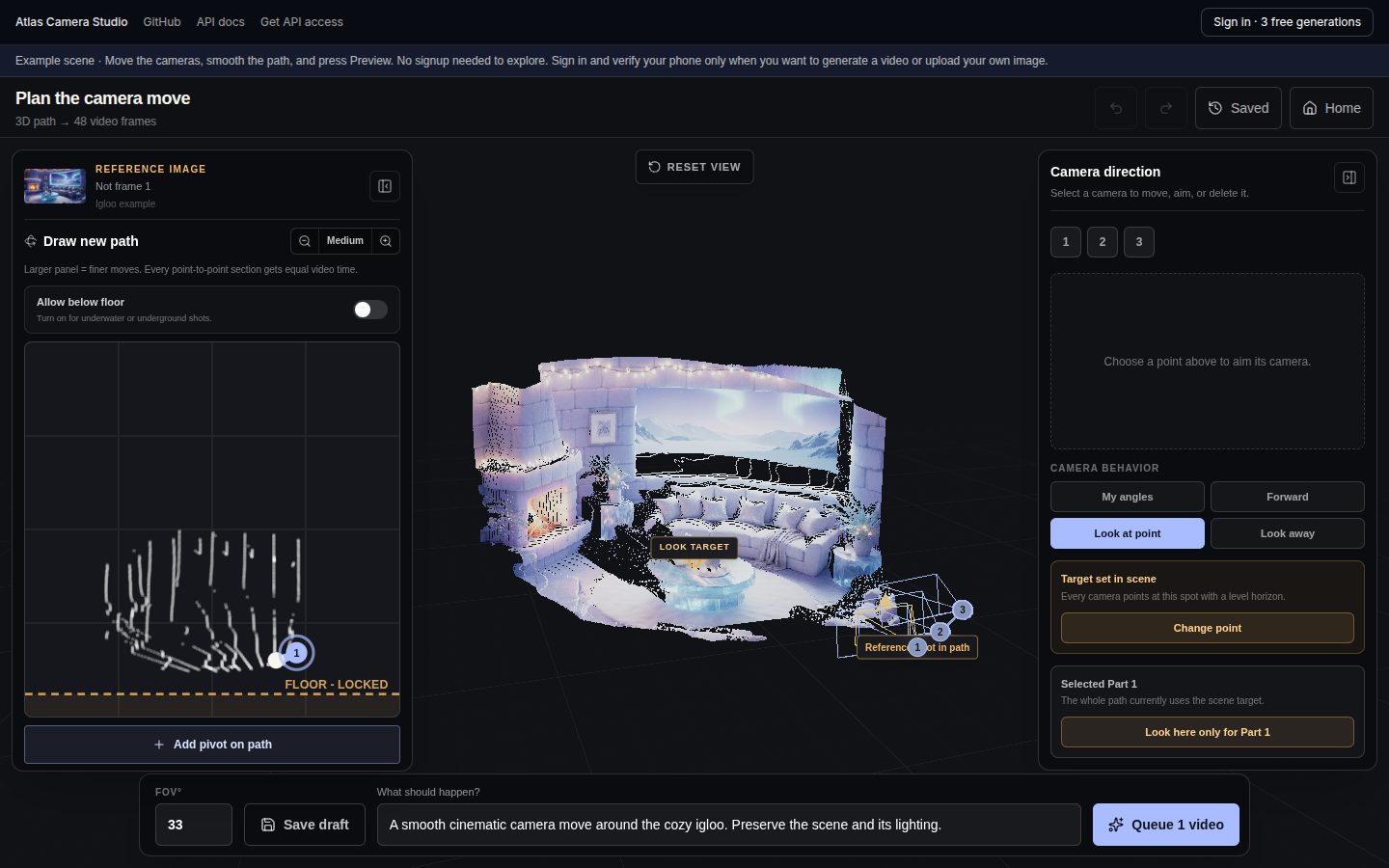
The README says it plainly: "The preview is a point cloud used to plan the camera. Generated views can reveal details that are absent from the original image." I like that sentence. It is the right mental model and most demos would not say it. The point cloud has holes behind every sofa because one photo cannot see behind a sofa; the model will fill them in, and you will not know with what until the video comes back.
The interesting part: 48 cameras from a few clicks
Most of the engineering in this repository is in one file,
src/trajectory/camera-trajectory.ts (2,229 lines), plus its 2,106-line spec. It
takes the handful of points you drew and returns the 48 poses the model will render.
Three decisions in it shape every shot.
The first is the curve. cameraPathCurve builds a
THREE.CatmullRomCurve3(points, closed, "centripetal") (line 2114). Centripetal
parameterisation spaces the knots by the square root of the distance between points,
which is the variant that does not overshoot or loop when two keyframes sit close
together. For a camera that matters: a uniform Catmull-Rom through a tight cluster
of keys will swing the camera out and back, and the model will dutifully paint the
swing.
The second is timing, and it is the one that bites: every section gets the same
share of the clip. The curve is sampled with
getPoint(t), not getPointAt(t), so is spread by section index, not by arc
length. cameraPathProgressAtFrame (line 1489) makes the frame mapping explicit:
keyframe of sections lands on frame
with a monotone cubic Hermite between those anchors so the progress never runs backwards. With three keyframes, the middle one is frame 24. The UI tells you this in small print ("Every point-to-point section gets equal video time"), and it has a consequence the small print does not spell out: a short section followed by a long one is a camera that crawls and then lunges. Load the "Uneven spacing" preset below and the fastest frame-to-frame step is 17.7 times the slowest, with the jump right at the middle keyframe. The fix is to space keyframes evenly, or add one in the long section.
The third is a final blur. After the curve, smoothCurvePoint replaces each
interior frame's position with a binomial average of the curve around it, weights
[1, 6, 15, 20, 15, 6, 1] over 64, taps of the path apart (lines 61-64).
Past the ends it mirrors the curve through the endpoint so the average does not pull
inward, and the first and last frames are pinned exactly to your first and last
keys. Separately, the Smooth path button (smoothTrajectorySegments) runs two passes of
a neighbour average with weight 0.2 on the drawn points themselves. Between them, a hand-drawn wobble
becomes a dolly move.
Directions get the same care. In "My angles" mode the orientations are splined as yaw and pitch with the same monotone Hermite (falling back to slerp when a key has roll); "Look at point" aims every frame at one target with a level horizon; there are also "Forward", "inward", "outward" and "look away" presets, and a per-part look target that hands over between parts with a smoothstep over a quarter of the section. Quaternions are sign-flipped to stay in one hemisphere from frame to frame, which is the bug everyone writes once.
Here is that maths, ported, over the real igloo scene from above. The dots are the 48 cameras; their spacing is the camera's speed.
- speed now
- 1.52 units/s
- fastest/slowest
- 1.2x
targetCameras[20].extrinsics
position:   [-0.450, 1.067, 0.234]
quaternion: [0, -0.035, 0, 0.999]
coordinateSystem: "rub"
Drag keyframes and the target. Click empty space to add a keyframe (up to 6).
camera-trajectory.ts; directions reduced to yaw, and "forward" simplified. Height is held at the reference camera's 1.067.Things to try. Switch to "Straight lerp": that is interpolateCameras in
src/camera.ts, the first editor's interpolation, linear in position and slerped in
rotation. Every key becomes a corner, and the camera changes direction in one frame.
Then load "App's igloo default": the three keys the app places for the example, at
the reference camera and 0.35 and 0.75 units to the right, a move of about 0.88
units over four seconds, aimed at the centroid. It is a deliberately small move, and
I think that is the right default. The further the camera travels from the one
photo, the more of the frame the model has to invent.
The JSON in the panel is what one entry of targetCameras looks like, minus the
intrinsics. The positions are in the reference camera's world frame and units, which
are whatever scale images2PosedRGBD estimated; the docs say to calibrate if you
need metres, and the app never does.
What comes back
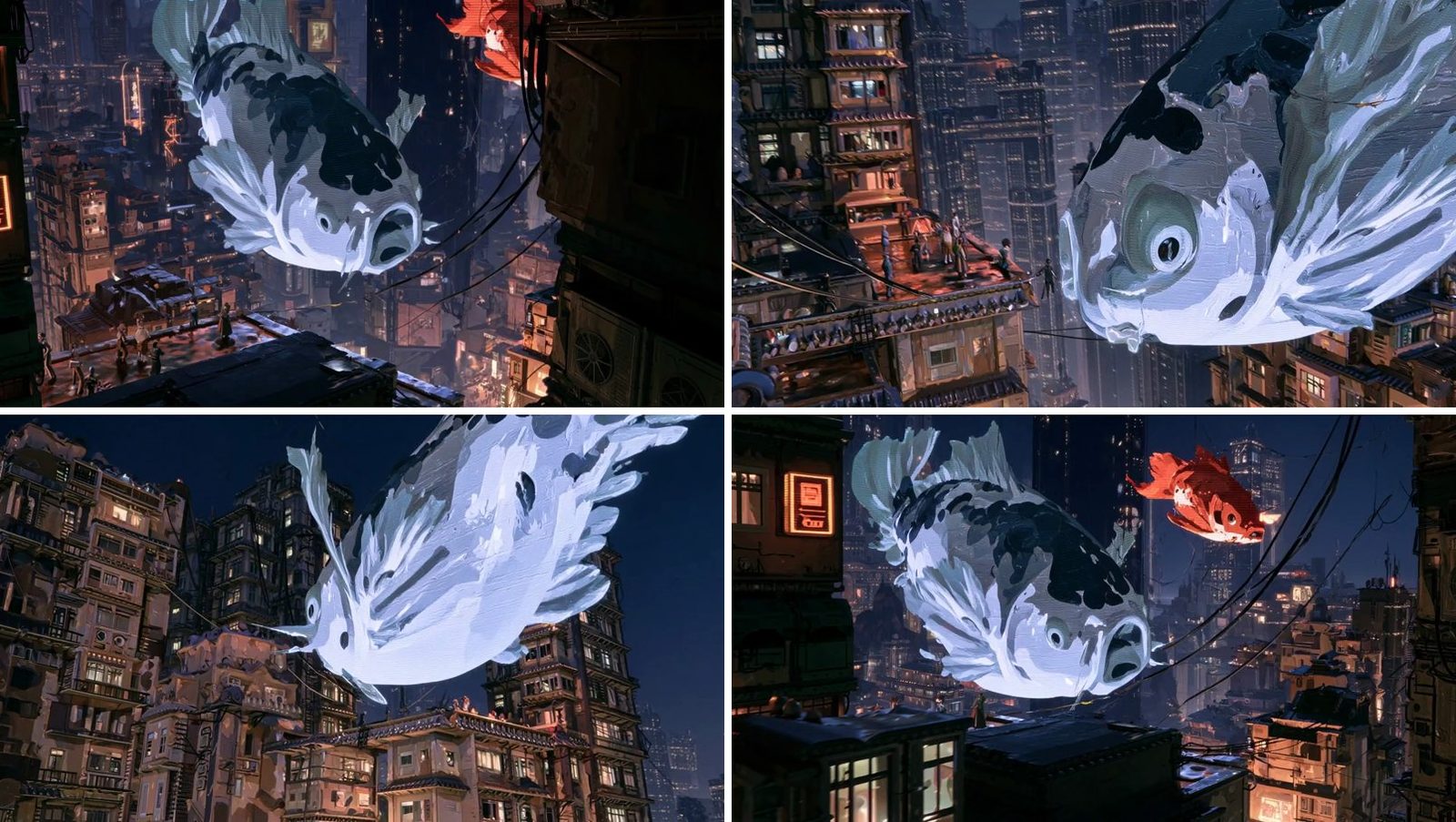
The orbit is the clearest demonstration of what this approach buys. The fish is seen from the side, from beneath and from the far side within four seconds, the buildings stay where they were, and the painterly style holds. No splat viewer could do that from one photo, because the far side of the fish was never photographed.
The video in the original post is a different matter. I pulled it through fxtwitter: X serves it at 1280 by 720, and the repository ships the source file at 2560 by 1440, 30 fps, 120 frames, four seconds. The current app cannot produce that. Atlas targets "must use the model's 1280 × 720 camera grid", and the app writes 48 frames at 12 fps. The README is upfront that "this earlier demo is supplied at 2560 × 1440, 30 FPS" and that the source images and camera paths for both examples are not included. So the clip that made people want the app was made with the app's ancestor, at a resolution the public endpoint does not offer. The announcement does claim "up to 1 minute of video at 1440p" for Atlas itself; the developer API in this repo is not that.
I am not reproducing frames from that clip here: it shows recognisable real people in a generated scene, and the fish example is the same pipeline's output at the format the app actually produces.
How this differs from camera-controlled video models
There are three common ways to get a camera move out of a generative model, and Atlas Camera Studio is a fourth.
The first is to say it in the prompt: "slow dolly in, then pan left". It is what every commercial video model accepts, and it is coarse. "Dolly" has no distance, the model decides the speed, and two runs disagree.
The second is a camera LoRA. AnimateDiff's MotionLoRA (arXiv 2307.04725) fine-tunes the motion module to a shot type: one LoRA for a zoom in, another for a pan. You get a move from a fixed menu, still with no numbers attached.
The third is a camera branch trained into the video model. CameraCtrl (arXiv 2404.02101) encodes each frame's camera as Plücker ray embeddings and feeds them through a plug-in module trained on top of a frozen video diffusion model. This site has read two recent examples: WorldCrafter adds relative camera geometry to attention through a parallel branch, and XGEN-JING turns keyboard state into a six-number control vector, of which it had wired only two at release. In both, the camera is an extra signal bolted to a model that was trained to make video first.
Atlas puts the camera in the model's own input format. Each context image carries a pose, each output is requested at a pose, and on what the API calls the "reference-context warp route" the context depth conditions the generation geometrically. The docs say no more than that about how. What you send is not a style of motion but 48 exact pinhole cameras, the same thing you would hand a renderer. The editor is therefore a real camera tool: keyframes, splines, look-at targets, field of view. Everything upstream of the network is deterministic and exactly specified.
World Labs' own evaluation leans on that difference, and its chart needs a caveat.
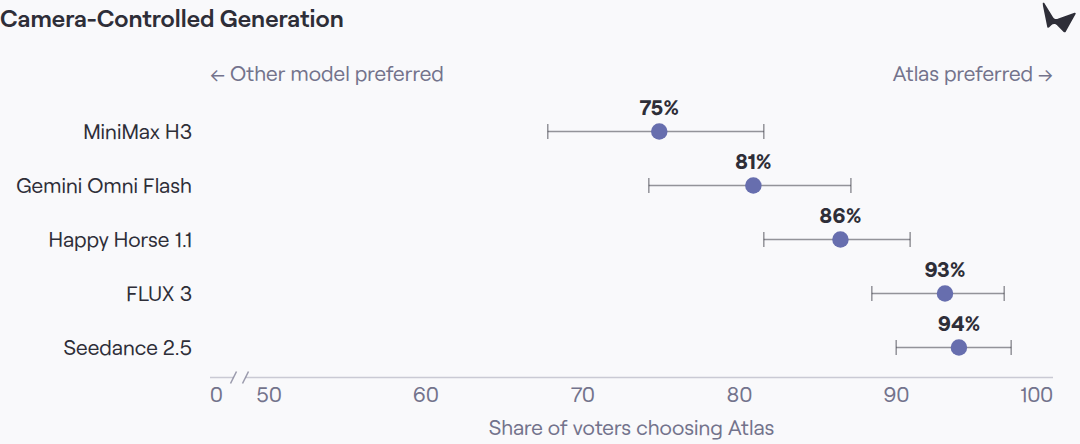
The post is candid about the method: "Other models do not accept cameras as a native input format, so we describe the camera path in the input text prompt, using standard cinematic terms." So this measures cameras-as-input against text-as-input, and the result is the expected direction. It does not compare Atlas with a model that has a camera branch, such as a CameraCtrl-style adapter, which is the comparison a practitioner choosing a tool would want. I could not find one.
How this differs from a splat viewer
World Labs already ships a camera-path tool for splats. Marble's Record studio lets you place keyframes in a splat world, scrub a timeline and download an MP4, with an optional Enhance pass. That is the other pipeline: reconstruct once, render many times.
The trade is the familiar one between reconstruction and generation, and it is sharp here.
A splat flythrough renders only what was reconstructed. It is deterministic, real-time, any length and any resolution, and free per frame once the world exists ($1.20 of World API credits at Marble 1.1 prices). Move the camera behind the sofa and you see the hole behind the sofa.
An Atlas shot fills the hole. It also fills it differently on every seed, costs
money per shot, is capped at four seconds and 720p by this app, and gives you no 3D
asset at the end (returnDepth: false, so not even per-frame depth). The scene
outside the photo is invented, and the README warns you of exactly that.
My rule of thumb from reading both: if the shot stays near the photo, or the photo is all you have, generate. If you need the same space from many angles, for longer, or with geometry you can reuse, reconstruct first. Atlas can do that too, from the announcement's own description, by outputting point clouds and splats, but nothing in this app uses it.
What "vibe-coded" means in this repository
The phrase appears only in the post. The repository has no AI-assistance note, no agent instructions file, and no co-author trailers. What it has is a history that reads like one: 22 commits by one author between 21:16 UTC on 5 October and 22:55 UTC on 8 October. The first eight land within 45 minutes; "Connect Marble jobs, secure hosted billing, and document deployment" adds 8,434 lines in one commit.
The more telling commit is on 7 October: "Restore Gowthami camera trajectory editor
with hosted account controls", 11,729 lines added and 2,415 removed. It deletes the
first editor (src/scene.tsx) and brings in Editor.tsx, Canvas.tsx, the 2,229-line
trajectory module and its 79-test spec from the internal tool Gowthami Somepalli
built at World Labs, which Jos credits in the thread and the README. So the camera
maths, the part worth reading, came from an existing internal editor. What was built
fast around it is the plumbing.
The seam shows. The internal editor's settings survive without a destination:
DEFAULT_CFG = 2.5, DEFAULT_FREEZE_TIME = true, up to 16 seeds per click, a 9:16
format at 400 by 720 behind PORTRAIT_GENERATION_ENABLED = false, and
updateFrameCount and updateFps functions that nothing calls. Guidance and freeze
time are saved into drafts and never sent, because the server's schema is .strict()
and accepts only key, poseJobId, cameras, prompt and seed. The first
editor's interpolateCameras is still exported, and a test still covers it, though
production never calls it.
The plumbing, though, is better than "vibe-coded" suggests. Every API submission
carries an Idempotency-Key derived from the job id, so a retry after a timeout
cannot start a second paid generation. Operation ids are persisted, and a restarted
server resumes polling them instead of resubmitting; the comment on the retry path
reads "A timeout never proves the upstream task stopped." The credit ledger is
SQLite with tests for races across processes, refunds are issued on terminal failure
and on a failed encode, duplicate Stripe webhooks are idempotent, phone numbers are
stored as HMACs, and a global semaphore keeps at most two jobs running at once
(jobs.ts:44). There are 32 tests of the app's own in tests/ beside the 79 in the
trajectory spec. I did not run them, under this site's rule against executing
third-party code.
What it costs and who can use it
The code is MIT. Running it is another matter. A local copy needs Node 22.12 or later, FFmpeg, and an API key from the World Labs beta, which you request through a waitlist that, in the README's words, "requests access; it does not immediately issue a key."
The hosted app at camera.wlt-ai.art needs no key. You can open the igloo example and edit the path without an account; generating needs a sign-in with a verified phone number. Each phone gets three free generations once, then packs of 3 for $5, 12 for $20 or 60 for $100, which is about $1.67 a shot and the hosting doc admits "may subsidize API costs". Limits are one active job per user, six scene-depth requests and ten generations per user per UTC day, and 300 generations across the whole demo per day. One reply under the post says it "cant run in india"; the hosting doc tells operators to "review allowed SMS countries", which would explain it, but I could not confirm which countries are on the list.
Verdict
As a tool, it is a good camera editor attached to a narrow pipe: one photo in, 48
cameras, four seconds of 720p out. The editor is the reusable part. Centripetal
splines, equal time per section, a binomial blur with mirrored ends, yaw-pitch
Hermite orientation with a look-at override, all tested, all MIT. If you are writing
a camera-path UI for any pose-conditioned generator, or for a splat renderer, read
camera-trajectory.ts before writing your own.
As a demonstration, it makes a point that is easy to miss in the video: the camera control here is exact because it is just geometry, and the fidelity is entirely the model's. The app can tell Atlas precisely where to look. It cannot tell you what Atlas will put there.
How I checked
I read the post, its thread and the first page of replies through the fxtwitter
mirror, and downloaded the quoted video. I cloned the repository at 445594a and
read the server, the client, the trajectory module and the tests; line references
are to that commit. I did not run any of its code. Video formats are from ffprobe
on the two files in examples/ and on the X download. The igloo depth figures come
from my own decode of public/example/igloo.exr (a small Python reader for its
ZIP-compressed half floats) unprojected with igloo.json's camera, and the speed
ratios from a Python port of the trajectory functions, which the editor above
reimplements in TypeScript. API behaviour, schemas and billing are from the Marble 2
beta OpenAPI document and docs pages, and World API prices from docs.worldlabs.ai,
read on 9 October. The screenshot is the live app rendered in a headless Chromium
with software WebGL; the two World Labs figures are from the Atlas announcement page,
rendered the same way. I could not check the price World Labs charges per
atlasGenerate task, the endpoint's limit on target cameras, which model route a
request takes, or how the 2560 by 1440 demo was made.