2026-10-23 · 13 min · image-generation · benchmarks · developer-tools
A 1:44 narrated explainer, drawn in code. Every number and picture in it is this article's own; the sources are below.
› transcript
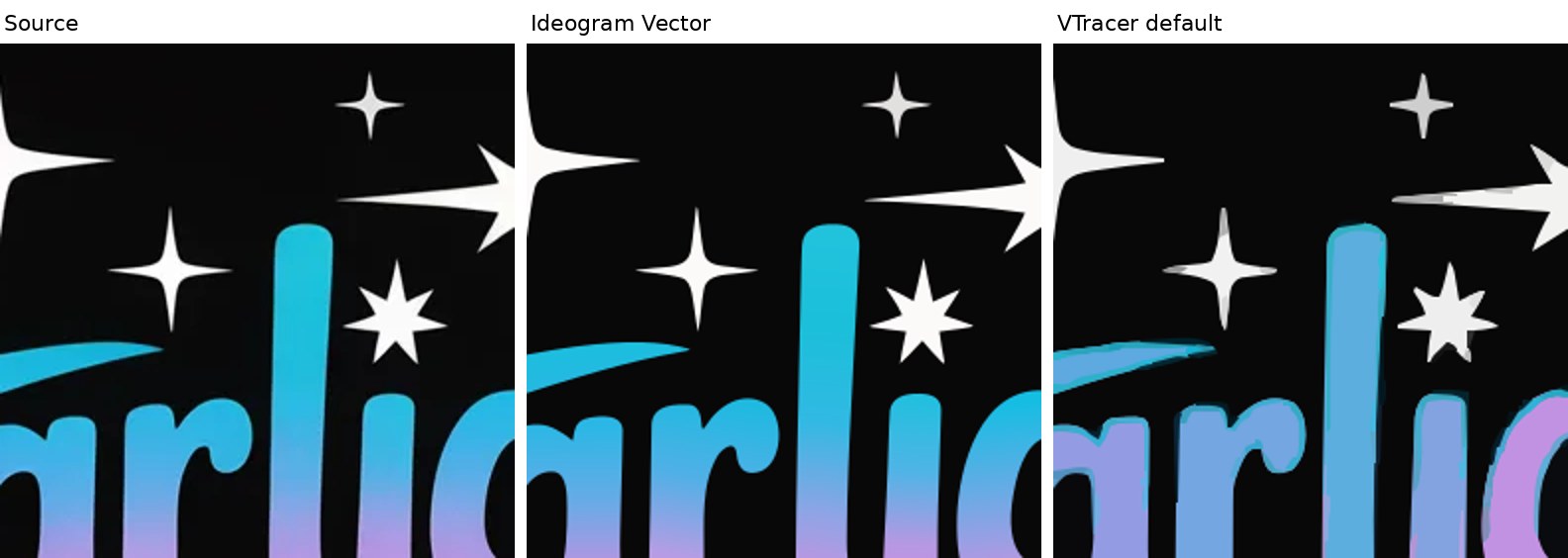
Hi, I'm Kerning! Ideogram's new model makes SVG files. There is no paper, so I opened its sample files. The files read like a picture traced into outlines, with a fitted gradient wherever the colour ramps. Probably, a prompt first becomes a picture. Every gallery file shares one square canvas. Each colour region is traced and fitted with curves. Path starts land on a quarter pixel grid, a tracer's mark. A region whose colour ramps gets a gradient of its own. Out comes a flat list of filled paths, in the same format the image vectorizer writes. Here is what a single file holds. There is no text element anywhere. Every letter is a filled outline. No groups, no strokes, just shapes back to front. A letter's hole is a dark blob painted on top. A classical tracer like VTracer has only flat colours, so a smooth ramp becomes a staircase of bands. Ideogram fits a gradient to each ramp, and draws the same lettering in a fraction of the shapes. In Ideogram's SVG the letters fade smoothly from cyan to lavender, like the source. VTracer's flat layers band the same ramp and leave an outline around each letter. On that lettering, Ideogram's small file matches the source far more closely. So think of it as filled outlines with fitted gradients. They scale and stay small, but the type is a drawing of type. Letters are outlines. Each ramp gets its own gradient. And it shares a writer with the vectorizer. Every source is in the full article. I'm Kerning. Bye!
Why read this
Solidtop 85%Measures all 40 published sample SVGs: outlined text, one gradient per path, a raster-trace fingerprint, and a VTracer baseline on the same inputs.
- Original analysis
- Concrete numbers to act on
- Explained from first principles
Image & video generationAPI onlyProprietaryPractitioner teardown
How this was scored
- Is it new?
- 1 of 3: An incremental tweak
- Can I trust it?
- 2 of 3: Measures key facts from files, code or configs
- Can I run it?
- 1 of 3: API-only, gated or restrictive licence
- Will I understand it?
- 2 of 3: Mechanism from first principles with figures
- Can I act on it?
- 2 of 3: A concrete recipe, numbers or comparison
- Will it last?
- 1 of 3: Relevant for months
- Does it affect many?
- 1 of 3: A specialist community
- Only here?
- 2 of 3: A teardown or measurement few others did
Score 56 of 100, ranked 432 of 607 rated articles. Each question is answered 0–3 by hand, and a 3 is rare. How articles are scored
On 22 October 2026 Ideogram announced its first vector model: "clean, editable SVGs with smooth gradients and sharp typography from a text prompt, or turn any image into a detailed, scalable vector." The thread calls it Ideogram Vector 1.0. It is live in the app and on the API as ideogram-vector-1.
There is no paper, no model card, no architecture description and no benchmark. What there is: a model page with 40 sample SVGs on it, served as plain files from a public bucket, and an API reference for two endpoints. An SVG is text. So instead of reading the marketing I opened the files.
Every number below is labelled. Measured means I computed it from a file or a run on a shared 4-core Xeon VM, CPU only. Reported means Ideogram or a paper says it and I did not re-run it. Reasoned means my arithmetic or inference on the other two. I did not sign up, call the API or spend a credit.
Why vector output is hard
A raster is a grid of colours. An SVG is a program: a list of shapes, each a path of drawing commands (M move, L line, Q and C quadratic and cubic Bézier curves, Z close) with a fill. A designer's SVG has a few dozen shapes, real <text> nodes in a named font, shared colours and groups that mean "the logo" or "the shadow".
Generating that is awkward from two sides.
As a language-model problem, SVG is long. Coordinates are numbers, numbers are many tokens, and an illustration has thousands of points. StarVector (arXiv:2312.11556) trains a multimodal LLM to write SVG code directly, on a 2M-sample dataset, and does well on icons and diagrams (reported). OmniSVG (arXiv:2504.06263) parameterizes commands and coordinates as discrete tokens on top of a vision-language model, with a 2M-asset dataset, and says that lets it reach a token length up to 30k; it also notes LLM4SVG (arXiv:2412.11102) is capped at 2048 tokens (both reported). Thirty thousand tokens is a lot of text and not a lot of illustration.
As an optimization problem, SVG is slow. VectorFusion (arXiv:2211.11319) and SVGDreamer (arXiv:2312.16476) skip SVG training data entirely: they push a raster diffusion model's gradients through a differentiable rasterizer into path control points and colours. The results are vector by construction, and each one is an optimization run.
The third route is the oldest. Generate a raster, then trace it. Tracers such as potrace (one colour) and VTracer (many) find colour regions, walk their boundaries and fit curves. They are fast and they do not know what a letter is: the usual complaint, which one reply to the launch put as "10,000 messy anchor points", is real, and gradients come out as staircases of flat bands.
Ideogram's post does not say which of these it does. The files have opinions.
What Ideogram discloses
From the API reference (reported, read on 23 October 2026):
- Generate SVG:
POST /v2/svg/generate/ideogram-vector-1, multipart. Apromptof 1-9500 characters, optional referenceimages("the first image is the primary source; any others are additional references"),aspect_ratiodefaulting toautowith 18 enum values,qualityoflow,medium(default) orhigh,num_images1-8, aseed. - Vectorizer:
POST /v2/svg/vectorize/ideogram-vector-1. A JPEG, PNG or WEBP of at most 50 MB, amodewhere "simple draws fewer, simpler shapes; default preserves more fine detail", and agroupflag for layering whose description is "Grouping is not yet available." - Both are asynchronous: they return a
generation_idthat you poll, or a signed webhook.
Not disclosed: the architecture, the training data, whether the model emits SVG tokens or pixels, output token or path limits, and any quantitative evaluation. I did not find vector pricing on the pages I read, so I say nothing about cost.
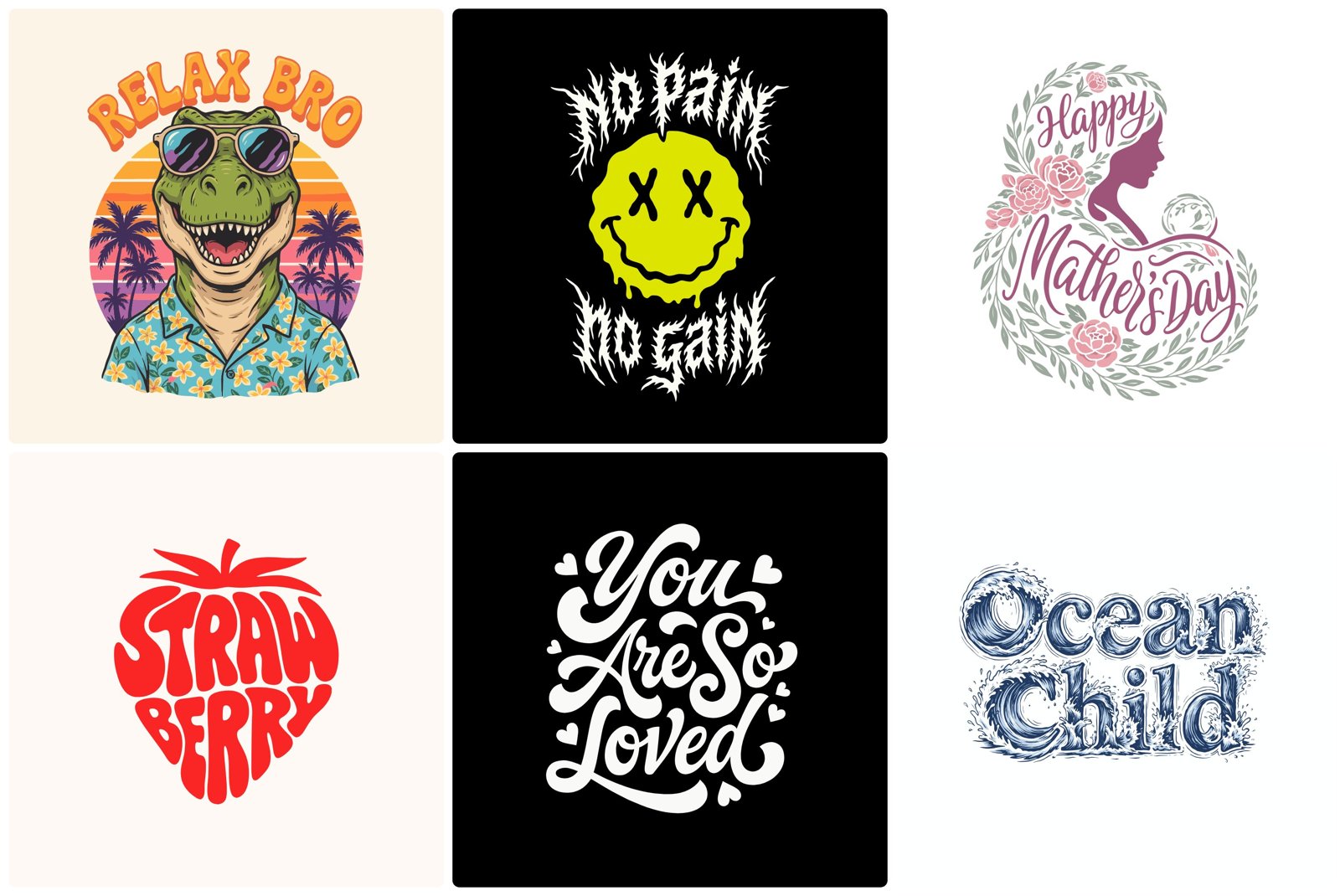
Opening the 40 files
The model page links 40 SVGs: 37 gallery and hero pieces presented as made with Ideogram Vector, and 3 "Vectorize an image" pairs with the source raster beside the converted SVG. The page does not say which gallery pieces came from a prompt alone; some have their prompt attached. Together they are 18.3 MB (measured). I parsed each with Python's ElementTree and counted elements, commands, colours and gradients. The explorer below holds all of it, and the drawing in it is Ideogram's own "Starlight" conversion, verbatim.
The structure is strikingly plain (all measured):
- Sizes span three orders of magnitude. 4,776 bytes to 3,360,494 bytes; median 214 kB. Path counts run from 6 to 10,295, median 249. The 3.4 MB file is a pen-and-ink winter lake: 5,458 paths, one of them 6,640 commands long.
- No text, anywhere. Zero
<text>,<tspan>or font elements in 40 files, including every lettering sample. Every glyph is a filled outline. "Sharp typography" means sharp shapes in the form of letters, not editable type. - No structure beyond the shape. No
<g>groups, no strokes, no<use>, no CSS, no ids except on gradients. Each file is a flat, back-to-front list of filled paths, which matches the API's admission that grouping is not available yet. - Gradients are local. 807 gradients in all, 419 linear and 388 radial. In the 34 files that share the main format, 797 gradients fill 797 paths: each gradient is used by exactly one shape, and gradient-filled shapes are 1.85% of all paths. Thirty of those 34 files have at least one.
- Linear and radial gradients are built differently. All 419 linear gradients in the 40 files have evenly spaced stops (0, 0.3333, 0.6667, 1 and so on, 2-6 stops). None of the 388 radial ones do: they have irregular offsets, such as 0.4246, and a
gradientTransformthat rotates and squashes the circle into an ellipse, as inrotate(-66.71) scale(1 0.1456). - Mostly curves. Of all commands in that format, 71.9% are
QorCcurves and 9.5% straightLlines. Coordinates are absolute, with three decimals.
Two smaller things the Starlight file shows. Its lettering is nine gradient-filled shapes, and the holes in the letters are not holes: they are two small paths in the background colour, #090808, painted on top. Only 1.0% of paths in the main format have more than one subpath, so this stacking is the norm, not a quirk (measured). And the last path in Starlight is a stray: M 860.250 584.000 L 860.000 584.250 L 860.250 584.000 Z, a sliver a quarter of a pixel wide that draws nothing visible.
What follows for editing
The launch thread says "Swap the palette, and the gradients follow." In the file, nothing is shared: colours are literal hex in each path's fill or each gradient's stops, and every gradient is private to one shape. An editor or Ideogram's app can recolour all of them, but there is no variable to change once (reasoned). Stacked counters have a sharper consequence: drag a letter in Figma and its counter, a separate dark blob, stays where it was; change the background and every counter stays the old colour (reasoned from the file structure; I did not test it in an editor).
None of this makes the files bad. For print, a cutter or a sticker, flat filled outlines are what you want. For a logo you will retype, it is a drawing of the logo.
The fingerprint: a quarter-pixel grid
Six of the 40 files are not like the rest. They put width before viewBox, write two decimals without spaces, use real <circle> and <ellipse> elements (105 ellipses in the beach illustration), and include one with an 864 x 1152 canvas. The other 34 share one writer: viewBox first, M 1503.637 1091.725-style spacing, three decimals, gradient ids g0, g1, … in document order (measured). I cannot tell from the outside whether the six come from another model version, a post-processing pass or a human cleanup; Ideogram does not say.
The 34 include all three image-to-SVG conversions. So the gallery output and the vectorizer output are written by the same code (measured). Two more details point the same way:
- Canvas size. All 31 gallery files in that format are 2048 x 2048. Each image-to-SVG file has exactly the size the page gives for its source raster: 1024 x 1024, 1024 x 1024, 1365 x 2048 (measured).
- Path starts snap to a grid. A coordinate with three decimals lands on a multiple of 0.25 by chance about 0.4% of the time. In those 31 gallery files, 43.1% of path start coordinates do, against 9.2% of all other coordinates; in the three conversions it is 28.9% (measured). A contour traced around pixel or sub-pixel corners starts on such a grid. A curve written by a language model has no reason to.
Put together, the simplest reading is that Ideogram Vector draws a raster at 2048 x 2048, then runs a vectorizer that traces regions, fits Bézier curves, and fits a gradient to a region whose colour ramps instead of splitting it into bands (reasoned). The evenly spaced linear stops look like colours sampled along an axis; the radial ones look like an ellipse fitted to a blob (reasoned). It is also possible that a model emits shapes in this exact format, or that a learned model drives the tracing step. The files cannot distinguish a learned vectorizer from a hand-written one, and "frontier technology" may well live in the raster model, the tracer or both.
That reading also fits the size of the output. Counting one token per command, one per coordinate pair and one per fill, which is about as compact as a vocabulary gets, the 40 files need a median of about 16,900 tokens; 13 of them need more than 30,000, and the winter lake needs 271,606 (reasoned from measured counts). That is well past the 30k OmniSVG reports as its ceiling. A raster-then-trace pipeline has no such ceiling.
Against a classical tracer
If the second stage is a tracer, the fair comparison is another tracer on the same input. The three conversion examples give me Ideogram's input and output, so I ran VTracer 0.6.12 (the vtracer pip wheel, colour mode, stacked layers, spline curves) on each source with its defaults and two other settings, then rendered every SVG back to the source's pixel size with CairoSVG and computed PSNR against the source (all measured, two threads).
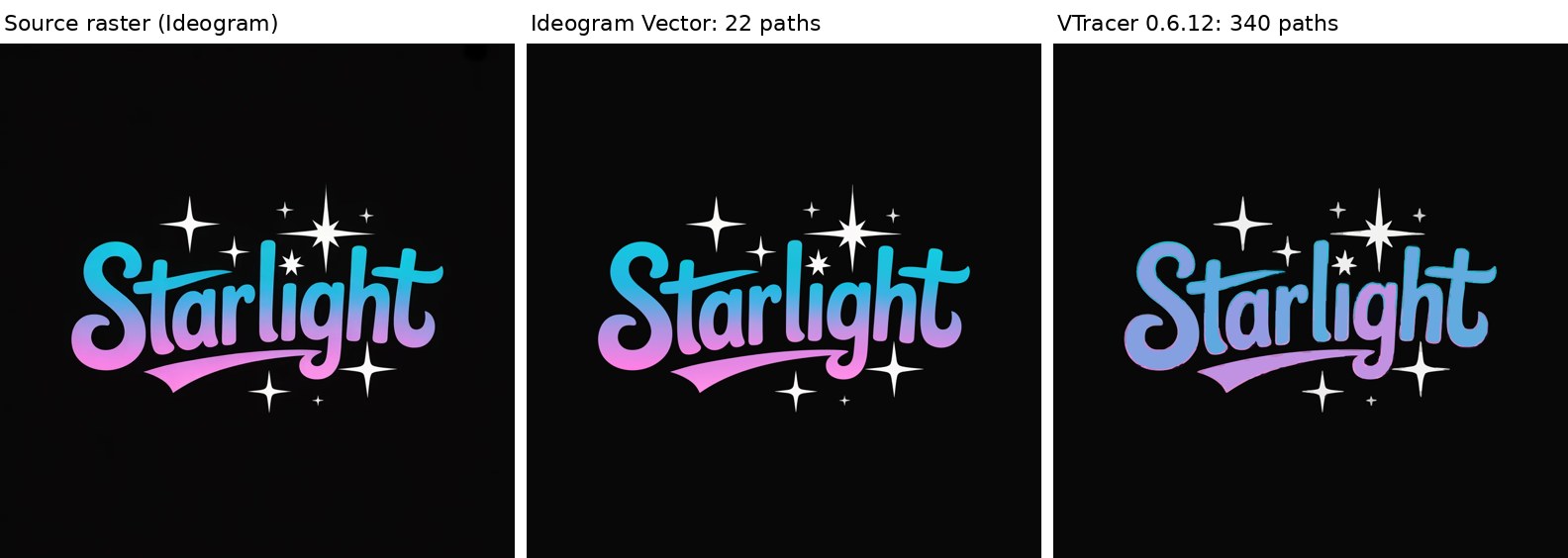
The numbers, measured:
| Source | Output | Size | Paths | Gradients | PSNR |
|---|---|---|---|---|---|
| Starlight, 1024 x 1024 | Ideogram | 16 kB | 22 | 9 | 38.9 dB |
| VTracer default | 333 kB | 340 | 0 | 25.1 dB | |
| VTracer precise | 329 kB | 1,172 | 0 | 28.4 dB | |
| My Cat Judges Me, 1024 x 1024 | Ideogram | 617 kB | 1,997 | 42 | 26.2 dB |
| VTracer default | 4.26 MB | 3,903 | 0 | 22.1 dB | |
| VTracer simplified | 829 kB | 765 | 0 | 20.9 dB | |
| Look Again, 1664 x 2496 WebP | Ideogram | 517 kB | 1,507 | 14 | 28.0 dB |
| VTracer default | 23.1 MB | 20,391 | 0 | 26.9 dB | |
| VTracer precise | 37.6 MB | 97,578 | 0 | 28.1 dB |
VTracer ran in 0.2 to 1.9 s on the 1024-pixel sources and 6.8 to 157.6 s on the large one (measured); Ideogram's conversion time is not visible from outside.
On flat graphic art the gap is large. Starlight is the clean case: Ideogram's SVG is 16 kB with 22 shapes and reproduces the source at 38.9 dB, while VTracer needs 340 shapes and 333 kB to reach 25.1 dB, because its only tool for a cyan-to-pink ramp is a stack of flat layers.
On the photographic pop-art portrait the gap closes: VTracer's precise setting matches Ideogram's fidelity at 28.1 dB against 28.0 dB, but needs 97,578 paths and 37.6 MB to do it, 73 times the bytes (reasoned from the measured sizes).
Two caveats. PSNR rewards matching pixels, not clean shapes, so it is a check that the small file is not simply worse, not a quality score. And I gave VTracer three settings, not a sweep, and no preprocessing; a careful user would get better numbers out of it. Ideogram also chose these three examples for its own page.
What the gallery shows
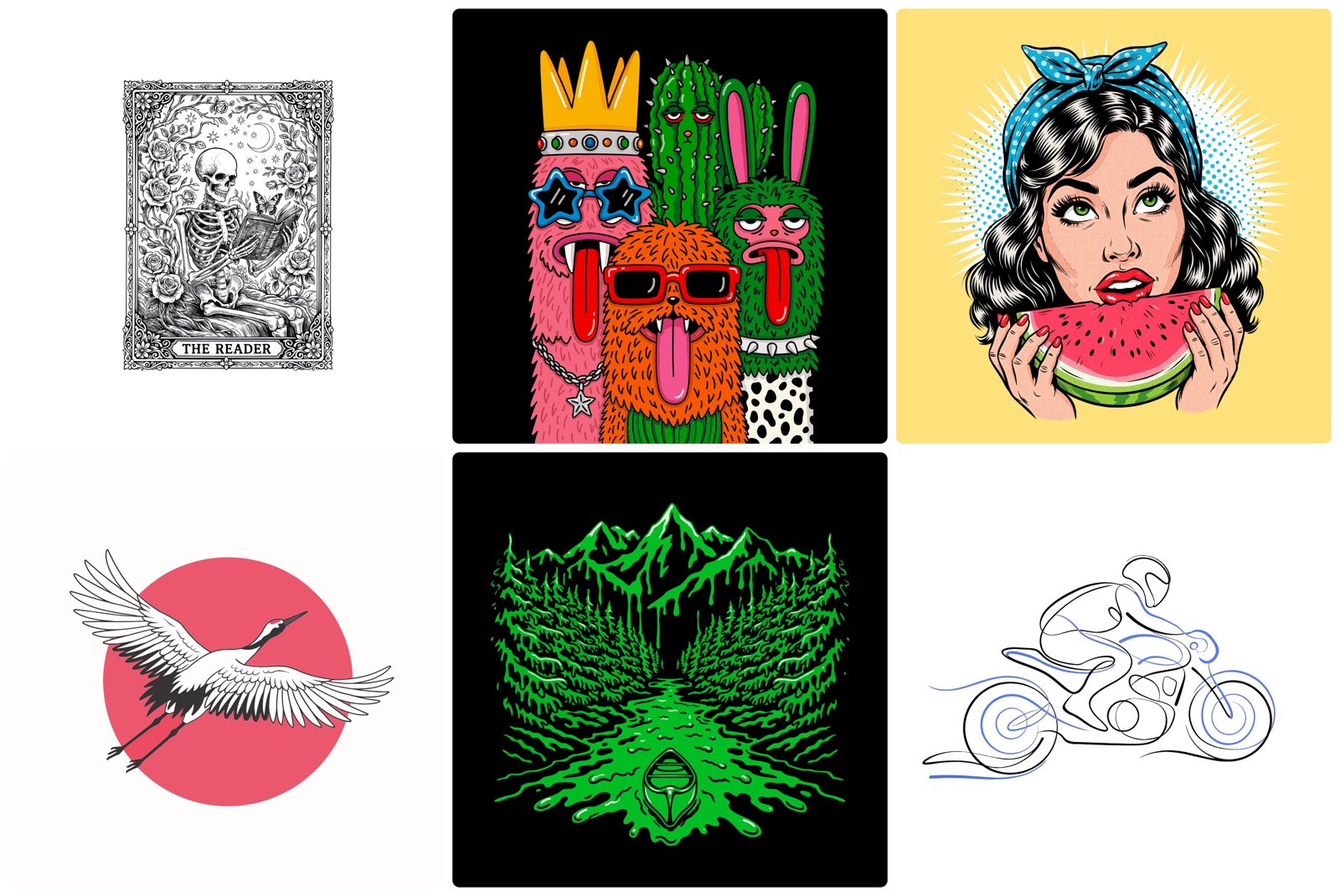
The illustrations are where the path counts go up. The comic watermelon portrait is 10,295 paths and 2.3 MB; the floral cat 4,932 paths and 121 gradients; the three black cats 5,403 paths (measured). Those are not files you will clean up by hand. They are, though, vectors that render at any size, and the gradient fitting is what keeps the flat-colour pieces down to a few hundred shapes.
Where this sits on the site: the FLUX 3 Image Klein and Ming-Image-0.1-Design pieces cover Ideogram's raster models on public leaderboards, which is probably the first half of this pipeline. For SVG that is generated by code rather than by a model, Pele measures Mermaid's SVG output byte by byte, and Anatomy builds figures from SVG path strings.
What I could not check
- The mechanism. Everything I say about raster-then-trace is inference from file structure. It is consistent with all 34 files in the main format, and Ideogram could confirm or refute it in one sentence.
- Text-to-SVG fidelity. The 37 gallery samples have no published raster to compare against, so I measured their structure only.
- Quality settings and
mode: simple. Every sample is from an unstated setting. How path counts move withqualityor the vectorizer'smodeneeds the API. - Typical outputs. These are 40 examples Ideogram picked to show. Random outputs may be larger, smaller or messier.
- Editing behaviour. The stacked-counter consequence follows from the files; I did not open them in Illustrator or Figma.
The takeaway
Ideogram Vector's sample files are flat lists of filled outlines with per-shape gradients, written by the same code as Ideogram's image vectorizer, on a 2048-pixel canvas, with path starts on a quarter-pixel grid. That is what a very good raster-to-vector stage behind a strong raster model would produce. What it adds over a classical tracer is measurable: gradient fills instead of bands, and the same fidelity in a fraction of the shapes. What it does not give you is type you can retype or groups you can move together.