2026-10-23 · 18 min · rust · developer-tools · compression · performance · benchmarks
A 1:39 narrated explainer, drawn in code. Every number and picture in it is this article's own; the sources are below.
› transcript
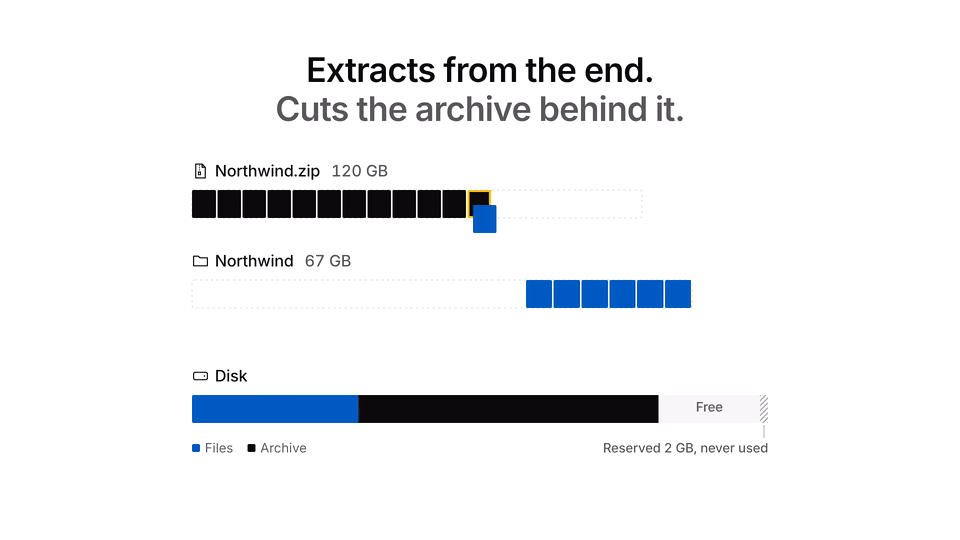
Hi, I'm Scupper! Unzip needs room for the archive and every file at once. This tool only needs room for the files. A zip compresses each entry alone and keeps its index at the end. So extract the last entries, then shorten the file. Before anything is cut, the index at the end of the archive is copied to a small side file. Then it takes entries from the end, as many as fit in the free space, and extracts them in parallel. Once the files are flushed to disk, the journal records how long the archive should now be. Only then is the archive truncated. The space it gives back pays for the next batch. Truncation works everywhere, but it frees an entry only once all of it is out. For a file bigger than the free space, it punches holes behind each flushed step instead. In the project's animation, the archive loses blocks from its end. The disk never has to hold both at full size. And if it dies halfway? The archive is only ever cut back to the last commit. Running it again redoes one batch and finishes. Or restore turns what is left back into a normal zip. On a disk too small for unzip, it ran the disk nearly full and finished, every file intact. On a roomy disk it peaks like unzip. On a tight one, each batch shrinks to fit the freed space. Extract from the end, journal before every cut, and punch holes for the files that will not fit. Every source is in the full article. I'm Scupper. Bye!
Why read this
Hightop 30%Reads hatchzip's engine and runs it: from-the-end truncation, batch sizing, hole punching, crash and restore, measured against unzip on a full disk.
- Checked against the source
- Runs on a laptop CPU
- A lasting reference
Developer tools & infraMITPractitioner tool
How this was scored
- Is it new?
- 2 of 3: A real new idea, method or capability
- Can I trust it?
- 3 of 3: Reproduces the headline result, or shows from primary files it is wrong
- Can I run it?
- 2 of 3: Open code or weights with real limits
- Will I understand it?
- 2 of 3: Mechanism from first principles with figures
- Can I act on it?
- 2 of 3: A concrete recipe, numbers or comparison
- Will it last?
- 2 of 3: A reference for a year or more
- Does it affect many?
- 1 of 3: A specialist community
- Only here?
- 2 of 3: A teardown or measurement few others did
Score 72 of 100, ranked 83 of 607 rated articles. Each question is answered 0–3 by hand, and a 3 is rare. How articles are scored
Xevrion posted a short animation on October 22: you finish a 180 GB download, hit extract, and get "not enough disk space". The pitch fits in one line: "unzip needs room for the archive AND the files. hatchzip doesn't: it unpacks from the end and eats the archive as it goes." The code is at xevrion/hatchzip, dual-licensed MIT or Apache-2.0, with installers for Windows, macOS and Linux.
The replies asked the right question about a dozen times, in three languages: what happens if it dies halfway, after it has already eaten half the archive? The author's answer, repeated in the thread, was "each file is CRC-checked before its part gets cut, a corrupt entry stops the run and stays in the archive, and running it again resumes where it stopped".
That is a claim you can test. So I did: I read the engine, built the command-line tool, and ran it against Info-ZIP unzip on a disk too small for unzip, killing it with kill -9 at points of my choosing. It held up. The more interesting finding is about what "needs less space" means, because the answer depends on how much free space you start with.
- license
- Apache-2.0 / MIT
- branch
- HEAD
- tests
- 21 files
- source
- 453.7 kB
- commit date
- 2026-10-22
by size of tracked source at this commit, file counts in brackets; docs, data and vendored trees excluded
local clone, 2026-10-23 at 398f5b8 — branch, commit, commitDate, fileCount, hasTests, languages, license, licenseFile, testFileCount
The repository is young: 62 commits between October 21 and October 22, about 11,800 lines of Rust across a core library, a CLI, a Slint desktop app and the shell integration. The engine that matters here is crates/core, 4,459 lines (measured, wc -l at commit 398f5b8). It ships a design document, docs/how-it-works.md, that is better than most production systems get, and a test suite that kills the process at its commit points on purpose.
Why the end, and why ZIP makes it possible
A normal extractor reads the archive, writes the files, and leaves you to delete the archive. Just before you do, the disk holds both. For the README's example, a 180 GB archive that unpacks to 200 GB, that moment needs 380 GB.
The fix is to delete the archive gradually. The question is which bytes you can give back while the file still exists. There is exactly one operation every filesystem supports for that: shortening a file from the end. ftruncate on Unix, SetEndOfFile on Windows, and FAT32 and exFAT USB sticks can do it too. Freeing bytes at the start or in the middle needs hole punching (fallocate with FALLOC_FL_PUNCH_HOLE on Linux, F_PUNCHHOLE on macOS, FSCTL_SET_ZERO_DATA on Windows), which FAT cannot do and which every system does differently.
So hatchzip works from the end. That only works because of how ZIP is laid out:
[local header 0][data 0] [local header 1][data 1] ... [local header N][data N] [central directory][end record]Every entry is compressed on its own, and the index (the central directory) sits at the very end. Take the last entry, extract it, and the bytes from its local header to the end of the file are no longer needed. Truncate there. The next entry is now the last one.
The engine calls each independently decodable byte range a unit. For ZIP a unit is one entry; for tar, one entry plus any long-name or pax records in front of it; for 7z, one solid block. Job::build sorts units by their starting offset, highest first (units.sort_by_key(|u| std::cmp::Reverse(u.start)) in engine.rs), so the order of the central directory does not matter, only where each entry physically sits. A unit's span runs from its own header to the next unit's header, which quietly covers ZIP's data descriptors (the 12 to 24 bytes some writers put after the data, when they did not know the sizes up front): they sit inside the span of the entry they belong to, and they go when it does.
The first thing truncation would destroy is the index. So before anything is cut, hatchzip copies everything past the last unit's data into a side file, <archive>.hatchzip-tail, with its CRC-32 recorded. From then on the archive is parsed through a reader (storage::Reader) that serves the live file below the cut and the saved tail at its old offsets above it. Regions already truncated away read as zeros. The zip crate scans backwards for its end record, zeros never match a signature, and the format library sees the archive exactly as it was. For ZIP64 the end record has two extra records in front of it; they are in the tail like everything else, and restore (below) knows how to rewrite them.
One batch, five steps, in a fixed order
Extracting one unit at a time would be safe and slow. hatchzip extracts batches in parallel, and the safety comes from the order of five steps (Run::execute and commit in crates/core/src/engine.rs):
- Choose the batch. Starting at the next unit, take units while their output fits in the free space measured right now, minus
--keep-free(2 GB by default). At most 512 units and 2 GB per batch. - Extract in parallel. Each file is written as
<name>.hatchzip-part. The decoders check CRC-32 as each stream ends, and the written size is checked against the declared one. A finished part is renamed to its real name. Symlinks and hard links are only recorded. - Flush. One
syncfson Linux;F_FULLFSYNCper file on macOS;FlushFileBuffersper file on Windows. - Commit. Write the journal,
<archive>.hatchzip, with the newcommitted_len: the archive length after this batch. Written to a temporary file, flushed, renamed over the old one, directory flushed. - Truncate. Shorten the archive to
committed_len, which is where the batch's lowest unit begins.
The invariant, in the design doc's words: "the journal never claims a file before it is durable, and the archive is never truncated past a unit before the journal claims it". A crash before step 4 leaves an intact archive and some files the journal does not know about; resume deletes them (the output folder holds nothing hatchzip did not write) and redoes the batch. A crash between 4 and 5 leaves an archive longer than the journal says; resume finishes the truncation. There is no separate list of finished entries. Units start at distinct offsets, so one number, committed_len, says which are done.
Here is that loop on the archive I tested with, entry sizes and all. Drag the free space and watch how many batches it takes.
The replay is a port of next_batch and commit, not a recording, but it predicts the measured run: at 492 MB free it takes three batches of 12, 31 and 4 units, and the first truncation cuts the archive to 186.5 MB, which is the archive length I found on disk after killing a real run during the second batch (186,458,020 bytes, measured).
What "less space" means
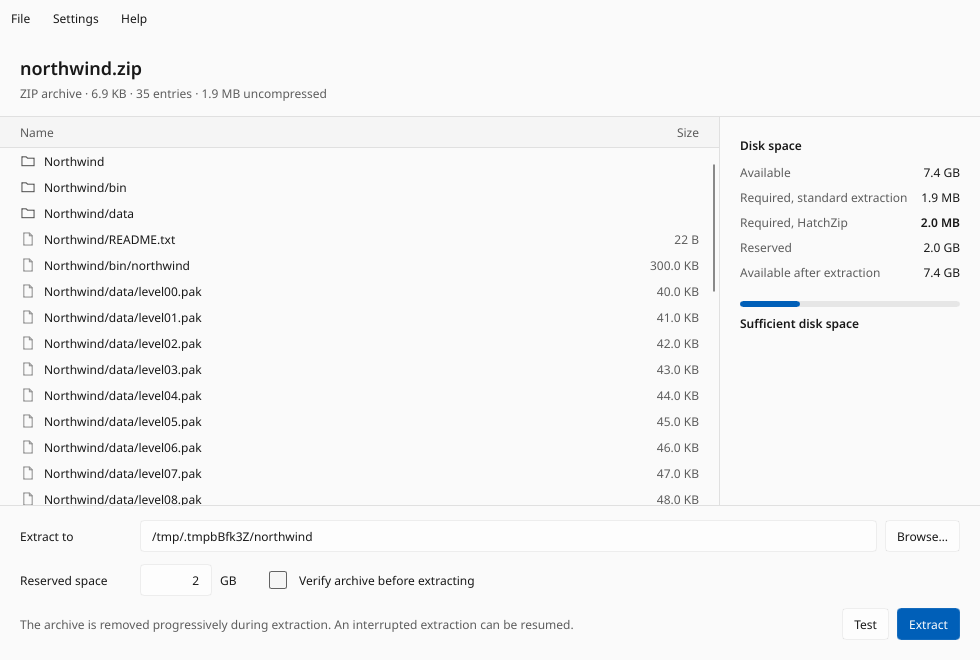
The README says the extra space needed beyond the output is "about the size of the largest single unit it can free at once". That is the minimum, and the up-front check computes it exactly: space_needed replays the extraction one unit at a time, counting each unit's output rounded up to 4 KiB blocks and crediting each unit's span when it is cut, and reports the highest point of that running total. hatchzip check prints it and changes nothing; the desktop app shows the same plan beside the file list.
But the run itself does not aim for that minimum. Step 1 sizes each batch to whatever is free now, up to 2 GB. On a roomy disk the first batch can swallow the whole archive, and then nothing is cut until everything is out. That is deliberate (bigger batches extract in parallel better), and it means on a disk with room to spare, hatchzip peaks exactly where unzip does. The savings show up only when you need them.
I measured both cases. The test archive is synthetic and built for this: 30 text files (400 MB of word salad that deflates about 6.5x), 16 random 25 MB blobs and one random 200 MB file, deflated by Python's zipfile into 661.6 MB on disk, 47 entries, 1,000.0 MB extracted. Each run was on its own tmpfs mount, so other jobs on the machine could not move the free-space numbers, with a poller summing allocated blocks under the mount about every 100 ms. Hardware: a shared 4-core Intel Xeon at 2.10 GHz cloud VM, CPU only, nice -n 19, hatchzip limited to two threads (RAYON_NUM_THREADS=2).
| Mount | Free at start | unzip 6.00 | hatchzip 0.1.1 |
|---|---|---|---|
| 2 GiB tmpfs | 1,485.9 MB | Finished, peak 1,661.7 MB, 5.72 s | Finished, peak 1,652.9 MB (one batch), 2.66 s |
| 1100 MiB tmpfs (1,153.4 MB) | 491.8 MB | Disk full at entry 34 of 47, exit 50, 33 files intact | Finished, 3 batches, peak 1,117.5 MB sampled, 2.22 s, 47 of 47 byte-identical |
All measured. On the tight disk hatchzip check reported "required 340.6 MB (+16.0 MB reserved)", so it would have started with as little as 356.6 MB free. The replay above agrees: 357 MB works, 340 MB does not. Its predicted peak, 1,136.6 MB, is higher than my 1,117.5 MB sample because a 100 ms poll misses the top of a spike, and it lands within the 16 MB keep-free of the 1,153.4 MB mount. The tool ran that disk as full as I told it to and no further.
So "peak equals output plus the largest entry" is true of the floor, not of the run. On a tight disk the peak is output plus one batch, and the batch shrinks to fit; on a roomy disk it is the same as unzip's. That is the right design. It is just not what the animation suggests.
A file bigger than the free space: holes
Truncation frees a unit only once all of it is out, so a 30 GB file inside the archive needs 30 GB free before any of it can go. For that case hatchzip punches holes. If the archive's filesystem can free bytes in the middle of a file, a unit holding one file of at least 512 MiB (stored or deflated ZIP, or any tar entry) is streamed when its output does not fit:
- Write output to the part file. Every 256 MiB, at the next point where decoding can restart:
- flush the part file,
- journal the resume point (output length, the bit in the archive where decoding restarts, CRC-32 so far),
- punch the archive from the start of the file's data up to that bit, with
fallocate(FALLOC_FL_PUNCH_HOLE | FALLOC_FL_KEEP_SIZE). The archive keeps its length; the punched bytes read as zeros.
Stored data can restart at any byte. Deflate can restart at any block boundary, the trick from zlib's examples/zran.c: a bit offset, plus the 32 KiB of output before it for back-references. hatchzip does not store that window in the journal; it reads it back from the last 32 KiB of the part file, which was flushed before the point was journaled. The local header in front of the data is never punched, so the archive still parses on resume. Whether punching really frees space is not assumed: can_punch writes a 1 MiB file of noise next to the archive, punches it, and checks that its allocated blocks dropped, because NTFS, for one, can accept the call and free nothing.
I tested it with a one-entry archive, a 600 MB random file stored without compression, on a 1000 MiB tmpfs with 448.6 MB free. unzip filled the disk and quit (exit 50). hatchzip check asked for 269.6 MB, the same figure the README reports for its own 600 MiB stored test; the run finished in 0.85 s with the file byte-identical and a sampled peak of 840.3 MB, about 240 MB above the archive alone (measured). Without punching it would have needed the full 1,200 MB (reasoned: 600 MB of archive plus 600 MB of output).
There is a catch the docs state plainly: a deflate encoder decides where its blocks go. zlib-rs at level 1 writes one block for the whole stream, which leaves nothing to resume from but the start, so such a file frees nothing until it ends. 7z solid blocks are not streamed at all yet.
Which formats can be eaten
| Format | Freed in steps of | Notes |
|---|---|---|
ZIP, ZIP64, self-extracting .exe | one entry | Stored, Deflate, Deflate64, bzip2, LZMA, PPMd, Zstandard tested (reported) |
| 7z | one solid block | Index at the end like ZIP; a block decodes only from its start |
| tar (uncompressed) | one entry | No index; the trailing zero blocks are the tail |
Split .001, .002 | one entry or block | Whole volumes deleted as the cut passes them |
.tar.gz, .tar.zst, .tar.xz | refused | One continuous stream; the format notes plan zran-style checkpoints |
RAR, native .z01 split ZIP | refused | Planned |
The 7z row hides the biggest caveat. Solid compression feeds many files through one stream, and that block cannot be freed until all of it is out. 7-Zip's defaults can put a whole archive in one block, and then there is nothing to gain: the README's own table shows such an archive refused up front because it needs the whole output's worth of free space. If you are packing something for people with small disks, a smaller solid block size (-ms= in 7-Zip) is what makes in-place extraction possible. The compressed-tar row is the same problem at its extreme: the whole archive is one stream, which only resumable checkpoints inside it can fix.
Killing it on purpose
The thread's question, then. I ran the tight-disk extraction again and sent kill -9 partway through, then looked at the wreckage before doing anything else (measured, every line):
- Killed during the second batch.
synth.zipwas 186,458,020 bytes, next to a 384-byte journal (committed_len186,458,020,resumeempty) and the 2,966-byte saved tail. The output folder held 12 finished files from batch one and 2.hatchzip-partfiles from batch two.unzip -lon the stump said "cannot find zipfile directory", which is correct: the directory lives in the side file now. - Resumed. The same command finished in 0.72 s, deleted the stray parts, and all 47 files matched their SHA-256 sums.
- Restored instead. After another kill,
hatchzip restore synth.zipappended a new central directory (the file grew by 2,202 bytes to 186,460,222), deleted the 8 uncommitted files (6 finished, 2 partial) whose entries were still in the archive, kept the 12 committed ones, and left a normal ZIP:unzip -treported "No errors detected" over the 35 entries still in it. - Killed before the first commit. The archive was untouched at full length;
restorerewrote it as an ordinary 47-entry ZIP.
So a crash costs a redone batch, not the archive. The two side files are the one thing you must not delete mid-run: the README says so in bold, because they hold the index the archive no longer has.
The reply's wording is accurate for ZIP and 7z: CRC-32 is checked as each file is extracted, a damaged file is never written, and the failed unit stays in the archive along with everything below it. Two qualifications the README itself makes. Plain tar has no content checksum, so there is nothing to check. And a damaged download is still partly lost: everything after the damage (which is extracted first, from the end) is out and cut before the bad entry is reached. --verify-first reads and checks the whole archive before deleting anything, at the cost of one extra full read; for something you cannot download again it should be the default, and the project's own TODO lists that as an open decision.
Hostile archives
Destroying the input raises the stakes on validation: a malicious archive that tricks an extractor can usually be re-downloaded and inspected, a half-eaten one cannot. hatchzip refuses before touching anything. I made five small archives to check (measured):
../escape.txtalongside a good file: refused ("would be written outside the destination folder"), archive untouched. The ZIP path check is thezipcrate'senclosed_name; tar and 7z go through hatchzip's ownsafe_path, which rejects.., drive letters and NUL./tmp/abs_pwn.txt, an absolute path: not refused, as the design doc says it would be, but stripped of its leading slash and written inside the output folder astmp/abs_pwn.txt. Nothing reached/tmp. That is also whatunzipdoes, and it is safe; the doc is just wrong about which of the two happens.Readme.txtandREADME.TXTin one archive: refused. Duplicates are compared case-insensitively, since on NTFS or APFS they would race inside a parallel batch.- A symlink
lnkto a directory outside, plus a filelnk/pwn.txt: nothing escaped. Links are created only after every regular file is written, sopwn.txtlanded in a reallnk/folder inside the output, and the final step then failed to make the link over that folder. The run ends in an error at the very end rather than a clean refusal up front, which is untidy, but nothing was written through a link. - A symlink
passwdto/etc/passwd: created as is. That is whatunzipandtardo too; the link is in your output folder, nothing is written through it, and following it is your call.
Overlapping ZIP entries (a known zip-bomb construction) are refused too, for a reason specific to this tool: cutting one entry's span would destroy another's data. Setuid, setgid and sticky bits are masked off (mode & 0o777). Device files, FIFOs and GNU sparse tar entries are refused.
Speed, briefly
Speed is not the point of the tool, but it is not a cost either. The parallel batch extract beats single-threaded unzip comfortably (measured, same archive):
| Where | hatchzip | unzip |
|---|---|---|
| tmpfs, 2 threads | 2.66 s | 5.72 s |
| tmpfs, all 4 cores | 0.99 s | (single-threaded) |
| ext4 on the VM's disk, 2 threads | 2.97 s, including its syncfs | 6.10 s, plus 0.88 s for a sync afterwards |
The README reports 0.25 to 0.35 s against 1.48 to 1.50 s for unzip on an i7-14700HX (reported). The ratio is in the same range as mine. An archive holding one giant file gets no parallelism and extracts at one core's speed.
What I did not check
Everything above ran on Linux, on tmpfs and ext4. I did not run the Windows or macOS builds, the GUI, or the installers. The project's own format notes mark hole punching on NTFS and APFS as compiling but unverified, and the README warns that on btrfs or APFS a snapshot holding the archive keeps its space allocated however much is truncated. I did not test 7z, tar, split or encrypted archives, ZIP64 past 4 GiB, or a real 180 GB download; the 7z and tar results in the README's highlights table are reported. Three parts of docs/how-it-works.md have fallen behind the code: besides the absolute-path case above, it still lists encrypted entries and non-empty output folders as refused, while the README documents password support and extraction into an existing folder that never overwrites a file.
The idea is old in spirit (anyone who has hand-truncated a file to save space has done step 5), but I have not seen it packaged with a journal, a restore path and a test suite that kills itself at every commit point. If you are moving large archives onto small disks, it does what it says. On a roomy disk, it behaves like a fast unzip that deletes the archive when it is done.
For two other small, single-purpose tools read end to end on this site, see fsearch (whole-disk file search from one mapped index) and tgrep (what a trigram index buys a grep).