2026-10-17 · 19 min · developer-tools · performance · benchmarks · typescript
A 1:44 narrated explainer, drawn in code. Every number and picture in it is this article's own; the sources are below.
› transcript
Hi, I'm Kindle! Pele is a new renderer for Mermaid diagrams, built for Obsidian. Here is how it draws them so fast. The idea: parse the text, lay out the graph in plain arrays, and write the picture as one string, never touching the page. A hand-written parser reads the text. It is fuzzed against Mermaid's own grammar. Labels are measured on a canvas, not on the page, and the layout runs over flat typed arrays. Then the positions are written straight into one SVG string. Colours are CSS variables, so a theme change needs no re-render at all. The layout is the classic layered recipe, written from scratch. Reverse the edges that close a loop. Give every node a level, top to bottom. Sweep up and down, reordering each level to cut crossings. Then assign coordinates, and route the edges so they stay apart. Mermaid measures text by putting nodes in the page, and it copies its whole config every time it reads a setting. Pele measures on a canvas, has no config to copy, and escapes text as it writes. I profiled Mermaid. The biggest cost is not layout or the page. It is copying the configuration object, over a third of every render. On the same diagrams, Pele was about a hundred to two hundred and fifty times faster by median, with a bundle six times smaller. The speed comes from doing less on every render. No page to measure, no config to copy, and one string out. Parsers checked against Mermaid, a layout in plain arrays, and a string themed by CSS. Every source is in the full article. I'm Kindle. Bye!
Why read this
Essentialtop 10%Times Pele and Mermaid on 8 diagrams in Chromium and profiles Mermaid: the 100-500x holds by best run, and Mermaid's top cost is copying its config.
- Checked against the source
- Runs in a browser
- Widely used
Developer tools & infraMITPractitioner tool
How this was scored
- Is it new?
- 1 of 3: An incremental tweak
- Can I trust it?
- 3 of 3: Reproduces the headline result, or shows from primary files it is wrong
- Can I run it?
- 3 of 3: Open, permissive, runs on reader hardware with instructions
- Will I understand it?
- 2 of 3: Mechanism from first principles with figures
- Can I act on it?
- 2 of 3: A concrete recipe, numbers or comparison
- Will it last?
- 2 of 3: A reference for a year or more
- Does it affect many?
- 2 of 3: A widely used model, tool or lab release
- Only here?
- 2 of 3: A teardown or measurement few others did
Score 76 of 100, ranked 53 of 577 rated articles. Each question is answered 0–3 by hand, and a 3 is rare. How articles are scored
On 17 October 2026 Steph Ango (@kepano), Obsidian's CEO, posted Pele: "my new rendering library for diagrams and charts, compatible with the latest Mermaid syntax". The post makes five claims:
- 100–500× faster than mermaid.js
- 6× smaller bundle
- no dependencies
- easy to theme
- responsive to device width
It also says Pele will be the renderer in the next version of Obsidian. In the replies, he confirms the layout engine "is reimplemented from scratch", and that the release is Obsidian 1.15. The code is obsidianmd/pele under MIT. The docs and playground are at pele.run.
I read the source at the 1.6.0 release commit (659c3593). Then I installed [email protected] and [email protected] from npm and benchmarked both on the same diagrams in headless Chromium. Everything labelled measured below comes from that run. The machine was a shared 4-core Xeon at 2.10 GHz, CPU only, with other jobs on it, running Chromium 141.0.7390.37. Reported means Pele's own figure, which I did not re-run. Reasoned means my arithmetic on the other two.
- license
- MIT
- branch
- main
- tests
- 468 files
- source
- 4.9 MB
- commit date
- 2026-10-17
by size of tracked source at this commit, file counts in brackets; docs, data and vendored trees excluded
local clone, 2026-10-17 at 659c359 — branch, commit, commitDate, fileCount, hasTests, languages, license, licenseFile, shallow, testFileCount
shallow clone: counts describe the pinned tree, not the history
What Pele is
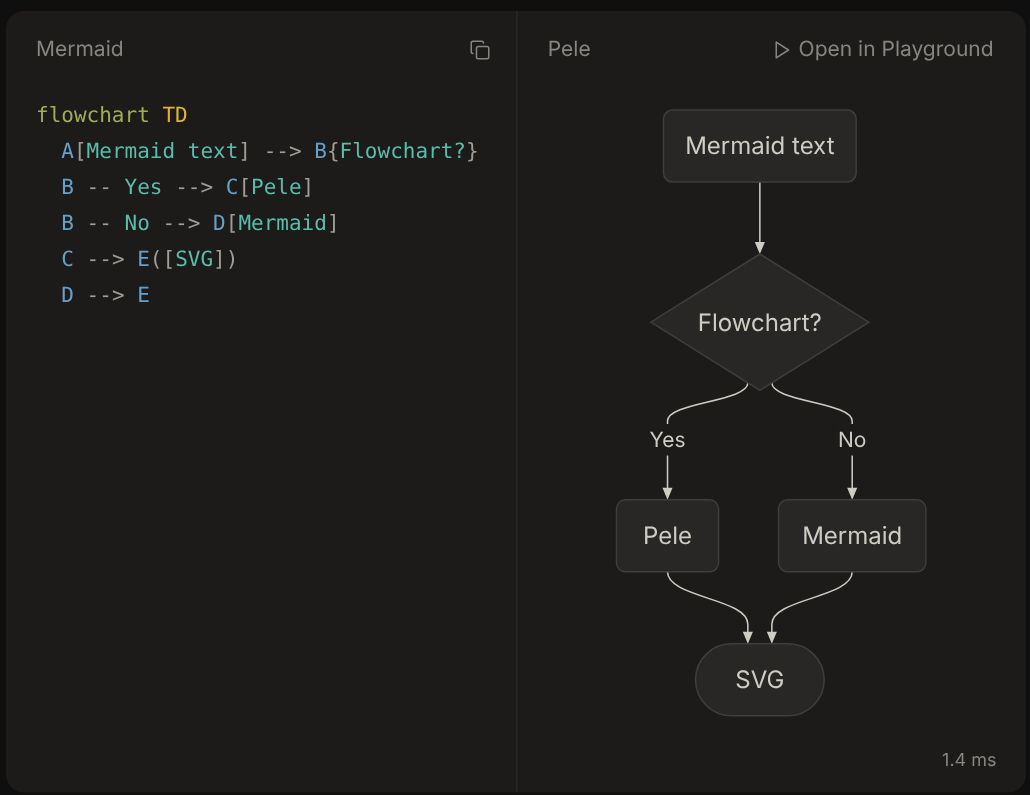
Pele takes Mermaid text and returns an SVG string. It does it synchronously, and it never touches the DOM:
import { render } from "pele"

const { svg, width, height, type } = render(`flowchart LR
  A[Mermaid text] --> B[SVG]`)
container.innerHTML = svg
Mermaid's equivalent is await mermaid.render(id, text). That is asynchronous because Mermaid may first fetch the chunk for the diagram type. It also needs a live document, because it measures text by putting elements on the page and reading their boxes.
The package is 50,027 lines of TypeScript across 287 files (measured, src/). It has zero runtime dependencies. Its dev dependencies include Mermaid's own parser package and jison, which the test suite uses as an oracle. Mermaid 12.1.0 lists 23 direct dependencies (measured, npm view): d3, dagre-d3-es, elkjs, cytoscape and two cytoscape layouts, KaTeX, DOMPurify, chevrotain, @mermaid-js/parser, marked, roughjs and others.
The mechanism, stage by stage
A render runs four stages: detect, parse, lay out and write. Each one is built differently from Mermaid's.
1. Detect and preprocess
src/core.ts strips frontmatter and %%{init}%% directives into a config object. Then it matches the first line against a table of regular expressions to get a diagram type. Each type is a Diagram object with parse and render, registered in a Map. That is why pele/core plus pele/diagrams/flowchart can ship a single type.
2. Parse with hand-written lexers that agree with Mermaid's grammar
Mermaid generates most of its parsers from Jison grammars. Its newer diagrams use Langium on top of chevrotain. Pele writes each lexer and parser by hand. The flowchart lexer (955 lines) even keeps the Jison grammar's lexer states by name: INITIAL, md_string, edgeText, shapeData and so on.
Pele checks compatibility in two ways:
- Ported specs. 123 of Mermaid's spec files are ported into
tests/compat/. Every skipped case has a written reason in aSKIPPED.md. Most of the 35 sequence skips check pixel positions in Mermaid's renderer, which Pele does not try to match. - Differential fuzzing.
tests/flowchart/oracle.test.tsruns Mermaid's generated Jison parser next to Pele's. It asserts the same tokens, the same accept-or-reject decision and the same calls into the diagram model. It does this on the spec corpus and on 5,000 mutated inputs built from fragments like-->,[[,:::andaccDescr {.
Parsing is cheap either way. In Node, Pele's parse() takes 0.020 ms of a 0.37 ms flowchart render (measured, median of 101 and 301 runs). The rest is layout and writing.
3. Layout: a Sugiyama pipeline in typed arrays
Flowchart, class, state, ER, requirement, use case, swimlane and agentflow all go through src/layout/layered.ts (1,896 lines), which wraps a compound-graph layer for subgraphs. This is the classic layered layout that dagre and ELK's layered also implement. Pele re-implements it, and it does not port either library:
- Break cycles. A depth-first search in declaration order reverses the edges that close a cycle (
orient). - Rank. A longest-path ranking from a topological sort, then up to 8 passes that pull each loosely attached node toward the side with more edges (
rank). Dagre's default is network simplex, which gives tighter ranks and costs more. - Order within ranks. Barycentre sweeps alternate down and up, up to 24 sweeps, and stop after 4 sweeps with no gain (
reduceCrossings). After each sweep, crossings are counted with an accumulator tree, which is O(E log V) per gap. Graphs of 600 or fewer nodes run the sweeps twice, from both directions. When the counts tie, Pele keeps the order closer to how the source was written. - Coordinates. Brandes–Köpf horizontal assignment: four aligned layouts, balanced (
position). - Route edges. Ports spread along node sides, edges snap straight where a small node shift allows it, and long edges get tracks. Above 20,000 dummy nodes, the longest edges become direct curves so huge graphs stay bounded.
The algorithms are textbook. The engineering is in how they are written. Everything is an Int32Array or Float64Array indexed by node id, with CSR-style adjacency (succStart/succE). There are no per-node objects in the hot loops. The file opens with an ordered list of eight aims, starting with "Lines can be told apart", and each one names the function that carries it out. I rarely see a layout engine document its trade-offs that plainly.
4. Measure text without a document, write a string
Nodes need sizes before layout, so labels have to be measured. Pele's defaultMeasurer calls measureText on an OffscreenCanvas 2D context and caches the width per font and string, up to 20,000 entries. A width measured while a web font is still loading is not cached. With no canvas (in Node, or a worker without one), it falls back to a table of Arial advance widths for the 95 printable ASCII characters. The table is packed as two base-36 digits per glyph and generated from the font's hmtx table by scripts/gen-metrics.mjs. Canvas measurement does not insert anything into the page or trigger a layout. Mermaid inserts each node into the DOM and calls getBBox.
The output is built as one string. svg/builder.ts even formats coordinates from integer hundredths, because, as its comment says, "Building the string from integers is much faster than converting a double". Colours are never baked in. The root <svg> carries --_fg: var(--pele-fg, #1f1f1f) and its siblings, so a theme change is a CSS change, with no re-render. That is the "easy to theme" claim. Obsidian's own CSS variables can feed --pele-* directly.
The claims, checked
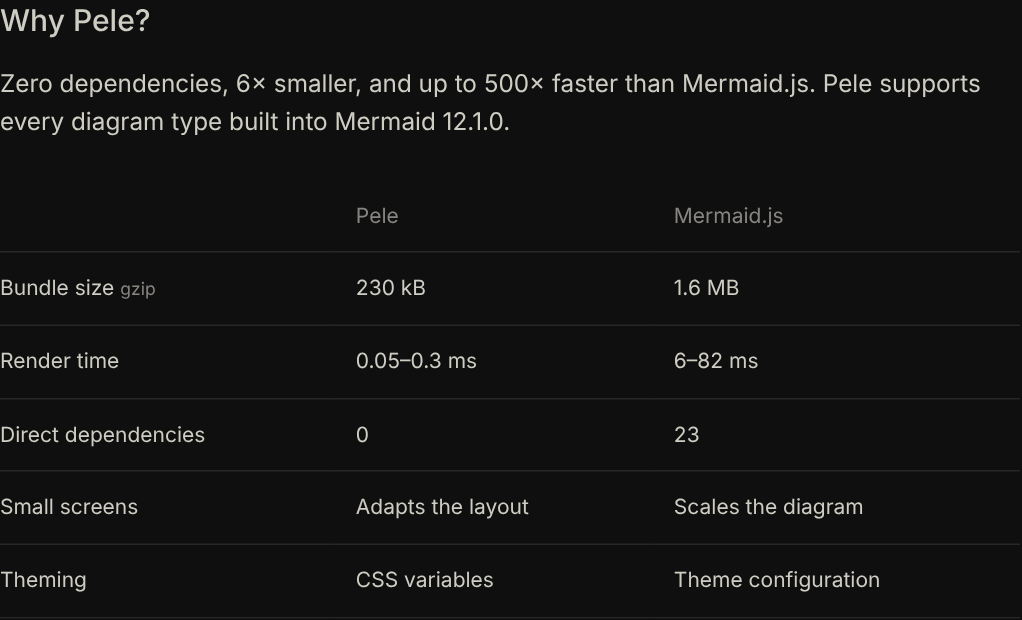
The repo's npm run bench times Pele alone, and optionally beautiful-mermaid, on Mermaid's flowchart doc examples and generated graphs. It never runs mermaid.js. So the site's "0.05–0.3 ms vs 6–82 ms" (reported) has no published method. I wrote my own.
I chose eight diagrams: a 5-node flowchart (the site's demo), a generated 100-node flowchart with 40 extra labelled edges, and one each of sequence, class, state, Gantt, pie and ER. Each library ran in its own fresh page, with five warm-up renders and then 31 timed batches. Pele ran several renders per batch, so its sub-0.1 ms times clear Chromium's timer resolution. I ran the whole suite twice. Run 2 came out 10 to 50 percent slower for both libraries as the machine got busier. The ratios moved much less.
Speed (measured). By median warm render, Mermaid takes 99× as long on the small flowchart (46.4 ms vs 0.467 ms) and 100× on the 100-node one (568.6 ms vs 5.7 ms). It takes 131× on sequence, 219× on class, 143× on state, 90× on Gantt, 171× on pie and 246× on the ER diagram. Run 2 gives 50× to 276× across the same set. By best batch, which is how you would get a headline number, the ratios are 142× to 583×. So "100–500×" is fair if you compare minima. If you compare medians on a noisy machine, it is closer to "100–250×". On a quiet machine the medians would sit nearer the minima (reasoned). My Pele times are higher than the site's 0.05–0.3 ms because this VM was shared. My Mermaid times sit around the top of the site's 6–82 ms for the same reason.
First render (measured). This is what a reader feels when they open a note. A fresh page's first Mermaid flowchart took 485 ms. That includes compiling and fetching its lazy chunks, from localhost, so there was no network time. Pele's took 36.4 ms. On class and ER diagrams it was 648 ms vs 17.4 ms and 552 ms vs 11.5 ms.
Bundle size (measured). dist/pele.js is 677,679 bytes minified: 253,213 gzipped at level 9, 251,634 at the default level, and 204,705 with Brotli. mermaid.min.js is 5,493,176 bytes: 1,578,065 gzipped at level 9. That is 6.2× (reasoned), so the "6×" holds. The site's "230 kB" for Pele is about 9 percent under what I measure for 1.6.0. Neither number is the most useful one, though. A page that draws one flowchart with Mermaid's ESM build fetched 29 files and 739,995 gzipped bytes. With pele/lazy it fetched 16 files and 54,020 bytes. That is 13.7× (reasoned).
The ELK detail (measured). Mermaid 12.1.0's default config sets layout: "elk" at the top level. That is why its flowchart, class, state and ER pages fetched the elkjs chunk: 507,495 gzipped bytes, the largest single piece of Mermaid. With layout: "dagre", the flowchart page fetches 243,699 bytes and the first render drops from 485 ms to 193 ms. The warm render barely moves (44.8 ms vs 46.4 ms). Swapping layout engines changes Mermaid's cold start. It does not explain its steady state.
Output size (measured). Mermaid's SVG for the 5-node flowchart is 75,660 bytes, against Pele's 3,645. Of Mermaid's bytes, 22,066 are a <style> block. Its labels are HTML inside <foreignObject>. Pele writes <text> and <tspan>, and nothing inside it is HTML.
Where Mermaid's milliseconds go
The usual explanation for Mermaid's slowness is "d3, DOMPurify, and measuring text in the DOM". I wanted to see it, so I CPU-profiled 20 warm renders in Chromium with the DevTools profiler. I used the unminified ESM build so function names survive.
The biggest single cost is not layout and not the DOM. It is copying the configuration object: every getConfig() returns a fresh deep merge of the whole config, theme variables included, and the build calls it from 258 places. Pele has no such object to copy; its colours are CSS variables the browser resolves at paint time.
On the flowchart, the shares are 37.2 percent for copying config, 32.2 for ELK, 13.1 for DOM measurement, 12.2 for DOMPurify and 4.5 for parsing. Across the three diagrams, DOMPurify is a steady 12 percent, DOM measurement is 7 to 13 percent, and ELK is 20 to 32 percent where it runs. The largest group is none of these. It is assignWithDepth, called from getConfig(), which returns assignWithDepth({}, currentConfig): a fresh recursive copy of the whole configuration, theme variables included, on every call. It accounts for 37.2 percent of samples on the flowchart, 53.7 on sequence and 53.0 on class (measured). getConfig() appears 258 times across the ESM build, 21 of them in the sequence renderer alone. Pele has no config object to copy at render time. Its theme is CSS, resolved by the browser at paint time.
It also shows up in tiny diagrams. A five-slice pie has almost nothing to lay out, and Mermaid still takes 6.5 ms on it (measured). That is a fixed cost per render, and Pele does not pay it. It suggests Mermaid could recover part of the gap without a rewrite, by caching getConfig() (reasoned, not tested).
What it looks like, and what it does not do
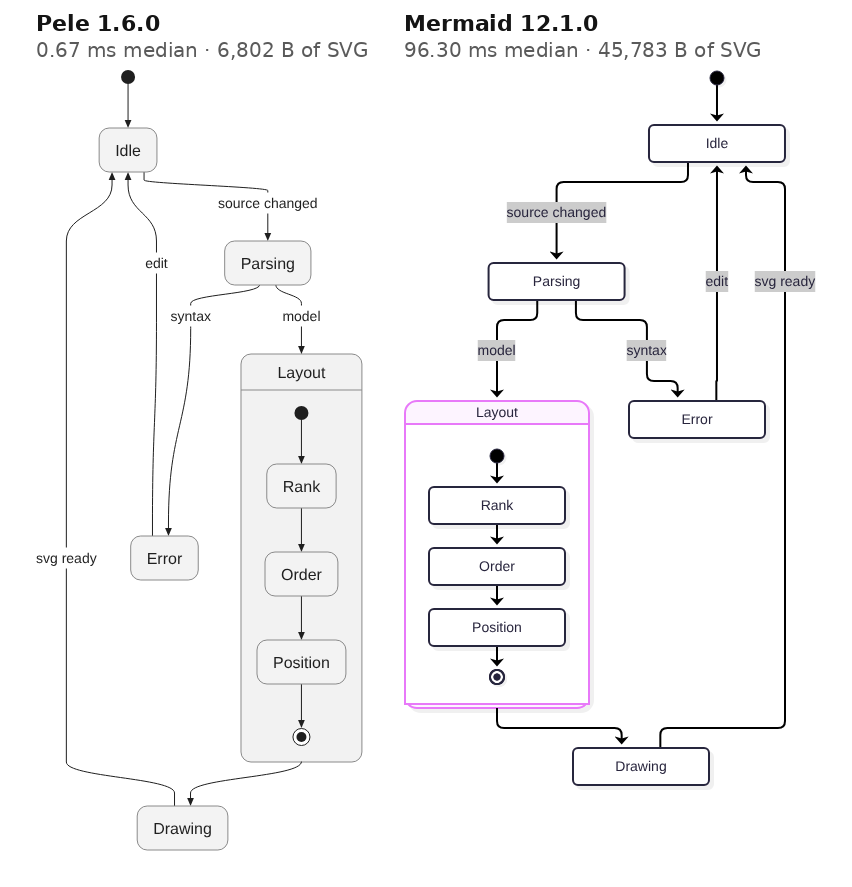
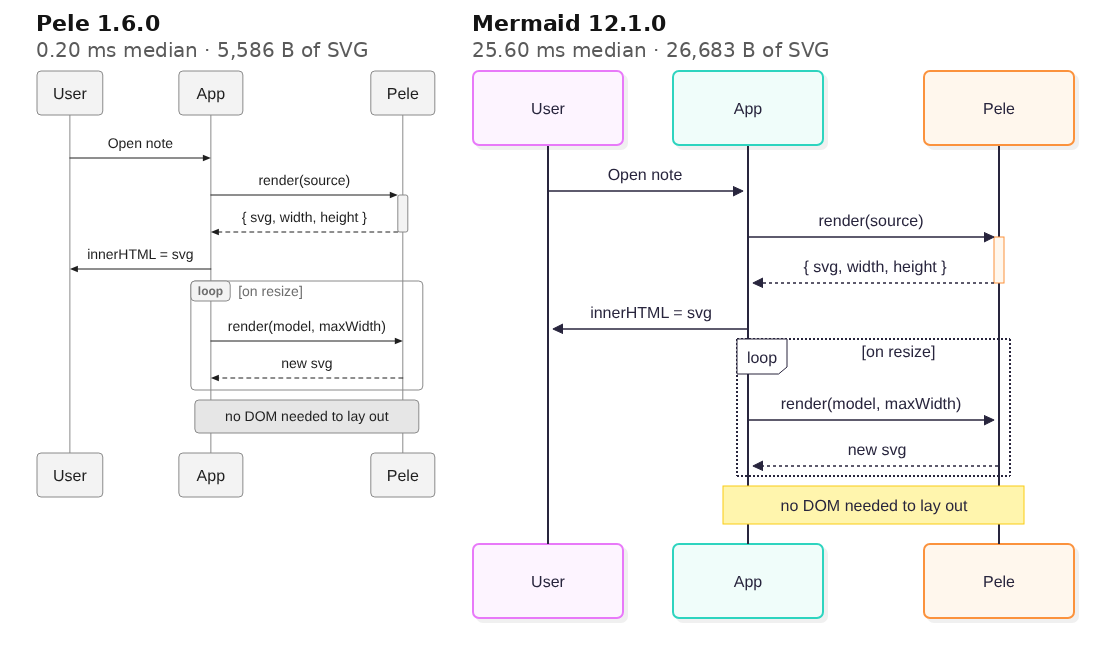
Coverage (measured). Pele claims "every diagram type built into Mermaid 12.1.0". Its compatibility table lists 33 types, from flowchart to Ishikawa. I ran render() over the 522 Mermaid documentation examples bundled in its test corpus, one file per type for all 33. All 522 rendered without an error. ZenUML, which Mermaid ships as an external plugin, throws unsupported-diagram, as the docs say it will.
Gaps (measured). These are by design, but worth knowing before you swap renderers:
- KaTeX in a label (
$$x^2$$) renders as the literal text$$x^2$$. - An HTML label like
<span style='color:red'>keeps its text and drops the styling.<b>and<i>survive astspans. %%{init: {"theme":"forest"}}%%andlook: handDrawnare accepted and ignored. Theming is CSS variables only.fa:fa-carwith noiconsresolver drops the icon silently.clickwith a JavaScript callback is ignored. Link clicks work through an allow-list of URL schemes.classDeffills are kept.
Layout parity is explicitly not a goal. If someone relies on Mermaid placing a node in a particular spot, the drawing will change.
Safety. Pele never turns diagram text into script or HTML. It caps the source at 50,000 characters, the SVG at 4,000,000 and flowchart edges at 5,000 (reported, src/core.ts). The edge cap is ten times Mermaid's 500. The comment explains why the cap exists: A & B --> C & D multiplies edges, so a few kilobytes of source could otherwise ask for millions.
Where it breaks, and what I would watch
- It is new. It is version 1.6.0 on release day, announced by one author and tracking a moving Mermaid. The fuzz oracle covers lexing and parsing; nothing covers drawing quality except the eye.
- Text widths in Node are estimates. Without a canvas, Pele sizes labels from an Arial width table. Server-side rendering with a different font will clip or pad labels. You can pass your own
measurer. - My numbers are noisy. A shared VM inflates Pele's sub-millisecond times more than Mermaid's, so my medians understate Pele. The direction of every result was the same in both runs.
For Obsidian, the trade looks clearly right. A note with ten diagrams goes from about a second of main-thread work to a few milliseconds (reasoned from the medians above). The diagrams also follow the theme without a re-render. For a docs site, the 54 KB lazy flowchart path is the real headline, more than 500×. This site already renders other projects' Mermaid sources into static figures, for example in BrowserSkill, DeepSeek Harness, speech-to-speech, AnyPS5 and Karotte. Pele is the first renderer I would consider running at build time for those, because it needs no browser.
19 October: Ondine, Mermaid in Rust
Two days after Pele, jxom (@_jxom) posted "Mermaid has been rewritten, again. In Rust!" and introduced Ondine. The post makes five claims: a 200-byte runtime, renders in about 50µs, "1,943x smaller, 2.8x faster than Pele", "13,467x smaller, 670x faster than Mermaid", and still no dependencies. The code is wevm/ondine under MIT, published to npm as ondine 0.0.3, with docs at ondine.sh. I read it at commit 0b589ec (22 October).
- license
- MIT
- branch
- main
- tests
- 125 files
- source
- 4.8 MB
- commit date
- 2026-10-21
by size of tracked source at this commit, file counts in brackets; docs, data and vendored trees excluded
local clone, 2026-10-23 at 0b589ec — branch, commit, commitDate, fileCount, hasTests, languages, license, licenseFile, shallow, testFileCount
shallow clone: counts describe the pinned tree, not the history
It is a port of Pele, and it says so. The compiler crate's first doc comment reads "The pipeline follows Pele (MIT)". layout/layered.rs (5,502 lines) opens with "Port of Pele's src/layout/layered.ts" and keeps Pele's list of aims, naming the same passes in snake case. The flowchart lexer is a "Port of Pele's src/diagrams/flowchart/lexer.ts" that reads UTF-8 bytes where Pele reads UTF-16 units. It does not port dagre or ELK. It ports the Sugiyama pipeline described above. One comment says floating-point expressions "keep Pele's operation order, since output depends on it" (measured, source).
A test holds it there. src/Parity.test.ts renders every test vector with both libraries and asserts the SVG body is the same string, once Pele's class names and colour defaults are renamed to Ondine's. The vectors are copied from Pele at 458322a. Steph Ango replied asking Ondine to "cover the MIT license requirements". The LICENSE now carries Pele's notice, added in 0b589ec three days after launch.
What differs from Pele is three decisions.
- Text is monospace arithmetic. Every glyph is 0.6 em, East Asian and emoji glyphs 1.2 em (
text/measure.rs). There is no canvas and no font table, so Node, browsers and Workers emit identical bytes. Pele measures a proportional font on a canvas. The price: Ondine's diagrams are always monospace. - It compiles ahead of time. The pitch is no
render()in the browser at all. The Vite plugin, a remark plugin for MDX, the CLI and an image Worker atondine.sh/svgcompile at build or request time. The page gets an SVG string andmount(), which iselement.innerHTML = svgplus anunmount. Bundled and gzipped, that is 210 bytes (measured). - The compiler is WebAssembly everywhere.
crates/wasmis acdylibwith a hand-written ABI:alloc,reset,render, a bump arena emptied per render, and results returned as length-prefixed fields. There is no wasm-bindgen and no napi binding. Node and the CLI load an all-types module optimized for speed; browsers get a size-optimized module per diagram type.
The claims, against my run (measured unless marked). The "200B runtime" holds: 210 bytes. But that is the size of innerHTML, and it is the root of the replies' main complaint. As Steph Ango put it, "the 200B runtime mounts SVG compiled at build time, which Pele can also do with no runtime at all". Size only compares fairly when both libraries render live. Ondine's all-types speed module is 1,266,600 bytes gzipped, 5.0 times Pele's 253,213 (reasoned). That matches his "~5× larger". The size-optimized all-types module is 633,670 bytes, 2.5 times Pele. One live flowchart costs 136,975 bytes of module plus 1,173 of glue, against 54,020 for pele/lazy. That is 2.6 times as much (reasoned). The "1,943x" and "13,467x" do not match Ondine's own docs table, which says 127 bytes against 248,064 and 1,506,327 (reported). Those divide to 1,953 and 11,861 (reasoned).
Speed is where the port earns its keep, by less than the post says. On my eight diagrams in Chromium, the speed module beat Pele's median by 1.51× and 1.58× (geometric mean of two passes). Per diagram it ranged from 0.77× to 3.0×. The per-type size module, the one a browser would actually download, came out 1.05× and 1.44× ahead. Pele beat the size module on the Gantt chart in both passes. On the 100-node flowchart the two were within noise: 7.15 ms against 7.5 ms, then 5.07 ms against 4.75 ms. Ondine's docs report 54.9µs against Pele's 151µs warm, mean over 612 vectors (reported). That is where the 2.8× comes from, and I could not reproduce it as a median. Against Mermaid, the speed module was 285× and 327× faster by geometric mean. The post's 670× is a ratio of averages over Ondine's corpus.
The "~50µs" is true of the Rust itself. Built natively and called from a Rust loop, the compiler took 14µs on the pie chart, 34µs on sequence, 48µs on the small flowchart, 109µs on state and 1.87 ms on the 100-node flowchart. In the browser, through WebAssembly, the same diagrams took 38 to 382µs.
Output. Ondine rendered all eight diagrams. Every SVG parsed, and every label I wrote appeared in it. In Chromium, Ondine's and Pele's outputs had the same number of shapes on every diagram. With Ondine's monospace rule given to Pele, seven of the eight were the same string after renaming. The pie chart differed only in its default slice colours, which Ondine's own test also rewrites. Ondine rendered all 522 Mermaid documentation examples in the corpus, across 33 types, and every one parsed as XML. A ZenUML source throws unsupported-diagram. Half-written input, like a node label with no closing bracket or a message arrow with no target, returns a Mermaid-style "Parse error on line N" with a caret, not a panic.
So Ondine is Pele in Rust with fixed-width text, held to it byte for byte. Live, it is about 1.5 times faster and several times larger. Precompiling is the real contribution, and any library that returns a string can do it.
How I checked. I cloned wevm/ondine at 0b589ec and read the compiler crate, the WebAssembly adapter, the parity test and the benchmark scripts. Then I built the compiler from source: rustc 1.97.0, release profile with fat LTO, two build jobs, 94 seconds. I timed it from a small Rust harness of my own, with 31 batches after five warm-ups. For the browser I installed [email protected], [email protected] and [email protected] from npm, bundled each with esbuild, and timed them in headless Chromium 141.0.7390.37 driven by puppeteer-core. I followed this article's method: a fresh context per library and diagram, five warm-ups, 31 timed batches, and first render as the median of five fresh pages. My 17 October sources were not kept, so I rewrote eight diagrams of the same kinds and re-ran Pele and Mermaid in the same session, so every ratio compares one session with itself. The machine was the same kind of shared 4-core Xeon at 2.10 GHz, CPU only, but busier: load average 5 to 11 during the runs. That is why I show two passes, and why the first-render column moves by up to 7× between them. Pele measured text on a canvas, as it does by default. I did not time it with a monospace measurer, which would be the fairer comparison of the two engines.