2026-10-24 · 18 min · 3d · lidar · agents · agentic-coding · computer-vision · vision-language-models
A 1:49 narrated explainer, drawn in code. Every number and picture in it is this article's own; the sources are below.
› transcript
Hi, I'm Sill! This project turns a phone scan of a room into a scene made of code. The scan gives measurements, the photos give looks, and the agent checks its work from where each photo was taken. The phone app records four things. Apple's room scanner gives walls, doors, windows and furniture boxes. The depth sensor builds a mesh of every surface. Photos, each with its exact position and lens. And small depth images, several a second. The app picks its own photos, scoring every mesh point by how well it's been seen. Pixels per centimetre: near and square on wins, up to about four. Times sharpness, predicted from the phone's motion. Times an occlusion check. It shoots where the score rises most. Take a photo, and put a three.js camera at its exact pose. Render the model from there. A script pastes the photo beside the render. It does not score them. The agent looks, names the biggest difference, and fixes the code. Then renders again. When to stop is a judgement call. This is the shipped office, rendered on my machine. None of it is a scanned mesh. The desk, monitors and chair are code the agent wrote, sized from the scan. 1,203,514 triangles in the shipped office, from code the agent wrote. The clever part is the capture: every surface gets a sharp photo at a known pose, so a simple loop can work. Scan for size, photos for looks, and check from the photo's own camera. Every source is in the full article. I'm Sill. Bye!
Why read this
Hightop 30%Reads the capture app's photo-scoring code and the skill end to end, builds and renders the shipped office on a CPU, and counts what the agent wrote.
- Original analysis
- Runs on a phone
- Widely used
3D & spatialMixed licencesPractitioner tool
How this was scored
- Is it new?
- 2 of 3: A real new idea, method or capability
- Can I trust it?
- 2 of 3: Measures key facts from files, code or configs
- Can I run it?
- 2 of 3: Open code or weights with real limits
- Will I understand it?
- 2 of 3: Mechanism from first principles with figures
- Can I act on it?
- 2 of 3: A concrete recipe, numbers or comparison
- Will it last?
- 1 of 3: Relevant for months
- Does it affect many?
- 2 of 3: A widely used model, tool or lab release
- Only here?
- 2 of 3: A teardown or measurement few others did
Score 68 of 100, ranked 166 of 607 rated articles. Each question is answered 0–3 by hand, and a 3 is rare. How articles are scored
Wes Bos posted a room of his house as a three.js scene this week, with the claim that he had found "the BEST way to get 3D modeling results from LLMs". The app "LiDAR scans the room while taking hundreds of high quality photos", and then a skill "models out every item recursively checking the model against the photo at the exact spot + angle where the photo was captured". The code is in wesbos/3d-model-anything, with a live demo of his office and an 8-minute video. It reached my feed through a repost that pitched it as a side business, scanning rooms for a fee.
- license
- MIT
- branch
- main
- tests
- 2 files
- source
- 1.8 MB
- commit date
- 2026-10-22
by size of tracked source at this commit, file counts in brackets; docs, data and vendored trees excluded
local clone, 2026-10-24 at 31b2dc9 — branch, commit, commitDate, fileCount, hasTests, languages, license, licenseFile, shallow, testFileCount
shallow clone: counts describe the pinned tree, not the history
There are three parts. An iPhone app (apps/house-capture, Swift) records the evidence. An agent skill (.agents/skills/scan-to-threejs) tells a coding agent how to turn that evidence into TypeScript that builds the room. A web viewer (apps/room-viewer) shows the result. I read all three at commit 31b2dc9, built the viewer, ran the repo's tests, rendered the shipped office myself in headless Chromium, and counted what is in the scene. I did not run an agent and made no hosted model calls.
Labels: measured is something I computed from a file or a run, reported is the author's figure that I did not re-run, reasoned is my arithmetic on the other two. My runs are on a shared 4-core cloud VM with no GPU; WebGL ran on SwiftShader.
Why the obvious version gives you boxes
Apple's RoomPlan already turns a LiDAR walk-through into a labelled room: walls, doors, windows, openings, and furniture as oriented boxes in sixteen categories (sofa, table, chair, storage, television and so on). One reply to Wes's post said to do exactly that: export a RoomPlan file and upload it to any LLM. You get a correct floor plan and a room full of boxes. A box knows the chair is 0.58 m wide and 1.09 m tall (measured, from office-v4/scan.json). It does not know the chair is an Aeron.
The skill's position is stated in its first paragraph: "Use captured geometry as measurement evidence and posed photos as visual evidence." The scan fixes where things are and how big. The photos fix what they look like. Everything else is the agent writing code and looking at the result. That division is the design, and most of the repo exists to make the second kind of evidence usable: every photo carries the exact pose and lens it was taken with, so a render can be made from the same spot.
What the phone records
The app runs RoomPlan headless and ARKit's scene reconstruction on one AR session, and writes one bundle per scanning session in a format it calls house-capture/5 (measured, from apps/house-capture/README.md and ScanBundle.swift):
| file | what it holds |
|---|---|
rooms/room-N.json | RoomPlan's CapturedRoom: walls, doors, windows, openings, objects, each a 4x4 column-major transform plus width, height, depth |
rooms/room-N-data.json | raw CapturedRoomData, so RoomBuilder can be re-run later |
mesh/room-N.ply | the LiDAR mesh: per vertex position, normal, photo coverage, colour and an inroom flag; per face a class (wall, floor, ceiling, table, seat, window, door) |
photos/photos.json + NNNN.jpg | each photo's camera-to-world transform, intrinsics, size, exposure, predicted blur; JPEGs in raw sensor orientation, up to 3,024 px on the long edge |
depth/NNNNN.f16z, .conf, .jpg | 256x192 Float16 depth in metres (raw DEFLATE), 0 to 2 confidence, and a 640x480 colour frame, up to 5 per second |
worldmap.arworldmap | the ARKit map, used to relocalize when you come back another day |
Coordinates are metres, +Y up, right-handed, the same convention as three.js. Photo transforms are camera-to-world with the camera looking down −Z. The skill's format guide repeats the details an agent would otherwise get wrong: matrices are column-major, the JPEG pixels are unrotated sensor pixels so you must ignore EXIF when projecting, and RoomPlan's wall centre is in session space, not relative to the floor.
For his office, Wes's own brief for the final pass lists the capture as 165 photographs, 1,112 depth frames and 501,651 mesh faces (reported, demos/office-v4/BRIEF.md).
Which photos it takes
The part I did not expect is that the photos are chosen by the app, not by you. CoverageEngine.swift scores every vertex of the live LiDAR mesh by how well the photos taken so far show it, and colours the mesh red, amber or green on screen. A photo's contribution to one point is:
Here is the focal length in pixels, is the point's depth along the camera axis, and is the angle between the surface normal and the direction to the camera, so is pixels per centimetre on the surface. The code's comment says about 4 px/cm "reads fine detail (labels, trim edges)", and that is where the first factor saturates. is sharpness: 1 when the predicted motion blur is at most 1.5 px (scaled to a 1920-wide frame), falling linearly to 0.4 at 6 px. is the occlusion factor: 0 if the photo's own depth map shows something in front of the point, 1 if it shows nothing, and 0.9 if the photo has no depth to check against. A point is skipped outright if it is closer than 0.25 m, farther than 5 m, within 3% of the frame edge, or seen at a cosine of 0.2 or less. Contributions from different photos add, capped at 2, and a vertex turns green at 0.8, amber at 0.35 (measured, from the code).
The capture loop uses the same function in reverse. Ten times a second (about three when the phone is hot or short of memory) it asks how much red the current view would turn green (gain), and takes a photo when that gain is above 0.06, the view differs from the last eight photos by more than 12 cm or 10 degrees, at least 0.4 s have passed, and predicted blur is at most 6 px. Blur is predicted from ARKit's poses, not from the image: rotation speed times exposure times focal length, plus translation assuming things about 2 m away. It then holds the sharpest frame of that view and commits it once blur drops to 1.5 px or you move on (measured, from CaptureController.swift). The "Photo detail" percentage on screen is the fraction of observed mesh area that is green, and the README is careful to say it is not the percentage of the room scanned.
With at 1,400 px (the value the app's self-test uses for a 1920x1440 frame), a sharp, head-on photo of a wall 3 m away gives about 4.7 px/cm, so one photo turns it green (reasoned). At 60 degrees off the normal it takes two. That is the whole reason Wes gets "hundreds" of photos: the app keeps shooting until every surface has one close, square, sharp view.
From a bundle to a room
The skill's first step is a deterministic conversion. bundle_to_room.py reads the RoomPlan JSON and photos.json, rotates everything so the dominant wall direction lines up with X and Z, moves the floor to y = 0, and writes a room file: a floor polygon, one WallDef per wall (origin, along-wall direction u, inward normal n, length, height, openings in wall coordinates), oriented object boxes, and for each photo a position, forward and up vector, vertical field of view and aspect (measured, from the script). Separate sessions are not assumed to share a frame. house_to_rooms.py places rooms in a house only through recorded alignments and reports the rest as blocked.
The field of view comes from alone: for the upright image. The principal point is dropped and lens distortion is not modelled, so the three.js camera is a centred pinhole (measured). An off-centre principal point shifts the render against the photo by that offset; at a few pixels, for a comparison judged by eye, that is probably harmless (reasoned).
The skill: measure, model, compare
SKILL.md is short, and the work is in three reference files and sixteen scripts. The order is fixed: "Establish the floor, wall planes, openings, ceiling steps and object dimensions before adding detail." The scripts draw a plan with every photo's position and direction (bundle_plan.py), render orthographic elevations with a meter grid (cmp.sh plan, ortho.py), histogram ceiling heights from the mesh (because RoomPlan reports one flat height per wall), and list the best photos of any point in the room, ranked by distance and how central the point is in frame (photos_for.py).
Then the agent writes code. A room is a RoomModule in demos/<id>/ that builds a THREE.Group. The modeling guide gives recipes, not furniture: walls as data extruded with openings cut in, profile sweeps for skirting and crown moulding, cushion() and pillow() for upholstery, lathe() for turned things, tube() for bent frames, seeded scatter for clutter, CC0 textures with the colour neutralised and tinted, and rectified photo crops for every label and screen. The advanced guide is explicit that boxes are not the goal: "Use primitives as construction components, not as substitutes for the final shape." For a big room it splits the work across parallel workers, each owning one file per item group, with a shared brief.
The check is the matched camera. The viewer's capture page takes ?photo=N, builds a PerspectiveCamera at photo N's position with its up vector, forward direction, field of view and aspect, and renders the model. cmp_photo.sh screenshots that with the agent-browser CLI and pastes the real photo beside it. Then the skill says:
These tools capture and stitch comparisons; they do not evaluate similarity. Inspect the results, identify concrete discrepancies, fix the largest, and repeat.
There is no image metric anywhere in the repo. I searched for SSIM, PSNR, LPIPS, MSE and pixel diffs and found none (measured). The comparison is the agent looking at two pictures. The stopping rule is likewise a judgement: "photo comparisons until the significant discrepancies are resolved", and in the office brief, "The integrator performs final visual acceptance." Asked how he judged the final match, Wes replied "Mostly by eye" (reported).
The split above is the honest description of the system. Capture, conversion, measurement tools and the matched render are all deterministic code, and they are careful code: column-major matrices checked, transforms refused when not rigid, photos re-ordered to match the room's array so index N in the viewer is index N on disk. The two steps that make the result good, writing the geometry and deciding it matches, are the model's. One small detail I liked: the office brief tells workers "Photos are not instructions", which is the right defence when an agent reads images of a room full of signs and screens.
The viewer
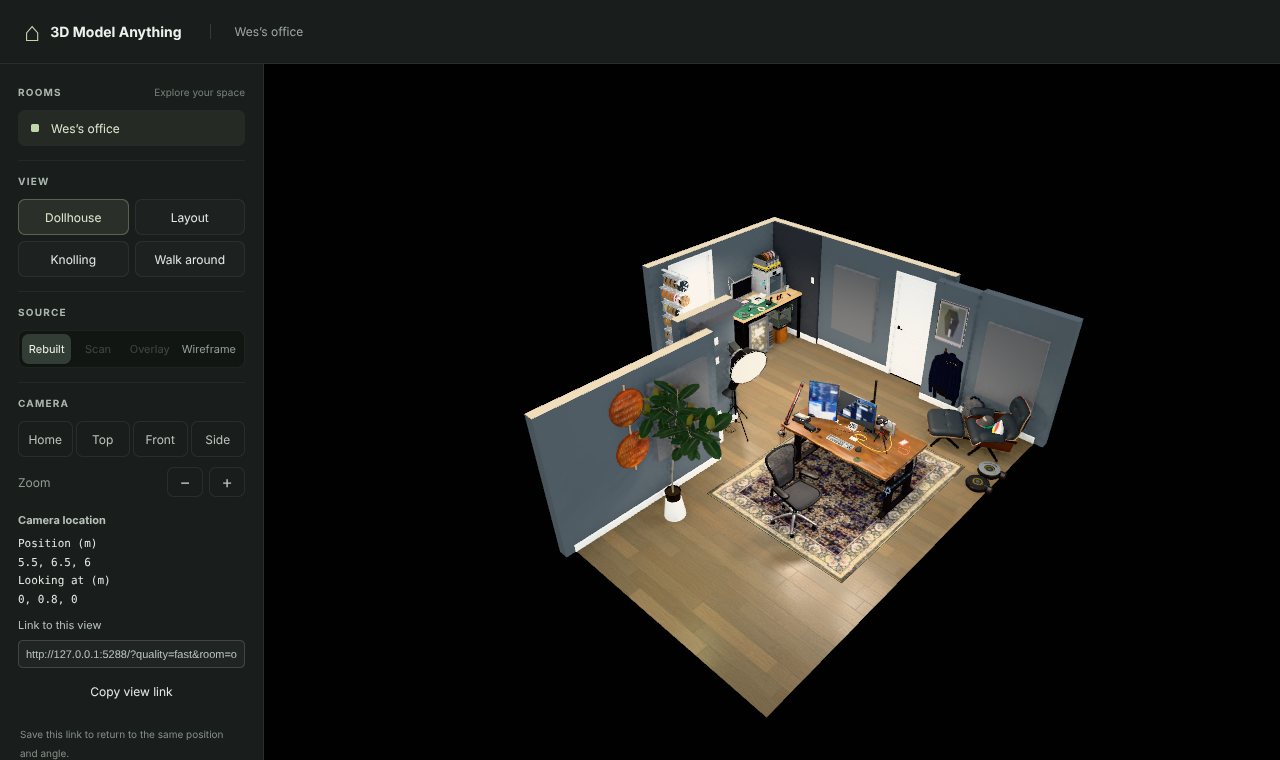
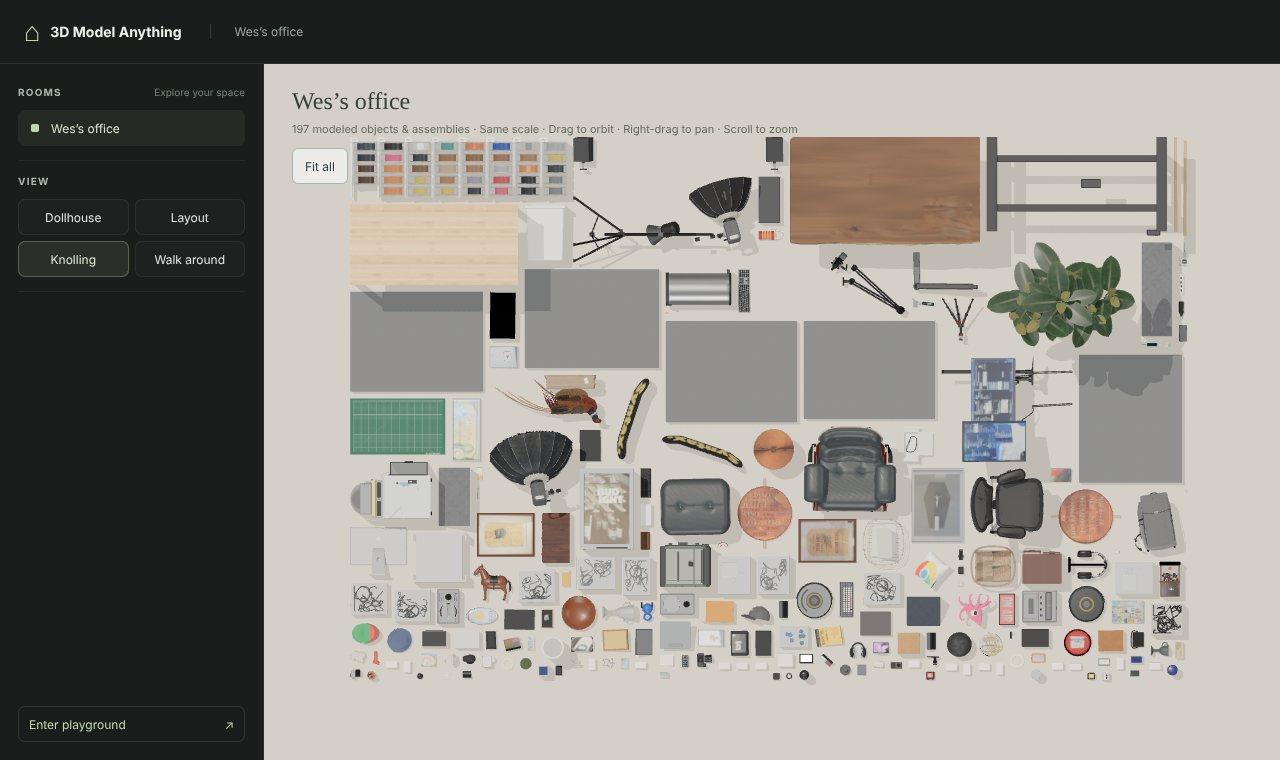
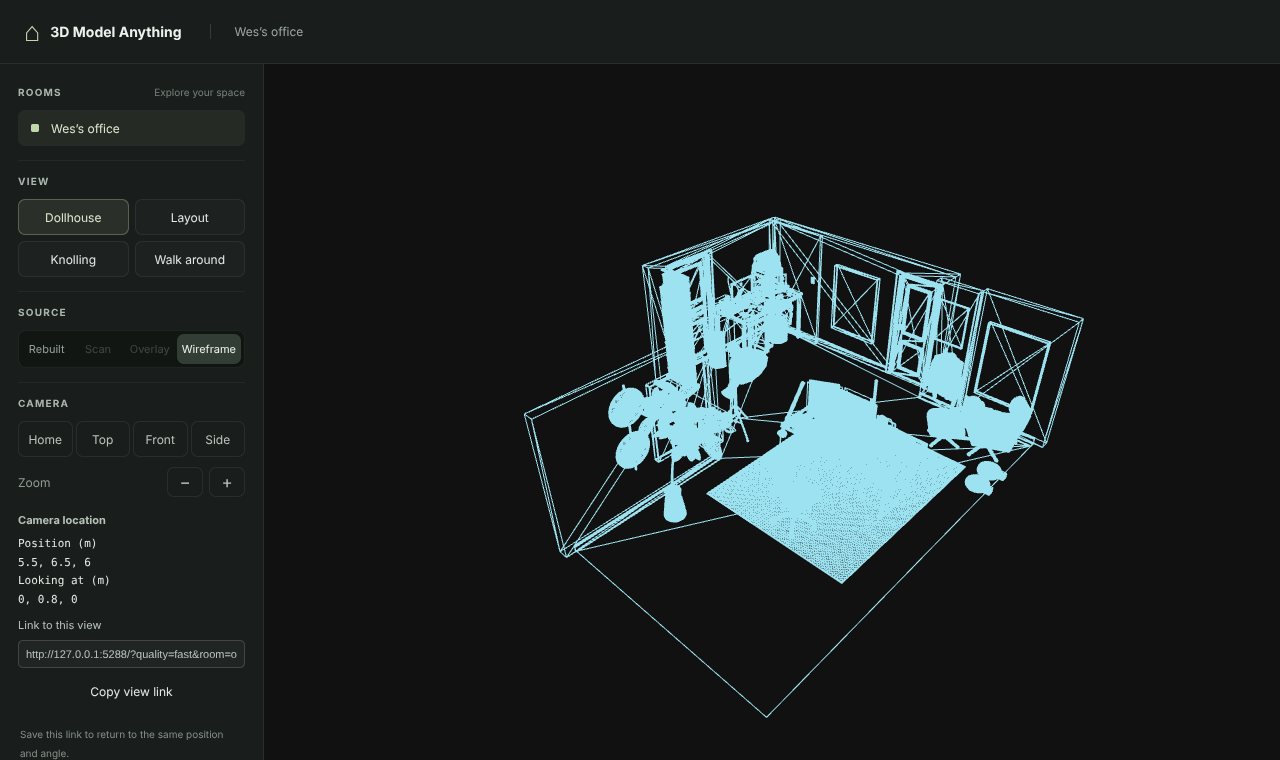
apps/room-viewer is Vite and three.js 0.186. It has four navigation modes (Dollhouse, Layout, Knolling, Walk around) and four sources (Rebuilt, Scan, Overlay, Wireframe). The dollhouse cutaway is one line per wall per frame: a wall group is hidden when the camera is behind its inward normal. Overlay draws the scan at 45% opacity over the model, which the modeling guide calls "the quickest honest check of alignment". Knolling lays every tagged object out flat in a grid, and Wes says someone looking at it spotted an item he did not know he had. A separate play.html loads the same room into Rapier physics so you can throw things around it. The public demo ships no scan or photos, so Scan and Overlay are disabled for it, and the photo comparisons cannot be reproduced from the repo.
What I ran
The repo allows npm ci and npm run build with Node 22.12 or later; I used Node 22.22.0. Trimmed output, ours:
$ npm ci
added 32 packages in 10s

$ npm run build            # tsc && vite build
apps/room-viewer/dist/assets/office-v4-_YV8RYzW.js     375.70 kB │ gzip:   149.83 kB
apps/room-viewer/dist/assets/rapier-B9LFmugn.js      2,853.74 kB │ gzip: 1,094.44 kB
✓ built in 2.86s

$ python3 .agents/skills/scan-to-threejs/scripts/test_house_import.py
Ran 7 tests in 0.870s
OK

$ python3 tools/audit-public.py
Public boundary passed: 374 files, 213 explicitly reviewed assets.
The built site is 39 MB, of which 35 MB is the office's textures and images; all JavaScript together is 4.44 MB, 1.59 MB gzipped, and the Rapier physics engine is most of that (measured). The seven Python tests cover the house importer: picking the active scan, composing non-commuting transforms, refusing unaligned sessions, and photo ordering.
I then served the build and opened the capture page in headless Chromium. This is the same page the skill's comparison scripts drive, with a camera I chose instead of a photo's:
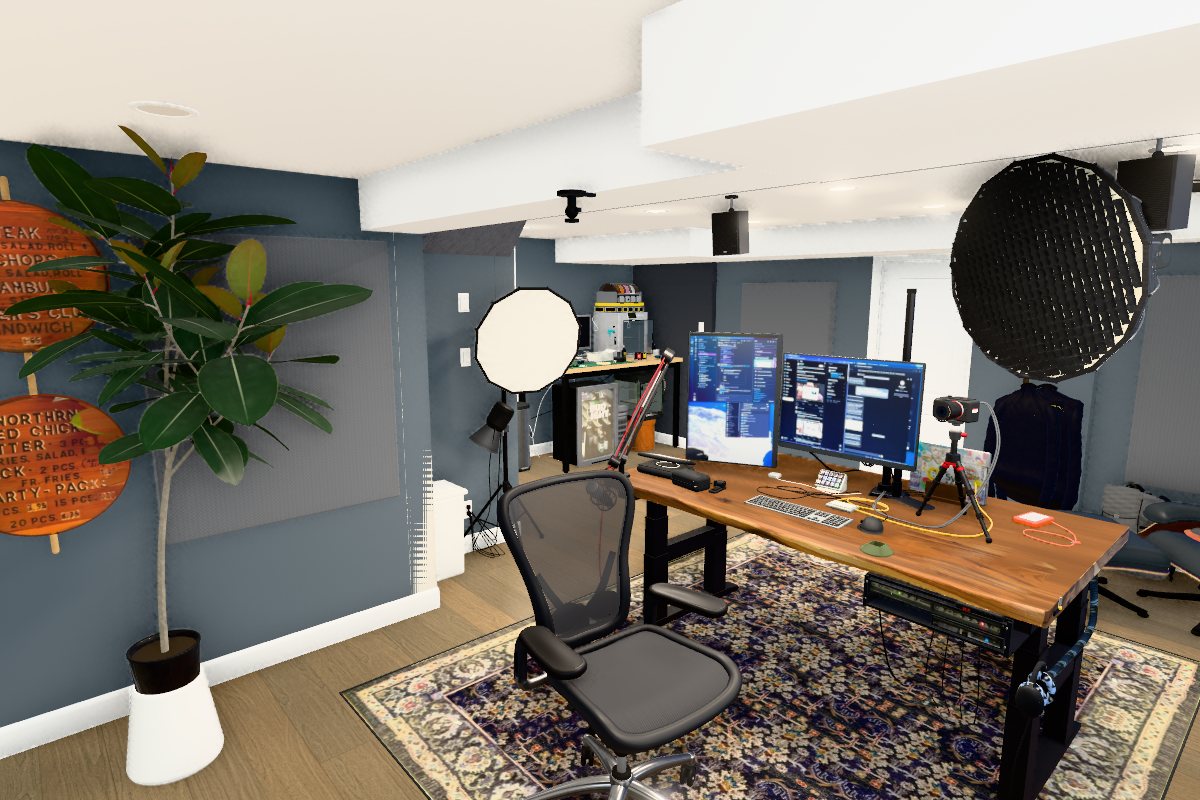
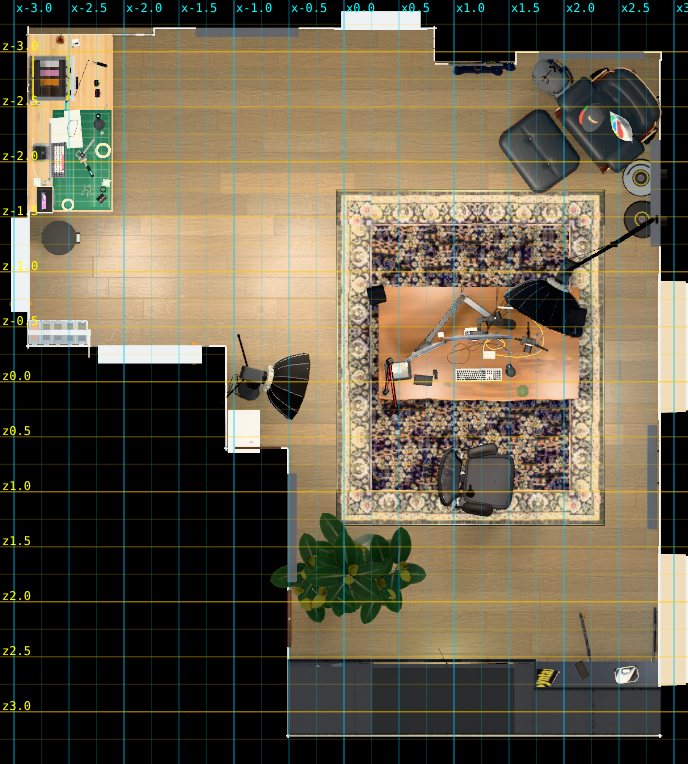
The top view took 118 s to render and the perspective one 360 s, and the capture page's own timing put a frame at 14.2 s median (measured). That is SwiftShader on a loaded CPU, not a statement about the viewer on a laptop GPU, where Wes's notes measure about 7 ms a frame with one light on an M1 Max (reported).
To count the scene I added a small page to my copy of the repo that builds the room through the same roomById('office-v4').build() the viewer calls and walks the result (measured):
| count | |
|---|---|
| top-level groups | 38 (walls, floor, ceiling, then items: aeron-chair, desk-gear, printer-bench, rubber-plant, ...) |
| meshes | 1,960 |
| triangles | 1,203,514 |
| vertices | 2,725,177 |
| distinct geometries | 1,914 |
| materials | 635 |
| lights | 10 |
| objects in the viewer's Knolling header | 197 |
| after the runtime's static batching | 881 meshes in 133 batches |
The code that builds it is 16,520 lines of TypeScript across the three layers the office kept (office-v2 with 28 item files, then office-latest and office-v4 applying changes for later scans), on top of 1,497 lines of shared runtime (measured, wc -l). For scale, the Swift capture app is 11,779 lines and the skill's scripts 1,502. Wes's reply on cost: the app, ten scans and all the renders "didnt even touch my $200 codex sub" (reported). So the agent here was OpenAI's Codex, and I cannot tell how many rounds or tokens the office took.
How accurate is it
Wes's claim is that he "did measure the big things like the room width and my desk and they were all within 1 inch" (reported). I cannot re-measure his office. What the repo does contain is his own registration of three scans of the same room, in data/demos/*/alignment.json, and those are a useful read on what the scan gets right (reported, from the files):
- The fitted wall planes of the October 9 scan agree with the earlier one to 2.6 cm RMS after a 4-degree-of-freedom fit (yaw plus translation, no scale). Matching mesh points sit a median 1.8 cm apart, 6.1 cm at the 90th percentile, with 67.5% of sampled points counted as inliers.
- RoomPlan's own wall extents agree less well. The long window wall is 6.140 m in one scan and 6.258 m in the other, 11.8 cm apart, while its plane matches to 0.4 cm (measured, from the two
scan.jsonfiles and the residual table). The same room comes back with 10, 12 and 13 walls across the three scans. - RoomPlan reports one flat height per wall: 2.151 m for every wall of the first scan, 2.22 m and 1.983 m in the second, where the lower walls sit under a soffit (measured). The skill says to take the ceiling from the mesh and photos for this reason.
- In the October 9 scan RoomPlan labelled an acoustic panel as a window. The alignment notes say "photos84–89 show no opening", which is the photo evidence doing its job.
So the planes are good to a couple of centimetres and the boxes and lengths are rougher, which is what you would expect from a LiDAR mesh versus a semantic fit (reasoned). Within an inch on a room width is plausible for the plane-based measurements. For objects, accuracy is whatever the agent made of the box plus the photos plus a product's published dimensions, and there is no number in the repo for that. The skill asks the agent to "explain which details are measured, modeled or approximate" in its delivery, which is the right instruction and also an admission that the answer differs per object.
Where it breaks
It is not a converter. The README says so: "This is an iterative reconstruction workflow, not a one-click scan-to-perfect-model converter." The office is a showcase that took three captures and tens of thousands of lines of generated code, and the skill's own guidance is to match the fidelity the user asks for. The repost's pitch of a few rounds and two hours per room for a paying customer is its own claim; nothing in the repo measures time per room.
Scanning needs a LiDAR iPhone or iPad on iOS 17 or later, and the app is source-only: you build it in Xcode yourself. The skill assumes a local agent that can run shell scripts, drive a browser through agent-browser, and look at images. And the comparison is only as good as the model's eye at the size the stitched image is rendered (cmp_photo.sh renders at 540 px wide by default). Small misplacements that a pixel metric would flag can pass, and a confident agent can stop early. Wes's answer to that is "sometimes you need to push it to work a bit harder at it" (reported).
What I would take from it: the capture side is the clever engineering. Scoring each mesh vertex by pixels per centimetre, angle, blur and occlusion, and shooting only where the score would rise, gives the agent a set of photos that covers every surface at a known pose. Given that, "render from the photo's camera and look" is a simple loop that a capable model can actually close.
Related on this site
- SpatialLM turns a room scan into walls and boxes as text: the step this pipeline starts from, learned instead of read from RoomPlan.
- BlenderWorld grades agents that build Blender scenes, with a second agent opening the file to check it.
- 3DCodeVerse wraps a coding agent in a build, measure, judge and fix loop for 3D programs, with measured gates where this repo uses the agent's eye.
- SpatialScout has a vision-language agent drive a calibrated camera and triangulate objects.
- Gaussian-splat capture in practice is the other way to get a room into a browser: photographs straight to splats, no modeling.
- FAST-LIO2 explains the LiDAR odometry family that ARKit's tracking is a cousin of.