transitions.dev's Generative effect: an agent animation drawn from the element's own geometry
mdjsonmcp2026-10-24 · 20 min · agents · agentic-coding · generative-ui · developer-tools
A 1:42 narrated explainer, drawn in code. Every number and picture in it is this article's own; the sources are below.
› transcript
Hi, I'm Gudgeon! An agent skill makes any card look as if an agent is building it, dot by dot. No model draws those dots. The idea: measure the real element, draw a dotted wireframe of exactly that, then reveal it behind a scan line. First, it walks the element once. Boxes: backgrounds, borders, buttons and images. Text lines, from the browser's own line rectangles. Small icons, path by path. And key elements, which get guides and size labels. The element goes in once, and gets measured. Out comes a list of parts, each with a start time. Every frame, one function takes the build's progress and redraws everything. It draws into an overlay on top. The real element stays in the page. Here is the formula. A dash of zero length with a round cap is one dot, every four point eight pixels. More dots, more line. Slide the offset, and the dots flow. A photo is read from its pixels. A contour sketch of its tones. A halftone, painted once onto a canvas. Dots in the photo's own colours. Then the photo, out of a blur. The cost is the dot field. One demo card has seven hundred and eighty-four circles, touched every frame. The skill picks the variant and the moment. The fixed runtime does the drawing. To recap: measure first, draw dots with dashes, and keep it to one showcase element. Every source is in the full article. I'm Gudgeon. Bye!
Why read this
Notabletop 60%Reads the Generative effect runtime line by line, renders its three variants in Chromium, and measures what the dots cost per frame and at start.
- Original analysis
- Runs in a browser
- A new technique
Developer tools & infraCustom licencePractitioner tool
How this was scored
- Is it new?
- 2 of 3: A real new idea, method or capability
- Can I trust it?
- 2 of 3: Measures key facts from files, code or configs
- Can I run it?
- 2 of 3: Open code or weights with real limits
- Will I understand it?
- 2 of 3: Mechanism from first principles with figures
- Can I act on it?
- 2 of 3: A concrete recipe, numbers or comparison
- Will it last?
- 1 of 3: Relevant for months
- Does it affect many?
- 1 of 3: A specialist community
- Only here?
- 2 of 3: A teardown or measurement few others did
Score 64 of 100, ranked 245 of 607 rated articles. Each question is answered 0–3 by hand, and a 3 is rare. How articles are scored
Jakub Antalik posted a 15-second clip on 23 October: cards, a headline and a photo of tulips building themselves out of grey dots, with an agent log scrolling on the left and CSS typing itself on the right. The post says he "Added more types to the Generative effect skill. It now includes UI, text, and image variants," and that the UI examples "were generated with Transitions.dev UI agent." A reply asked whether you have to name the variant. His answer: all types are in one skill, and it "should decide which type to use from what you point at."
The clip looks like generative video. Is it a shader, a diffusion model, a canned Lottie? None of those. It is a measuring tape and a dotted pen. The runtime reads the element you hand it (its boxes, its text lines, its icon paths, the outlines of its glyphs, the tones of its photo) and draws a dotted wireframe of exactly that, over the element, on a fixed timeline, then hands over to the real thing. Nothing is generated in the model sense. The "agent" part is the skill file, which tells a coding agent where to put the call.
I cloned the repository, read the skill and both runtime files, and ran the variants in headless Chromium. Everything below that is labelled measured came from those runs on a shared 4-core cloud VM, CPU only, software rendering, with five other jobs on the machine (load average 8 to 12). Treat the timings as an upper bound.
- license
- custom
- branch
- main
- tests
- 32 files
- source
- 8.9 MB
- commit date
- 2026-10-23
by size of tracked source at this commit, file counts in brackets; docs, data and vendored trees excluded
Read at 54fbee8 (23 October 2026, the depth-1 clone's only commit). Custom licence: free to use in products, not to republish as a transitions library. The skill lives in skills/transitions-ui-generation/.
local clone, 2026-10-24 at 54fbee8 — branch, commit, commitDate, fileCount, hasTests, languages, license, licenseFile, testFileCount
What a generative effect is, in code
The skill is skills/transitions-ui-generation/. Its SKILL.md is 3,615 words (measured), with six reference files, three demo pages and four runtime files: ui-generation.js (491 lines), text-image-generation.js (788 lines) and two small CSS files. No dependencies. The runtime is plain DOM:
- an absolutely positioned
<div class="t-gen">laid over the element,aria-hidden, with no pointer input; - inside it one
<svg>for the dot field, the guides, the outline, the parts and the labels; - for text and images, a
<canvas>or two (the halftone, the colour dot matrix) and an SVGmask-imageon each text block so glyphs can be inked in one at a time; - a
requestAnimationFrameloop that maps elapsed time to a progresspand rewrites attributes.
There is no WebGL, no shader and no network call. The element itself is hidden at the start (opacity: 0), and at the end the runtime restores its inline opacity, clip-path and filter and removes the overlay. The whole public API is generate(el, options), which returns { finished, cancel, element }, plus auto() for a data-t-generate attribute and timeline() for scrubbing.
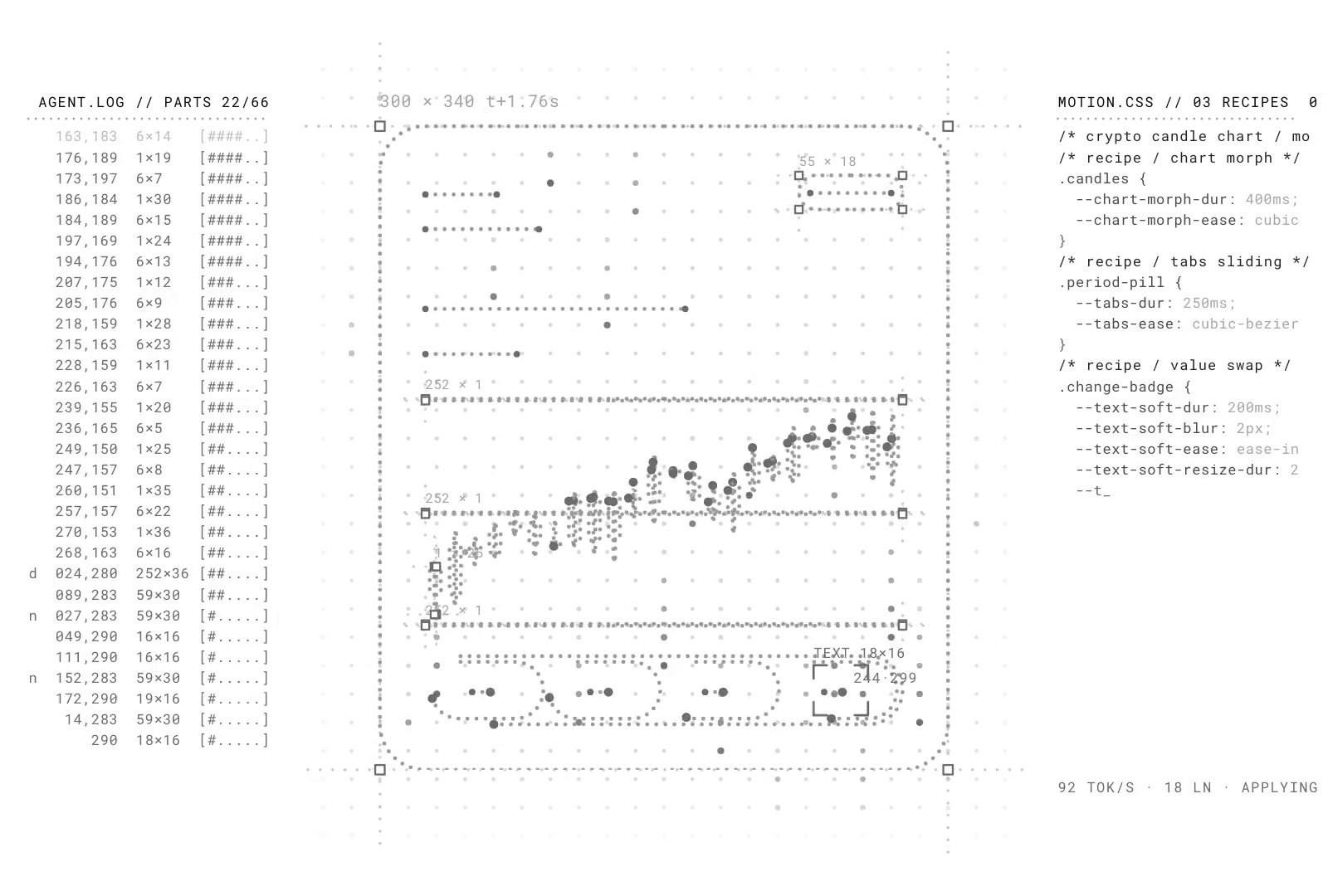
Here is a frame from the author's own clip. The card on the left is mid-build: a dot field, a dotted outline with corner handles, every part traced, a size label counting 300 × 340 t+1.76s, a reticle on the part being drawn.
The ui variant, phase by phase
The default variant draws a component. Before the first frame, measure() walks the element's descendants once:
- Boxes: anything with a background, a border or a background image, plus every
img,canvas,video,input,button,textareaandselect. Boxes bigger than 60% of the element (backgrounds) and blurred layers are skipped. Duplicates within 1.5 px are drawn once. - Text lines: each text node's
Range.getClientRects(), merged per line. A line is drawn as one dotted stroke through it. - Icons: every inline
<svg>up to 120 px, path by path, with its realgetScreenCTM()transform. - Key elements: interactive boxes first, then the largest, up to 5. These get their own guides, corner handles and a size label.
- At most 60 parts; past that the largest are kept.
Then one function, frame(G, p, t, D), draws everything as a function of progress. The phases are fixed fractions of duration (default 2,400 ms), copied here from the PH table in the source:
| Phase | Window of duration | What happens |
|---|---|---|
| Dot field | 0 to 0.30 | A 15 px grid ripples out from the centre; matrix rain runs down its columns until about 0.86 |
| Probe | 0.02 to 0.24 | A dotted vertical line sweeps left to right, lighting the dots it passes |
| Guides | 0.04 to 0.30 | Four lines along the edges, running past the corners |
| Outline | 0.10 to 0.42 | Both halves from the top centre; handles pop in; the size label counts up |
| Parts | 0.28 to 0.74 | Each part traced in document order; each takes 0.2 of the build, starts spread evenly |
| Reveal | 0.74 to 1.055 | The real element comes in behind a scan line, fading and un-blurring from 3 px |
| Clean | 0.84 to 1.04 | The dot field and guides fade out |
The overlay is removed at duration × 1.09, so a default run is about 2.6 s (reasoned: 2,400 × 1.09 = 2,616 ms). The drawing eases on cubic-bezier(0.16, 1, 0.3, 1) and the reveal on cubic-bezier(0.22, 1, 0.36, 1), which is transitions.dev's --ease-smooth-out token. Scrub it below. The card is mine and the drawing is simplified (no rain, probe, reticle or handles), but the windows, the grid, the dot spacing, the part schedule and both curves are the runtime's.
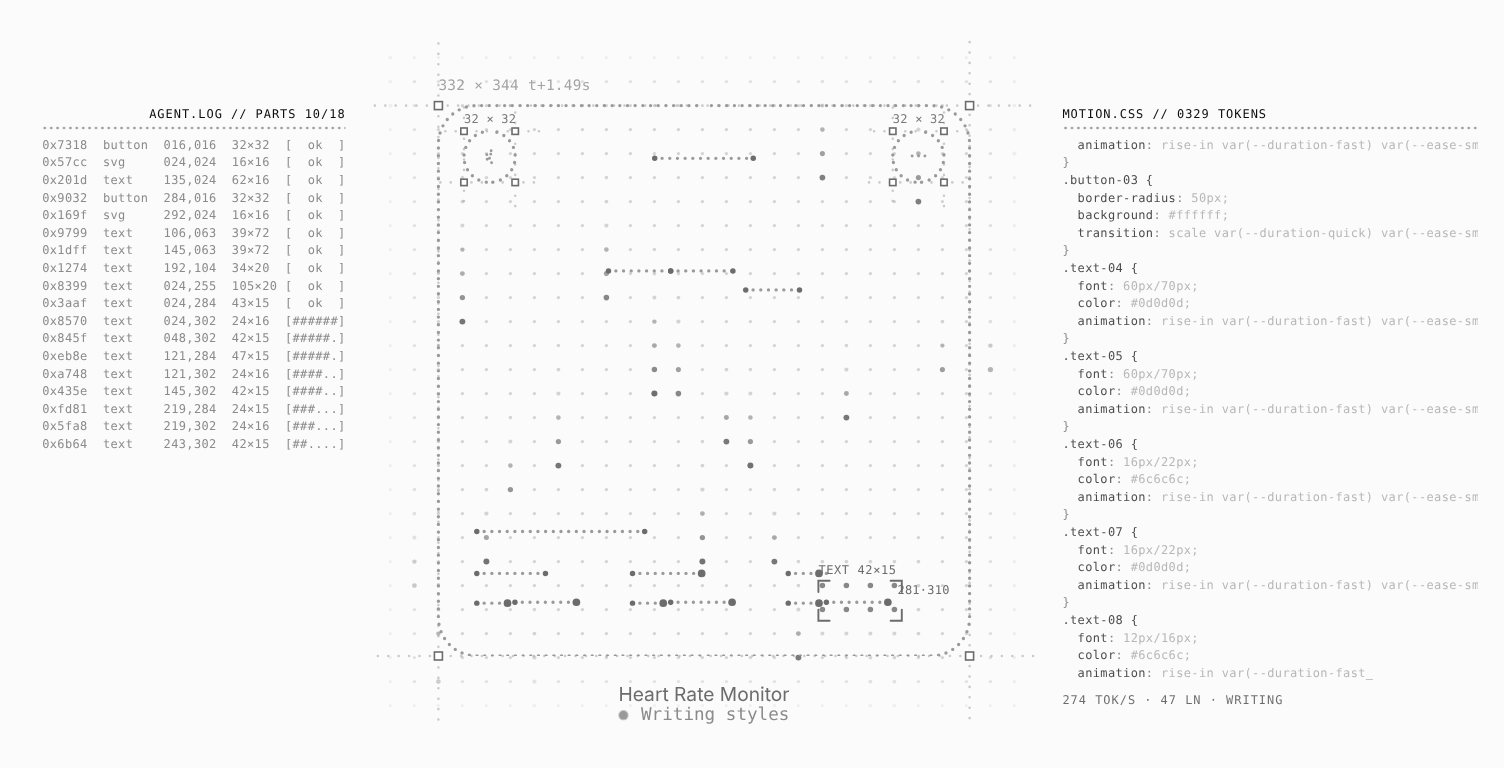
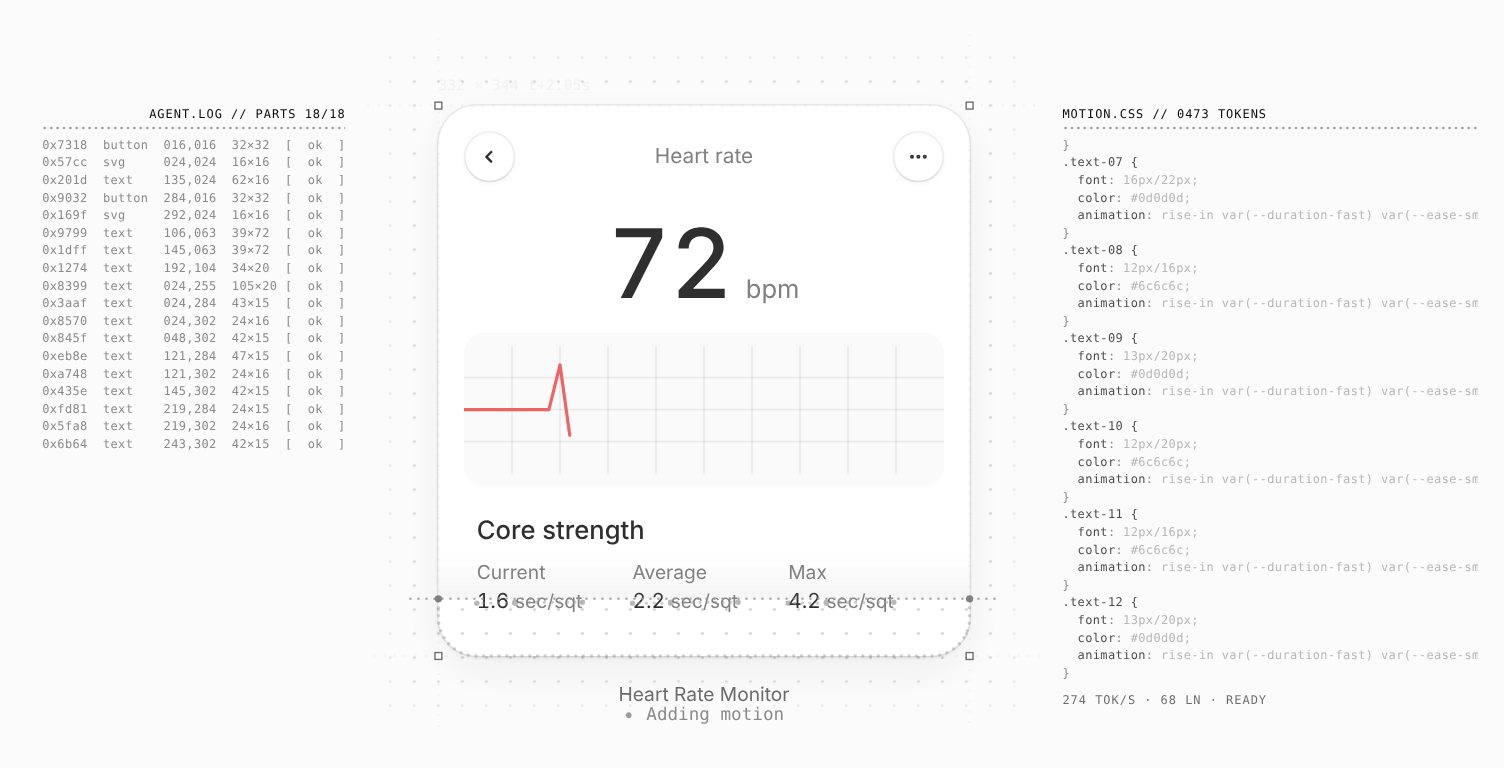
My run of the skill's own demo page, with its Heart Rate Monitor card from the transitions.dev Community, in the mode with texts. Two frames: the parts phase, and the reveal.
How a dot is drawn
The dotted line is one cheap trick worth stealing. A traced path is an ordinary SVG <path> with stroke-linecap: round and a dash array of zero-length dashes:
// ui-generation.js, drawStroke(): n dots, one every 4.8 px, then a long gap
s.el.style.strokeDasharray = `${"0 4.8 ".repeat(n - 1)}0 ${L + 10}`;
s.el.style.strokeDashoffset = -((t * 0.016) % 4.8);   // the dots keep flowing
A zero-length dash with a round cap paints a dot whose diameter is the stroke width (2.1 px by default). How far the line is drawn is just how many dots are in the array; getTotalLength() gives L. The offset slides with time, so the dots creep along the line in its drawing direction even after it is complete. A moving "head" circle sits at getPointAtLength() of the current end. The outline is two of these, each half of the rounded rectangle from top centre to bottom centre, which is why it grows symmetrically.
The dot field is not a trick at all. It is one <circle> per grid point, 15 px apart, from 30 px outside the element to 44 px past its far edge, and every frame sets opacity and r on every circle and toggles a class. That is the cost centre; I come back to it below.
The text variant: glyphs by marching squares
For display type, the outline of every glyph is traced, not guessed. glyphLoops() draws each character alone on a canvas in the element's computed font, at 2x when it is under 64 px, and reads the alpha channel back with getImageData. It runs marching squares at a threshold of 128 to get closed contours, simplifies each with Ramer-Douglas-Peucker at 0.3 px, drops loops whose bounding box is under 1.5 px², and sorts by area so the outer shape is traced before the counters (the hole in an "e" comes after its bowl). Each contour becomes one dotted path.
The ink then comes in through a mask. Each text block gets an SVG mask-image with one rectangle per glyph whose fill-opacity rises when that glyph's outline is done plus fadeDelay (140 ms), over fade (90 ms), at least fadeStagger (90 ms) after the previous one. A sequenceEase curve, [0.37, -0.02, 0.73, 0.88] by default, spreads the glyph start times across the build. Text under 32 px gets the small-text treatment instead: one dotted line through each line of text, characters fading in as it passes.
The image variant: sketch, halftone, colour, photo
For a photo, the runtime reads its pixels (so it has to be decoded, and cross-origin images without CORS get a flat dot screen instead). In order:
- Frame: a dotted frame from the top centre, a size label and a live status.
- Sketch (0.08 to 0.38 of the image's own timeline): luminance on a 3 px grid, stretched between its own 1st and 99th percentile, box-blurred, then marching squares at six tone levels (0.14 to 0.84). The contours are smoothed with Chaikin, cut into strokes of at most 240 px so the sketch builds in many places at once, and kept longest-first within a length budget. A topographic drawing of the photo.
- Screen (0.2 to 0.56): a halftone, one dot per 3 to 5 px cell, sized by tone with the local contrast lifted (tone plus twice its difference from a blurred copy), sweeping in from the top left. Landed dots are painted once into a settled canvas, so they cost nothing afterwards.
- Colour (0.52 to 0.68): the grey dots cross into a dot matrix in the photo's own colours.
- Photo (0.64 to 0.88): the real image fades in from a 6 px blur.
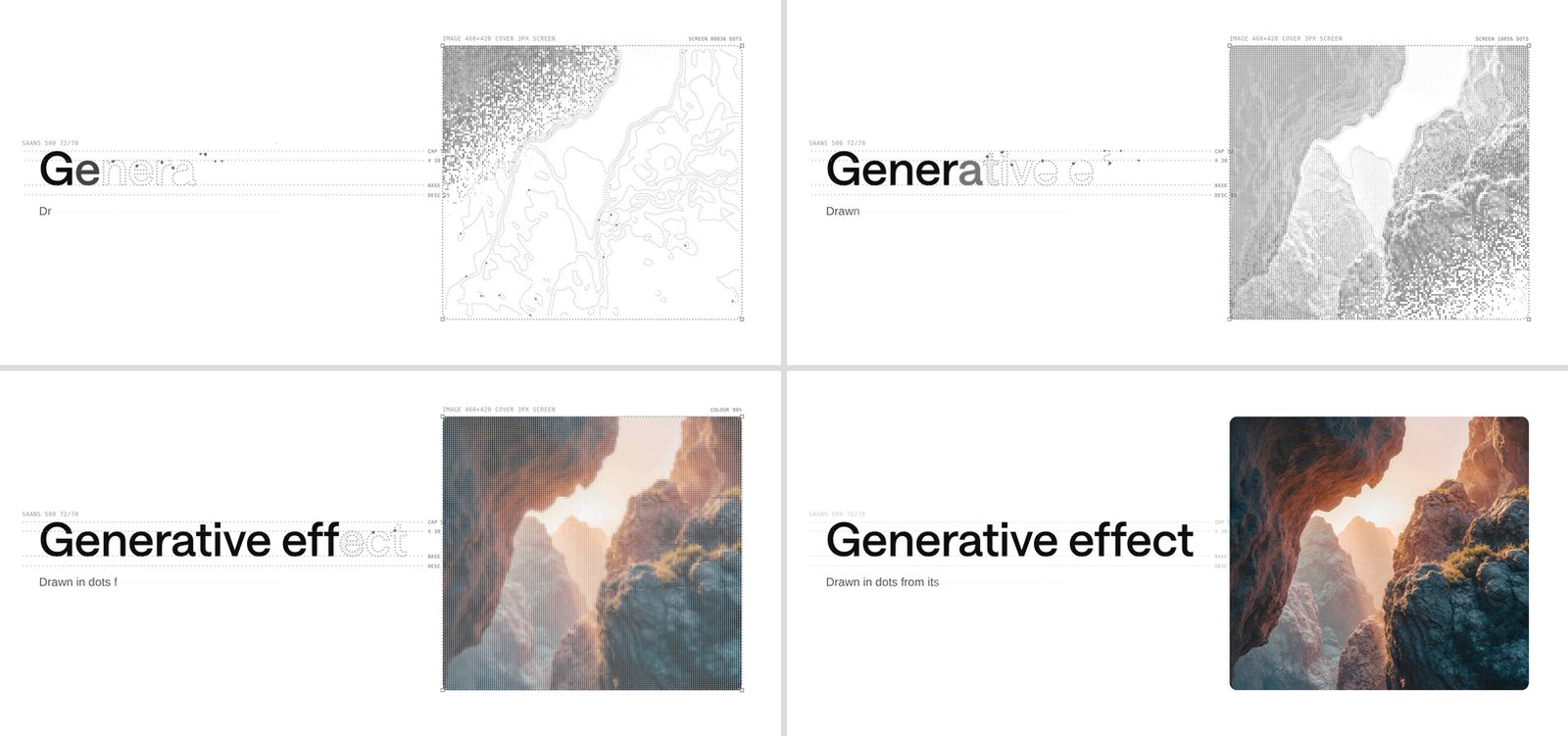
Here are four of my frames of all three variants at once, a headline, a subtitle and the skill's demo canyon photo, scrubbed with timeline().seek(ms) so each frame is exact.
The same build as a short clip, every frame seeked, so it plays at the runtime's real pace:
At 1.6 s the image status read SCREEN 18354 DOTS (measured) for a 460 by 420 px photo on a 3 px screen, out of 21,420 cells (reasoned: 153 × 140; the lightest cells get no dot).
How the skill steers an agent
The runtime is the effect. The SKILL.md is the part an agent reads, and it is mostly decision rules and guard rails, not prose about motion:
- Variant from the target. A headline →
text. Its subtitle or eyebrow →small-text. A photo →image. A hero mixing them →auto(text at 32 px or larger is traced glyph by glyph, smaller gets a line). A card or component →ui. This is the rule behind "it should decide which type to use from what you point at": the choice is written down, by element kind, for the agent. - Mode from the moment. An AI feature returning UI →
skeleton, played when the result arrives. A launch page or demo →skeleton-texts. Asked for "the log" or "the futuristic version" →skeleton-texts. Unsure →skeleton, and ask before adding the texts. - When not to. Anything under about 120 px, or anything that appears often (every route change, every list row): don't. Use a skeleton reveal instead. "A generation animation is a moment, not a loading state."
- A protocol. The
transitions generatecommand has four steps: find the element (ask if ambiguous), pick variant, mode and trigger, propose it in one line ("I'd play skeleton on<ResultCard>when the response arrives. Confirm?"), then install and wire it with a small diff. - Do not rewrite the runtime. "They are tuned together: the drawing phases, the dot spacing, the flow speed and the reveal curve." The agent copies four files and writes the call.
- Wiring per framework: vanilla, the attribute API, React (
useLayoutEffectwithrun.cancel()as cleanup), Vue and Svelte. And twelve common mistakes, nearly all about measuring too early: before fonts load the glyphs are traced in the fallback face; before an image decodes its sketch is empty; ondisplay: nonethere is nothing to measure.
That list is the most useful thing in the file: the effect is only honest if it measures the final layout. It is the same pattern I saw in Impeccable and Anatomy: the skill carries the judgement, and a deterministic artifact (a linter there, a figure kit there, a runtime here) carries the craft, so the agent cannot drift on the parts that need to be exact.
What it costs
Bytes. ui-generation.js is 36,364 bytes and text-image-generation.js 55,695; the two CSS files are 4,231 and 3,776 (measured). With gzip -9 that is 12,949 + 19,650 + 1,533 + 1,451 = 35,583 bytes (measured, summed). One catch: ui-generation.js imports the text and image module statically, so a page that only uses the ui variant still ships 92,059 bytes of JavaScript, 32,599 gzipped (reasoned from the two measured sizes). A dynamic import() for the four non-ui variants would save the larger file for the common case. The site's own copy at assets/ui-generation/ui-generation.js does not import it at all, and has a reveal: "fade" option the skill copy lacks (measured, by diff). So there are already two forks of the runtime in one repository.
The dot field. Every frame touches every dot. The grid rule is easy to compute, and I checked it against the overlay in the browser: the Heart Rate Monitor card at 332 by 345 px gets a 28 by 28 grid, 784 circles, inside an overlay of 947 nodes; the skill demo's three cards together carry 2,904 dots and 3,576 overlay nodes (measured). Drag the sizes below; the grid grows with area, so a full-width hero costs several times a card.
Frame time. I wrapped requestAnimationFrame in the demo page and timed each callback. Per card, the median callback was 4.0 to 5.4 ms and the 95th percentile 8.9 to 19.9 ms, across six runs (measured). With one card the page delivered 157 to 194 frames in a 3.6 s window; with three cards at once, 89 to 106 (measured), so roughly 25 to 30 fps on this loaded, GPU-less VM. A laptop with a GPU will be smoother, but the shape holds: the cost is DOM attribute writes, linear in dots and in elements. The skill's advice of one showcase element at a time is also the performance advice.
Build stall. The text and image variants do real work before the first frame. Building the timeline for a 17-character, 72 px headline took 23 to 85 ms over five runs (the first, cold, is the 85); for the 460 by 420 px photo, 56 to 174 ms (measured). That runs inside one animation frame, so it shows as a dropped frame at the start: the largest single callback in my generate() run was 181 ms (measured). After that, seeking a frame cost a median of 0.4 ms for both (measured), because the halftone is painted once into a canvas instead of kept as live DOM. The subtitle is nearly free: 3 ms to build.
The duration is a floor, not a promise. The docs say a text run is "about duration × 1.06." For my 47-character subtitle at the default 3,000 ms, the timeline's own end was 4,042 ms (measured). The cause is the stagger: each character fades at least 90 ms after the previous one, and 47 characters at 90 ms is already 4.1 s (reasoned). The skill does warn that "a long delay runs the build past duration." It is worth knowing that the default settings already do for a long subtitle.
Accessibility
This part is done properly. With prefers-reduced-motion: reduce, both runtimes skip the drawing entirely: the element is set to opacity: 0 and faded in over 200 ms with a CSS transition, and finished still resolves, so code awaiting it works unchanged. In my run with reduced motion emulated, finished resolved for all three elements in 221 ms and no overlay was ever created (measured). The skill tells the agent "Never remove this." Both CSS files carry a matching @media (prefers-reduced-motion: reduce) block.
The overlay is aria-hidden and ignores the pointer, and the real element stays in the accessibility tree throughout; a screen reader reads the card, not the dots. Two things the runtime cannot fix, and the skill says so: the element is invisible for most of 2.6 s, so nothing should be gated on it; and it is a moment, not a loading state, because watching it on every route change would be tiring. One reply on the launch post made the second point from a viewer's side: too much is moving at once. With the texts panels on, the left, centre and right of the screen all animate together.
What the clip shows that the repo does not
The launch clip and my render differ in one telling way. In the clip, the right-hand panel is headed MOTION.CSS // 03 RECIPES, lists transitions.dev recipes by name ("recipe / chart morph", "recipe / tabs sliding", "recipe / value swap"), and its footer says APPLYING. The open runtime's panel is headed with a token count (MOTION.CSS // 0329 TOKENS in Figure 2), emits per-part rules with the element's own radius, font and colours plus a generic transition, and its footer says WRITING, then READY (measured: deriveCode() and my frames). The clip's log also counts 66 parts, past the default maxParts of 60.
So the clip was made with a different configuration or build: the post says the UI was generated with transitions.dev's hosted UI agent, and the open generate() takes a code array that would let a caller stream recipe lines instead of derived ones. I could not check this: the agent is a paid hosted service and its source is not in the repository (unverified). It does not change what the effect is. It does mean the most product-like part of the clip, the CSS that names which motion recipe each part gets, is not what you get from npx skills add.
Where it breaks, and what I would change
- It measures once. Layout is read before the first frame. If the element resizes, scrolls inside an
overflowcontainer or loads a late image during the 2.6 s, the drawing drifts. The skill lists all three as mistakes, and the attribute API waits until the element is in view, but nothing in the runtime re-measures. - The cost is per dot. Thousands of SVG circles rewritten every frame is fine for one card and noticeable for a hero or a grid. Drawing the dot field into a canvas, as the halftone already is, would make it near-free.
- One static import. Split the text and image module behind a dynamic import so the default variant ships 36 KB, not 92 KB.
- "Generative" is a styling choice. The drawing is exact because it is measured, so unlike a pre-rendered animation it always matches the real UI. No model draws these dots.
Compare Claude Motion, where the model writes the animation code, or the one-shot launch video skills, which hand a brief to an HTML video framework. Here the agent writes almost nothing. For an effect whose point is matching the real element, that split seems right.
How I checked
- Cloned
Jakubantalik/transitions.devat depth 1 (commit 54fbee8, 23 October 2026). ReadSKILL.md, the six reference files,ui-generation.jsandtext-image-generation.jsin full, anddiffed the skill runtime against the site's copy. - Read the post, thread and replies through the fxtwitter mirror; pulled Figure 1 from the clip with
ffmpeg. - Served the clone on localhost and drove Playwright 1.56 Chromium, headless,
--disable-gpu, Google Fonts blocked (my headline uses the repo's own Saans Medium). The ui frames come from the skill'sdemo.htmlunder Playwright's fake clock; the text and image frames and the clip from my own page callingtimeline()andseek(). - Timings: a
requestAnimationFramewrapper around every callback, six runs of the ui demo, one of my text and image page, and five timedtimeline()builds per variant. Node counts fromquerySelectorAllon the overlay. - Not checked: the hosted UI agent that made the clip's cards, its recipe panel, and anything on real GPUs or phones. I did not run the
transitions-devCLI or the agent CLI.