2026-10-23 · 19 min · agents · on-device · security · privacy · tool-calling · image-generation · llama-cpp
A 1:52 narrated explainer, drawn in code. Every number and picture in it is this article's own; the sources are below.
› transcript
Hi, I'm Gunwale! Intel's AI Playground lets you message your own PC from your phone. Here is the path. The trick is direction. Your PC asks the chat service for messages. Nothing connects in. You type on your phone. The message waits on Telegram's or Slack's servers. A Python service on your PC holds a request open and collects it. The desktop app checks that service every two seconds, over loopback, with a secret token. It runs the turn on local models. A small Qwen model plans, and ComfyUI draws on the Arc card. Replies return the same way. Compute stays home; prompts and pictures cross the chat service. Reaching a home PC usually means a forwarded port, a tunnel, or a vendor relay. Home Agent only connects outward, and no Intel server sits in the path. Who may talk to it is one number. In setup, you message your bot and press Detect. The app reads your chat id. Every handler compares each sender against it. Slack uses one user id. Anyone else is dropped before the model sees a word. One catch. Detect can pick up a stranger, so check the test message reached you. Past the gate, a message drives an agent with tools, like Python inside Blender. Tools are on by default. Only settings changes and downloads ask first, in the same chat. The project's tests pass offline, twenty eight of twenty eight. The model stays home. The chat, and its tools, belong to whoever holds it. Outward polling, one id as the key, and a transcript that lives with the chat service. Every source is in the full article. I'm Gunwale. Bye!
Why read this
Notabletop 60%Traces a Telegram message through Home Agent's code to the GPU and back: what leaves the PC, who may talk to it, and what one message can start.
- Original analysis
- Runs on a consumer GPU
- Widely used
Agents & harnessesMITPractitioner tool
How this was scored
- Is it new?
- 1 of 3: An incremental tweak
- Can I trust it?
- 2 of 3: Measures key facts from files, code or configs
- Can I run it?
- 2 of 3: Open code or weights with real limits
- Will I understand it?
- 2 of 3: Mechanism from first principles with figures
- Can I act on it?
- 2 of 3: A concrete recipe, numbers or comparison
- Will it last?
- 1 of 3: Relevant for months
- Does it affect many?
- 2 of 3: A widely used model, tool or lab release
- Only here?
- 2 of 3: A teardown or measurement few others did
Score 63 of 100, ranked 286 of 607 rated articles. Each question is answered 0–3 by hand, and a 3 is rare. How articles are scored
Intel's developer account posted a short one on 21 October: "With AI Playground Home Agent and Slack/Telegram, you can launch PyTorch-powered image generation and content creation from your phone while the compute stays local on your Intel-powered AI PC." The link in the post resolves to a YouTube video, "AI Playground Home Agent: Full Walkthrough", on Intel's channel. The thing itself is open source: intel/AI-Playground, MIT, Copyright 2024 Intel Corporation.
The sentence has two halves and they deserve different answers. "The compute stays local" is true, and the code shows exactly how. "From your phone" means a bot on Telegram or Slack, and a bot on someone else's chat service is a different kind of local. So this is two articles in one: how a message gets from your phone to an Arc GPU and back without opening a port, and what that bot can be told to do by whoever is holding the chat.
- license
- MIT
- branch
- HEAD
- tests
- 131 files
- source
- 4.9 MB
- commit date
- 2026-10-01
by size of tracked source at this commit, file counts in brackets; docs, data and vendored trees excluded
local clone, 2026-10-23 at bdda6cc — branch, commit, commitDate, fileCount, hasTests, languages, license, licenseFile, testFileCount
What AI Playground is, underneath
AI Playground is a desktop app for running generative models on an Intel AI PC: chat, RAG over your documents, image generation and editing, video, speech, a game-making agent. The README lists the hardware: Intel Core Ultra with a built-in Arc GPU, or an Arc A- or B-series card with at least 8GB of VRAM, plus an experimental NVIDIA mode; Windows or Ubuntu; 82GB+ of disk recommended (reported). I read it at commit bdda6cc of 1 October 2026; WebUI/package.json says 3.2.1-beta.
The repository's own architecture page, an arc42 document under docs/arc42, draws the shape:
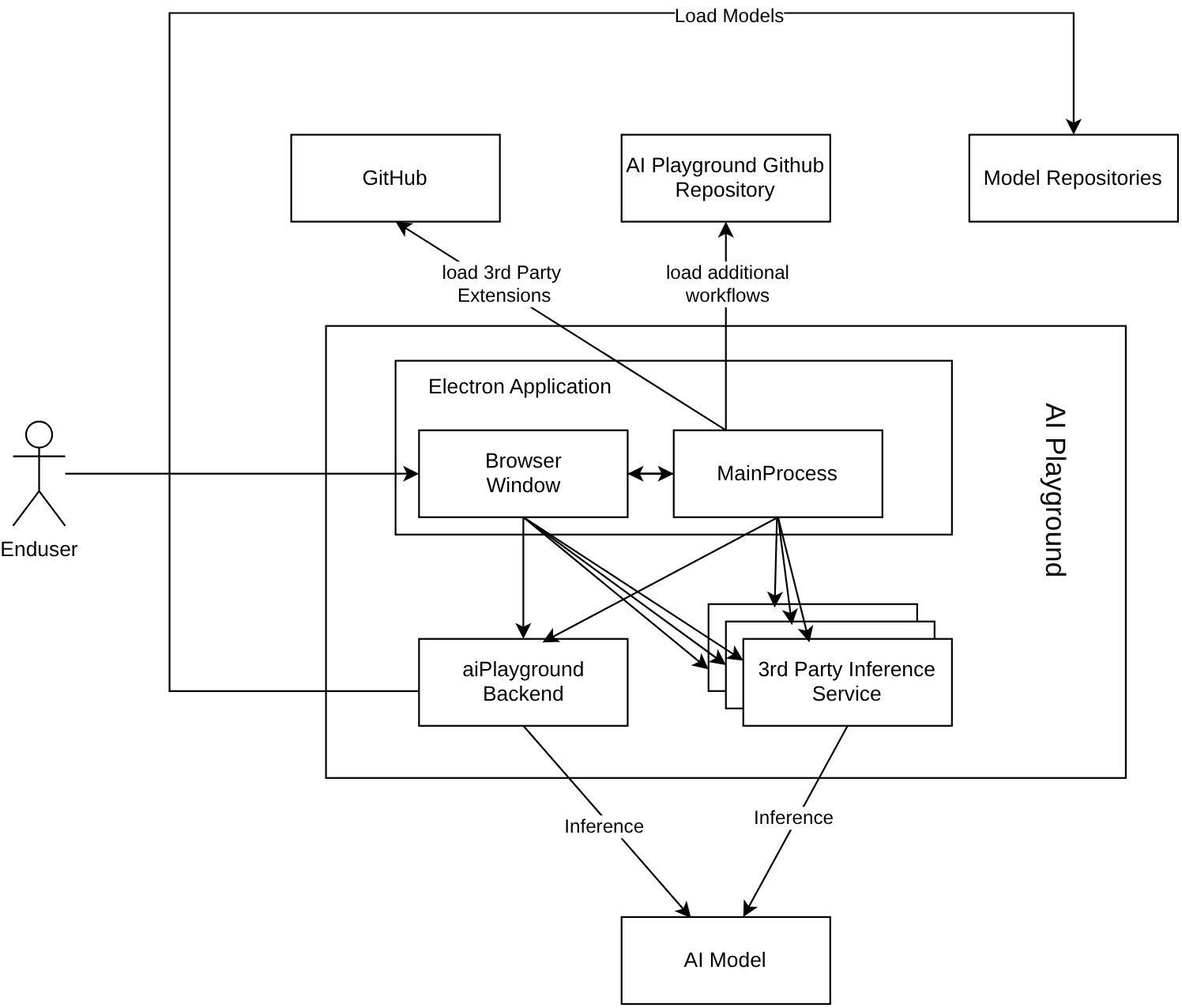
The window is Vue in Electron. It cannot spawn processes or touch the filesystem, so the main process starts each backend as a long-lived subprocess and the window calls them over HTTP. Each backend is its own uv-managed Python environment:
- Images and video: ComfyUI on PyTorch, pinned to
torch>=2.13.0,<2.14with anxpuvariant andtriton-xpu, so diffusion runs on the Arc GPU through PyTorch's XPU device. Presets include SD 1.5, SDXL, Flux.1 Schnell and Kontext, Flux.2 Klein, Z-Image, Wan 2.1/2.2 and LTX. This is the "PyTorch-powered" half of the post. - Language models: two engines. llama.cpp, pinned to build
b7278, downloaded as thewin-vulkan-x64orubuntu-vulkan-x64binary, so GGUF models run on the GPU through Vulkan rather than SYCL. And OpenVINO Model Server, which is also the route to the NPU. - Speech: Whisper and Kokoro through OpenVINO, Qwen3-TTS in its own backend.
One correction to a common description: IPEX-LLM is gone. service/config.py keeps a one-line obituary, "was part of old ipexllm inference backend". If you remember AI Playground as an IPEX app, that was an earlier version.
Every Python backend binds to 127.0.0.1 and requires an X-AIPG-Auth header matching a token the main process generates at each launch and hands over in an environment variable (backend_shared/aipg_loopback_auth.py). The comment there explains why: on a shared machine, loopback is reachable by every local user. Requests from a non-loopback address get a 403; a wrong token gets a 401 through hmac.compare_digest. Home Agent inherits this.
Home Agent: a mailbox, not a server
Home Agent is a fourth Python service, home-agent/, about 3,900 lines including a 785-line self-contained HTML chat page (measured, wc -l). It is a Flask app on 127.0.0.1:58000 with three channel modules behind one protocol, channels/base.py: Telegram, Slack and "LAN chat". A Discord channel appears in the type definitions and is commented out in the registry ("follow-up PR").
The important design choice is who connects to whom.
Telegram uses long polling. telegram.py builds a python-telegram-bot Application, calls delete_webhook, and then updater.start_polling(). The PC asks Telegram's API for new updates and holds the request open until there are some. Nothing on the internet connects to the PC, so there is no port to forward, no tunnel and no dynamic DNS.
Slack uses Socket Mode. slack.py hands an app-level token to AsyncSocketModeHandler, which opens a WebSocket from the PC to Slack, and Slack pushes events down it. Same property: outbound only. The setup screen generates a Slack app manifest with socket_mode_enabled: true and eight bot scopes: chat:write, commands, files:read, files:write, im:history, im:read, im:write and users:read.
LAN chat is the exception. local_web.py starts a ThreadingHTTPServer on port 8765 by default, bound to 127.0.0.1 unless you tick Allow LAN, in which case it binds 0.0.0.0 and anyone on your network can load the page. It is the only channel with an inbound socket, and the only one where nothing touches a third party.
I looked for an Intel relay, because "control your PC from your phone" products usually have one. There isn't one. No Intel host appears in the Home Agent code, Python or TypeScript. The only remote endpoints are Telegram's and Slack's APIs; besides the bot loops, the Electron side calls Telegram's getMe and Slack's auth.test to validate tokens during setup, and sends the test message.
Inbound messages do not go straight to a model. Each channel's handler checks the sender, then appends a small dictionary to an in-memory list: {"text": ..., "chat_id": ...}, plus base64 images, audio or documents if you sent some. That is the whole job of the Python side on the way in. The Electron window then polls GET /channel/<kind>/poll every 2000 ms (POLL_INTERVAL_MS in WebUI/src/assets/js/store/homeAgent.ts), drains the list, and runs the turn itself, with the same chat engine and tools the desktop app uses. Replies go back the other way: the window calls POST /channel/<kind>/send/<action> with an action such as reply, update, photo, video, voice or keyboard, and the channel module turns it into a Telegram or Slack API call. Streaming text arrives on Telegram through sendMessageDraft and on Slack through chat.update, so the reply grows in place on the phone.
The trace below walks one message through those hops for each channel, from you and from someone else.
Two consequences follow from the mailbox design. The PC must be on, awake and running AI Playground; the Users Guide says so. And messages that arrive while the app is closed wait at Telegram or Slack and are delivered when it starts, which is convenient and, as we'll see, has one sharp edge.
Which model answers
The turn runs under a dedicated preset, modes/base/presets/home-agent-chat.json. Its preferred models are unsloth/Qwen3.5-9B-GGUF/Qwen3.5-9B-Q4_K_M.gguf on llama.cpp and OpenVINO/Qwen3-8B-int4-cw-ov on OpenVINO, with a 32,768-token context, at most 2,047 new tokens per reply and temperature 0.7. requiresToolCalling and toolsEnabledByDefault are both true, and RAG is on. The system prompt tells the model it is "the user's remote AI assistant accessible over a chat tool like e.g. Telegram" and to be concise "because replies are read on a phone".
The preset only lists local backends, and the self-configuration tool's schema restricts backend to llamaCPP or openVINO. AI Playground has a Hybrid Cloud mode for ChatGPT, Claude, Gemini and Grok, but the Home Agent cannot be talked into using it. Inference stays on the PC.
Images run through ComfyUI on the same GPU. One comment in llm_proxy.py shows what sharing one GPU looks like in practice: an interrupted LLM stream after a tool call "is expected when the app stops llama.cpp to free VRAM for image generation". The language model is unloaded so the diffusion model fits, which is why the README sets a higher bar for Home Agent than for the app: 32GB of system memory on Core Ultra laptops, or 16GB of VRAM on a discrete GPU (reported).
Intel publishes no latency or throughput figures for Home Agent. The one speed number in the repository is a README screenshot of an agentic chat in the desktop app: Qwen3.5-9B Q4_K_M on an "Intel(R) Arc(TM) Pro B60 Graphics" at 39.54 tokens per second (reported, from Intel's screenshot; I have no Arc hardware and did not re-run it). A phone round trip adds the 2000 ms poll and two trips through the chat service on top of whatever the GPU takes.
What leaves the machine
"The compute stays local" is true. The data does not, for two of the three channels.
On Telegram and Slack, the conversation itself lives on the chat company's servers: your prompt going in, every streamed reply coming out, every photo you send for editing, every generated image or video uploaded back with send_photo, send_video or Slack's files_upload_v2, every voice note, and every document you send to the knowledge base. A Telegram bot chat is an ordinary cloud chat, not an end-to-end encrypted secret chat. So the privacy statement is: the weights and the GPU are yours; the transcript is Telegram's or Slack's. For many uses that is fine. It is not "offline", which is the word the README uses for the app as a whole.
LAN chat keeps everything on your network, but it is plain HTTP. The password you type and the session cookie it mints cross your Wi-Fi in clear text. The cookie is HttpOnly; SameSite=Lax and valid for 7 days, and all users share one password.
Bot tokens are stored by the Electron main process through safeStorage, which uses DPAPI on Windows and the desktop keyring on Linux. On a Linux desktop with no Secret Service running, linuxPasswordStore.ts forces Chromium's --password-store=basic, a backend that encrypts with a fixed built-in key: obfuscation, not protection (reasoned from Chromium's design, not tested here). The chat id and Slack user id are stored in plain text as "public fields". In logs, every channel contributes a token-shaped regular expression, and a logging filter replaces matches with <TOKEN_REDACTED>.
Who may talk to it
Each channel has exactly one key.
- Telegram: one chat id. In setup you message your new bot and press Detect; the app reads the chat id of whoever messaged and stores it as the allow-list. Every handler then compares
chat_idagainst it and drops anything else. It is a chat, not a person: if the configured id belonged to a group, every member of the group would pass (reasoned from the code; the setup flow assumes a private chat). - Slack: one user id, and only direct messages count.
on_messageignores any event whosechannel_typeis notim, then compares the sender's user id. - LAN chat: one shared password.
/api/logincompares it withsecrets.compare_digest, and after 5 wrong guesses from an address that address is locked out for 30 seconds, doubling per further failure up to 30 minutes. At most 64 sessions are live at once, and a request body over 64 MB is refused before it is read.
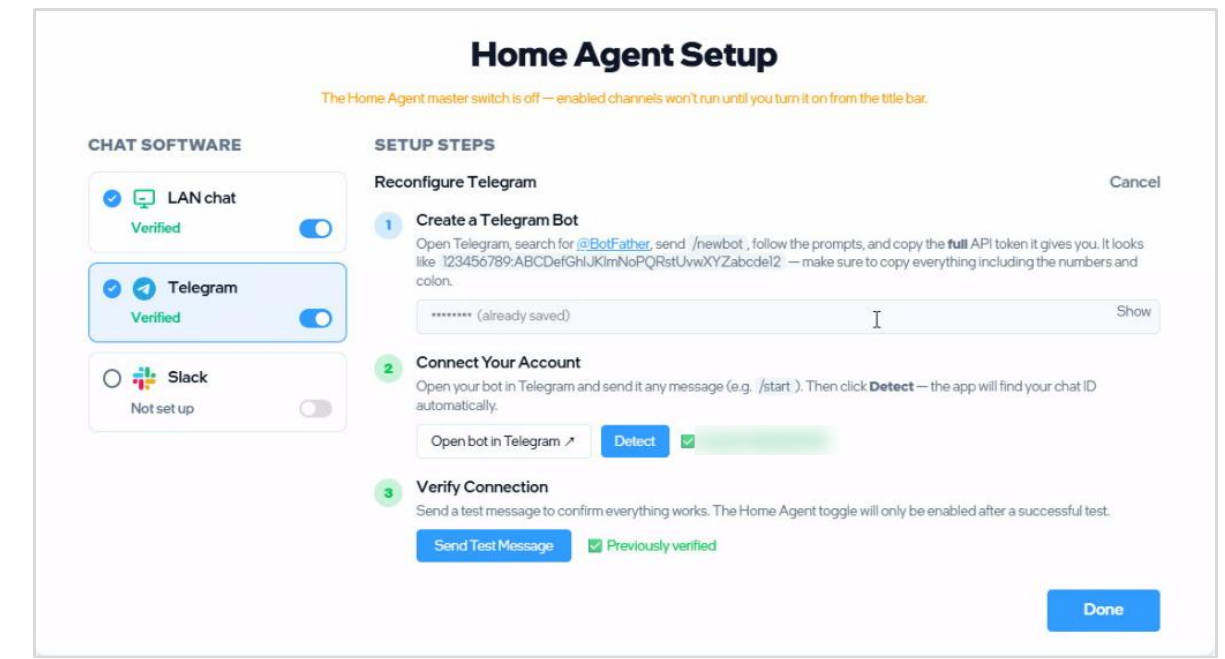
I wanted to see the allow-list work rather than read it, so I ran the real Telegram channel offline. The harness replaces python-telegram-bot's Application.builder() with a fake that records handlers and returns canned updates, starts TelegramChannel with a made-up token and an allow-list of chat 1001, and calls the registered handlers directly. No token, no network. Results (measured, shared 4-core cloud VM, CPU only):
- The channel registered 15 handlers and an 8-entry command menu:
help,chat,imggen,cancel,new,history,load,reset. - A text message from chat 666 was logged as "Ignoring message from unauthorized chat_id: 666" and never queued. The same text from chat 1001 was queued as
{'text': 'draw a cat', 'chat_id': '1001'}. - With no allow-list yet (detection mode), a message from chat 4242 was not queued, and 4242 became the detected identity.
The gate holds. The fourth result is the sharp edge. Before it starts polling, _run_bot reads up to 100 pending updates and stores the chat id of the first one as the last-seen identity, writing it to home-agent/.chat_id, without the allow-list check that every live handler applies. In my run, with the allow-list set to 1001 and a stranger's message from 666 waiting at startup, get_identity() returned 666 and .chat_id on disk read 666 (measured). Replies still went to 1001; the stranger got nothing. But the setup screen's Detect asks the backend for exactly that identity and, if one is there, uses it immediately as the new allow-list. Slack has the same pattern: _maybe_remember_user saves the sender before the allow-list comparison.
A Telegram bot's @username is public, so anyone who finds it can message it. If someone does that while your PC is off, and you later press Detect again, the app can propose their chat id. Send Test Message would then deliver the test to them, not you, and you would see nothing arrive. That last step is the real check, and it is worth treating as one: after Detect, confirm the test message reached your phone. The fix in the code is small, applying _record_authorized_chat_id's rule in the pre-populate loop too (reasoned; I have not filed it).
What one message can do
Once a message passes the gate, it is a prompt to an agent with tools, and the tools are the point of the product. WebUI/src/assets/js/tools/tools.ts lists them. For the Home Agent preset, built-in tools and MCP tools both default to on, and per-tool switches default to on except captureScreenshot, the one name in OPT_IN_TOOLS.
Read the board as a list of capabilities that belong to whoever holds the chat. With defaults, a message can start image and video generation, edit a photo, search DuckDuckGo and read or click through web pages in a background browser, speak and transcribe, add a document to the knowledge base, and call any MCP server that is running. The package's mcp.json ships one server, a date-and-time tool. The developer config adds Blender and Chrome DevTools, and the README's showcase is exactly that: a chat calling Blender's execute_blender_code.
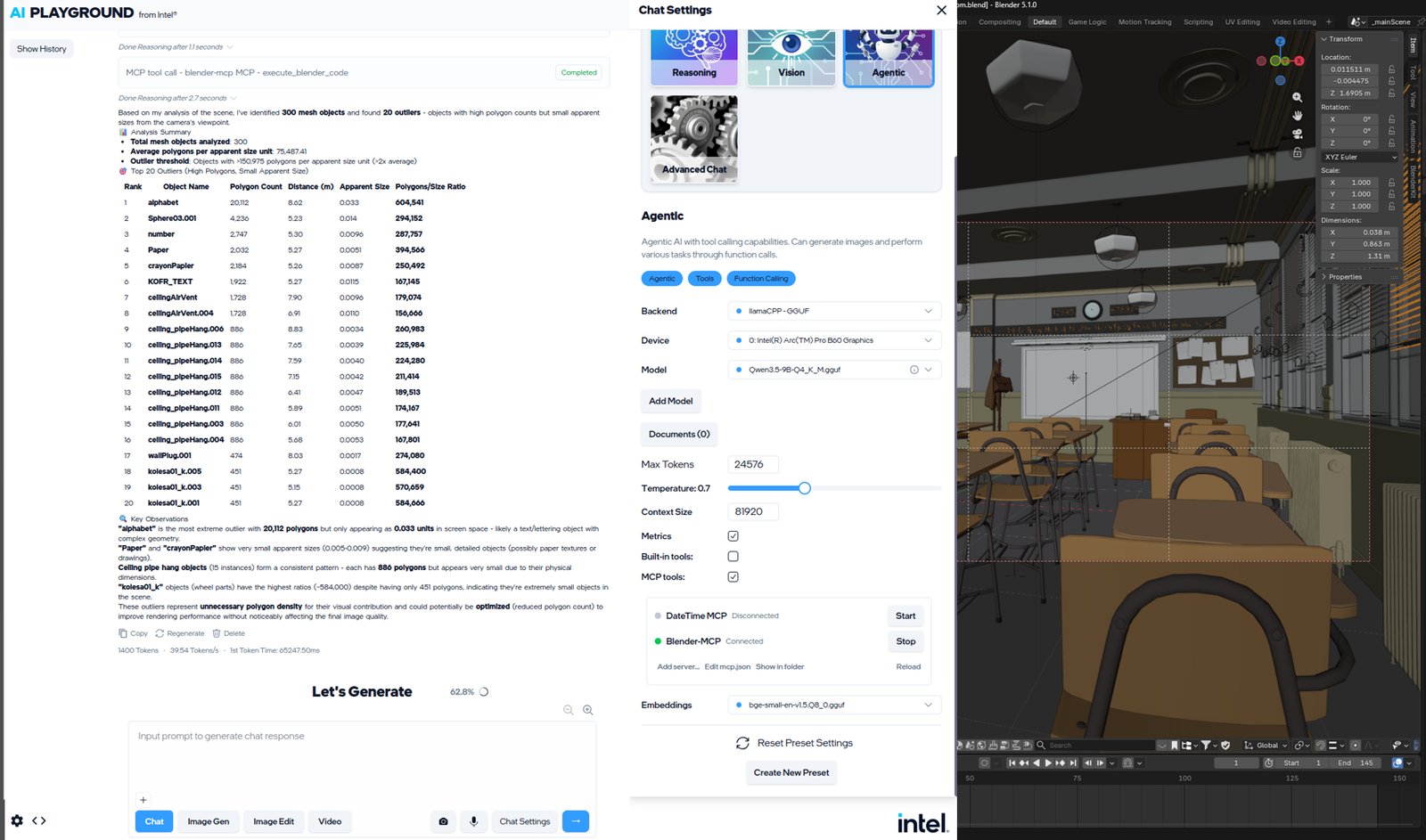
Two kinds of action ask first. configureHomeAgent, which can change the model, device, temperature, context size, system prompt, whether tools and MCP are enabled, and clear RAG documents, always shows a Confirm/Cancel card. So does downloading a model. The preset's system prompt even tells the model not to ask in prose, because "the app automatically shows the user a confirmation prompt". When a remote turn is in flight, the prompt goes to the same chat as inline buttons, a typed reply counts too (parseConfirmationReply accepts "yes", "ok", "go ahead", a thumbs-up and others), and the request is cancelled after 2 minutes. It is also mirrored as a card on the desktop.
This is the right gate for the wrong threat. It protects against the model changing its own settings because a web page told it to, and that matters, since browseWeb puts arbitrary page text into the context. It does not protect against a person in the chat, because the confirmation goes to that same person. And it does not cover any of the actions on the board marked "runs".
The threat model, written down
Here is how I would state it, defensively, from the code.
Someone gets into the chat. A stolen phone, a hijacked Telegram account, a Slack admin who can sign in as you, or a Telegram chat that turns out to be a group. They can do everything you can: generate anything the installed models will produce on your GPU, read your RAG documents through questions, browse the web from your IP address, approve their own settings changes, and drive any MCP server you have running. With the screenshot tool enabled and a window bound, they get pictures of that window, because toolMedia.ts forwards captureScreenshot output to the chat like any generated image. None of this is a bug. It is what remote access means. The code's whole security model is the one id, so that id deserves the care you would give an SSH key.
Someone steals the bot token. A Telegram bot token lets its holder call getUpdates and sendMessage as the bot. They cannot pass the chat-id check, because that check runs on your PC, but they can read messages that arrive while they are polling, and two pollers on one token fight over updates. Revoke it in BotFather if you suspect it. On Linux without a keyring, assume the token file is readable by anything running as you.
Prompt injection through content. Text from a web page, a PDF you added, or a photo's visible text reaches the model. The settings gate covers self-reconfiguration. Nothing in the code gates a tool call that came from injected text: an injected instruction could, in principle, ask for a web request that carries something from your RAG documents in its URL, or call an MCP tool. Whether a 9B model follows such an instruction is an empirical question I did not test. The exposure grows with each tool you turn on.
Someone on your Wi-Fi. Only with LAN chat and Allow LAN on. The password is throttled well, but it travels in clear text, and anyone who sniffs it or the cookie is in for a week.
Locking it down
All of these are settings or habits, not patches:
- Use Telegram with a private chat, or Slack, which is per-user. After Detect, confirm that Send Test Message arrived on your phone before you enable the channel.
- Give the bot an unguessable
@usernameand never add it to a group. - In Settings, Built-in tools, for the Home Agent preset: turn off what you will not use from a phone. Browse the web is the big one, both for injection and because it browses from your home IP.
- Keep MCP tools off for the Home Agent preset unless you need them. Tool settings are stored per preset, so this does not touch the desktop Assistant, and nothing asks before an MCP call. An MCP server that can run code, such as Blender's, should not be reachable from a chat.
- Leave Capture screenshot off. It is off by default for a reason.
- Prefer LAN chat on a network you trust, and leave Allow LAN off unless you need it; when it is on, use a long password.
- On Linux, run a keyring (GNOME Keyring or KWallet) so the tokens are actually encrypted.
- Turn the Home Agent master switch off when you are not away. The PC only answers while the app runs and the switch is on.
What holds
The post's claim holds as stated: generation is launched from a phone and runs on the PC's own GPU through PyTorch, and nothing in the path is an Intel service. The engineering under it is careful. Outbound-only transports, an authenticated loopback between processes, encrypted tokens, redacted logs, throttled LAN logins, a 25 MB cap on inbound Telegram documents, and a human confirmation for the agent's self-reconfiguration. The repository's own tests for the LAN channel pass: 28 of 28 in 6.18 seconds (measured, pytest home-agent/tests, Python 3.13 rather than the pinned 3.12, CPU).
What the post leaves out is the other half of "local". The model is local; the conversation is not, unless you use LAN chat. And an agent with tools that answers a chat gives that chat its tools. The allow-list is a single id, the one place it can be pre-filled wrongly is the identity detection, and the confirmations protect against the model rather than the person. If you set it up with those three facts in mind, it is a reasonable way to make your home GPU useful from a phone.
Related reading on the site: Xiryn is another personal agent you drive from Telegram, with a vault and a remote desktop, and a pairing code where Home Agent has Detect. Octop is a self-hosted agent workspace whose isolation is opt-in, much as Home Agent's tool reach is opt-out. BrowserSkill is about where to put the consent switch when an agent borrows something of yours. And QuantUI-rs writes the quantized ComfyUI checkpoints a pipeline like this one loads.
How I checked
I cloned intel/AI-Playground (git clone --depth 1) at bdda6cc (1 October 2026) and read home-agent/ in full: web_api.py, llm_proxy.py, and channels/ (base.py, types.py, commands.py, actions.py, registry.py, telegram.py, slack.py, local_web.py). On the Electron side I read WebUI/electron/subprocesses/homeAgentBackendService.ts, linuxPasswordStore.ts, mcpServers.ts, llamaCppBackendService.ts and comfyUIBackendService.ts, and in the renderer store/homeAgent.ts, store/openAiCompatibleChat.ts, store/textInference.ts, store/confirmationReply.ts, store/useTelegramSetup.ts, tools/tools.ts, tools/toolMedia.ts, tools/configureHomeAgent.ts and lib/builtinToolEnablement.ts. Also backend_shared/aipg_loopback_auth.py, comfyui-deps/pyproject-flexible-venv.toml, the preset JSON, both mcp.json files, the README, the arc42 page and the Users Guide PDF. Line counts are wc -l.
What I ran, all offline on a shared 4-core cloud VM with no GPU: the repository's home-agent/tests with pytest (28 passed), and a harness of my own that drives the real TelegramChannel handlers through a fake python-telegram-bot Application, with no token and no network. What I did not run: the Electron app, any model, ComfyUI, or a real Telegram or Slack bot. Everything about the renderer's dispatcher, tool enablement and confirmations is read from the code, not observed. The speed figure is Intel's. The X post's thread and replies held nothing beyond the video link.