2026-10-06 · 20 min · agents · security · harness
Why read this
Hightop 30%Reads Octop's source to show accounts are split only by an API row check: by default agents, terminal and desktop share the host user, and the jail is opt-in.
- Original, source-checked analysis
- A guide you can follow today
- Open code or weights
Security & safetyAPI onlyPractitioner tool
How this was scored
- Is it new?
- 1 of 3: An incremental tweak
- Can I trust it?
- 3 of 3: Reproduces the headline result, or shows from primary files it is wrong
- Can I run it?
- 2 of 3: Open code or weights with real limits
- Will I understand it?
- 2 of 3: Mechanism from first principles with figures
- Can I act on it?
- 3 of 3: A decision guide a practitioner can follow today
- Will it last?
- 1 of 3: Relevant for months
- Does it affect many?
- 1 of 3: A specialist community
- Only here?
- 3 of 3: The only place this analysis exists
Score 72 of 100, ranked 67 of 445 rated articles. Each question is answered 0–3 by hand, and a 3 is rare. How articles are scored
Tencent's announcement of Octop is a list of things people want from a home or team AI server. Everyone gets their own login. Each person can create several agents, each with its own workspace. Models, storage, memory and plugins can be swapped. Every agent has a browser, a terminal and a remote desktop. It hands coding work to Claude Code, Codex, Cursor, OpenCode or CodeBuddy, it sits in your Telegram and Discord group chats, and it starts with octop run. One sentence in the post is a security claim: "Nothing you say or save shows up in another account."
That is the sentence I wanted to check. On a multi-user agent server the agents run shell commands, drive a browser and type into a desktop for several people on one machine, so whether one account can see another depends less on the login screen than on what a shell command can reach. I cloned TencentCloud/Octop at 4b17f1c (2026-10-06) and its agent runtime, octop-harness, at 14a1cd9 (2026-10-03). I did not run either.
- license
- MIT
- branch
- main
- tests
- 750 files
- source
- 17.3 MB
- commit date
- 2026-10-06
by size of tracked source at this commit, file counts in brackets; docs, data and vendored trees excluded
Read at 4b17f1c (2026-10-06), version 1.0.2b6. src/octop is 656 Python files and 144,008 lines; the agent runtime lives in a second repository, octop-harness, read at 14a1cd9.
local clone, 2026-10-06 at 4b17f1c — branch, commit, commitDate, fileCount, hasTests, languages, license, licenseFile, shallow, testFileCount
shallow clone: counts describe the pinned tree, not the history
One process, many accounts
Octop is one Python process. The architecture decision record is short and clear about it: "Everything runs in a single Python process served by uvicorn. There is no external queue (Redis, RabbitMQ, Celery), no separate worker process" (docs/adr/001-single-process-model.md). FastAPI serves the dashboard, the HTTP and WebSocket API and the CLI's channel. IM bridges, cron and every agent runtime live in the same event loop. State lives in a control-plane database (SQLite by default, PostgreSQL optional) and under ~/.octop/:
~/.octop/
├── config.json
├── octop.db                 # SQLite: users, agents, providers, channels, cron, threads
├── secrets/                 # JWT secret, channel tokens
├── agents/<agent_id>/       # per-agent workspace (SOUL.md, skills, memory.sqlite, …)
├── browser-profiles/        # Chromium profiles, one per user
├── plugins/                 # third-party plugins, loaded into this process
└── security/tool_guard/     # shell command rules
octop run is the composition root. launch.py builds an OctopServer, which opens the database, runs migrations, seeds plugins, builds the agent registry, starts the gateway and the scheduler, and only then hands a FastAPI app to uvicorn. On Linux it also schedules a background task that tries to install bubblewrap. That task matters later.
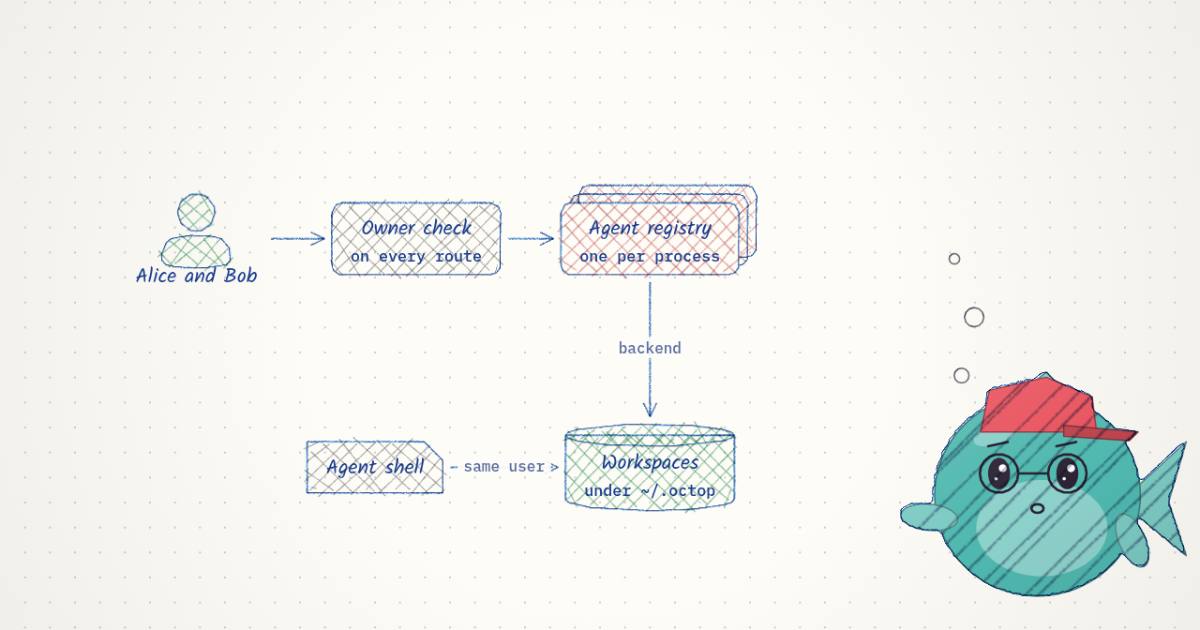
The consequence of one process is that every account shares one operating-system user. The server, every agent's tools, every Terminal session and every coding agent it spawns run as whoever ran octop run. Separation between accounts therefore has to come from somewhere other than Unix permissions. Octop puts it in two places: a check on every API route, and, if you configure it, a jail around the commands an agent runs.
Accounts: a row check on every route
Every request carries a JWT. It resolves to a users row. Every agent row has a user_id. The routes that touch an agent load the row and compare. This is the whole check (src/octop/api/common/agent.py:14-36):
def user_owns_agent(row: Any, user: Any) -> bool:
    return row.user_id is not None and row.user_id == user.id


def assert_agent_owner(row: Any, user: Any) -> None:
    """Raise if the user may not mutate this agent row (admin bypasses)."""
    if user.is_admin:
        return
    if row.user_id is None or row.user_id != user.id:
        raise OctopError(ErrorCode.FORBIDDEN, "agent not owned by user")


def _user_may_access(row: Any, user: Any) -> bool:
    if user.is_admin:
        return True
    if row.user_id is not None and row.user_id == user.id:
        return True
    return bool(agent_is_shared(row))
Three facts follow from these lines. An admin passes every check, and can also act as_user for another account (lines 51-58). A shared agent, one whose owner set is_shared, is readable by every account: its workspace read routes go through _user_may_access (api/routers/workspace.py:166), while writes use the owner-only path. And chat history is separated a second time by its key: a dashboard thread is keyed <agent_id>:dashboard:<user_id>:dm, so Bob talking to Alice's shared agent sees his own threads, not hers.
The architecture document is candid that this is the design: "Agent ownership is enforced at the row level (agents.user_id matched against the caller; admin bypass allowed) — there is no longer a separate per-user AgentManager" (docs/architecture.md). One registry serves every account's agents.
So the post's sentence is true at this layer, with two qualifications it does not state: the admin sees everything, and a shared agent's workspace and memory are shared by design. The question is what sits underneath.
Workspaces: what the agent's shell can reach
An agent's workspace is a directory, by default ~/.octop/agents/<agent_id>/. Its persona file, skills, uploaded files and, with the SQLite control plane, its memory database (memory.sqlite, namespace agent_<agent_id>, infra/agents/memory/backend.py:76) live there. Octop does not read or write those files directly. It goes through a backend object from octop-harness, and the backend is also what runs the agent's shell commands.
When an agent has no backend configured, the harness uses this one (octop_harness/backends/__init__.py:78-82):
DEFAULT_BACKEND_SPEC: dict[str, Any] = {
    "type": "local_shell",
    "root_dir": _HOST_ROOT,  # "/"
    "virtual_mode": True,
}
virtual_mode makes the file tools join paths under root_dir and refuse paths that escape it. With root_dir set to /, that bounds nothing. local_shell runs commands as a subprocess of the server. Octop's own code says plainly what that means, in the helper the dashboard calls before it labels anything a sandbox (src/octop/infra/utils/host_dirs.py:83-93):
def host_jail_enforced() -> bool:
    """True when a non-root ``root_dir`` gets real OS-level confinement.

    Only Linux + bubblewrap qualifies (see :mod:`octop.infra.utils.bwrap`).
    Elsewhere ``root_dir`` bounds the agent's *tool* paths, but the agent
    process still runs with the server user's own filesystem access — so the
    UI must not describe it as a sandbox.
    """
So an agent created with no policy is a shell running as the server's OS user, which owns ~/.octop: every account's workspaces, the control-plane database and the browser profiles. Octop's API will not show Bob Alice's files. A command Bob's agent runs is not stopped by the API at all. What stands between it and Alice's directory is the bundled tool guard: 20 regex rules over bash and execute arguments, 7 rated CRITICAL and 13 HIGH (measured, octop_harness/security/tool_guard/rules/dangerous_shell_commands.yaml), whose own header describes them as patterns that flag a command for review. A pattern list decides what to ask a human about. It is not a boundary, and it does not try to be one.
Turning the jail on
There are two real boundaries in the code, and an admin has to choose either one.
A scoped root_dir with bubblewrap. An admin can set a per-user policy, workspace_root_dir, in the user-management page. Agents that user creates then default to a local backend rooted at that directory, with workspaces under <root>/.octop/workspaces/<agent_id>. Saving a backend outside the allowed root is refused (infra/users/resource_policy.py:160-169). On Linux, with bwrap on the path, the harness swaps in BubbledLocalShellBackend, and every execute runs inside this (octop_harness/backends/bwrap_shell.py:86-131, trimmed):
argv: list[str] = [
    bwrap,
    "--die-with-parent",
    "--new-session",
    "--unshare-pid",
    "--unshare-ipc",
    "--unshare-uts",
    "--bind", str(root), "/",          # the user's root_dir becomes /
]
for host_path in ("/usr", "/bin", "/lib", "/lib64"):
    argv.extend(["--ro-bind", host_path, host_path])
# plus --ro-bind-try for resolv.conf, passwd, group, nsswitch.conf
argv.extend(["--dev", "/dev", "--proc", "/proc", "--tmpfs", "/tmp",
             "--chdir", work_dir, "--", "/bin/sh", "-c", command])
That is a mount-namespace jail: the agent's / is the user's directory, system binaries are read-only, and ~/.octop simply is not in the tree. It shares the network namespace with the host (there is no --unshare-net), and the module docstring is precise about its reach: "File tools still use deepagents virtual_mode path join; only execute is process-isolated." Two conditions turn it off silently. On anything other than Linux, or without bwrap, the harness falls back to plain local_shell (bwrap.py:3-6). And when Octop itself runs in a container, the policy is ignored entirely (resource_policy.py:57-61):
def effective_workspace_root_dir(raw: Any) -> str | None:
    """Stored workspace-root policy, ignored when Octop runs in a container."""
    if running_in_container():
        return None
    return workspace_root_dir_of(raw)
That is defensible, because the container is then the outer wall, but notice which wall: it surrounds all the accounts together, not each one.
A Docker sandbox per agent. The harness's docker backend keeps one long-lived container per agent, named octop_sandbox_agent_<agent_id> by default (sandbox_scope may also be user, one container shared by a person's agents, or fixed). The container starts from python:3.12-slim running sleep infinity, and commands go in through exec_run. The defaults are conservative (octop_harness/backends/docker_sandbox.py:454-484, trimmed):
run_kwargs: dict[str, Any] = {
    "image": self._image,                 # python:3.12-slim
    "command": ["sleep", "infinity"],
    "working_dir": self._workspace_root,
    "labels": labels,
}
if self._volumes:
    run_kwargs["volumes"] = self._volumes   # only what you configure
if not self._allow_network:
    run_kwargs["network_mode"] = "none"     # allow_network defaults to False
if self._pids_limit is not None:
    run_kwargs["pids_limit"] = self._pids_limit   # 256 by default
No host tree is mounted unless you add a volume, and the network is off unless you allow it. It is the strongest per-agent wall in the system, and the one most people will skip, because their agent then cannot see their files.
The browser, the terminal and the desktop
In the dashboard each of these is a page you open with an agent selected. In the code they have three different scopes, and none is per agent the way the workspace is.
The terminal is a host shell. WS /api/agents/<agent_id>/terminal/ws checks the terminal permission and agent ownership (api/routers/terminal.py:525, :552), then spawns your login shell in a PTY with the agent's workspace as its working directory (terminal.py:310-318):
proc = subprocess.Popen(
    cmd,                       # [$SHELL, "-i"]
    stdin=slave_fd,
    stdout=slave_fd,
    stderr=slave_fd,
    close_fds=True,
    preexec_fn=posix_compat.setsid,
    env=env,
    cwd=cwd,                   # the agent's workspace_dir
)
It does not go through the agent's backend. An agent in a Docker sandbox or a bubblewrap jail still gets a Terminal tab that opens on the host, as the server's user, starting in the workspace directory. The cwd is a convenience, not a confinement. The process-wide cap is 10 live shells (measured, _MAX_SESSIONS). The terminal permission is in the "control" group, which new users do not get by default; only the "settings" group is pre-checked (infra/users/permissions.py). In practice, granting terminal to an account is granting it a shell on the machine.
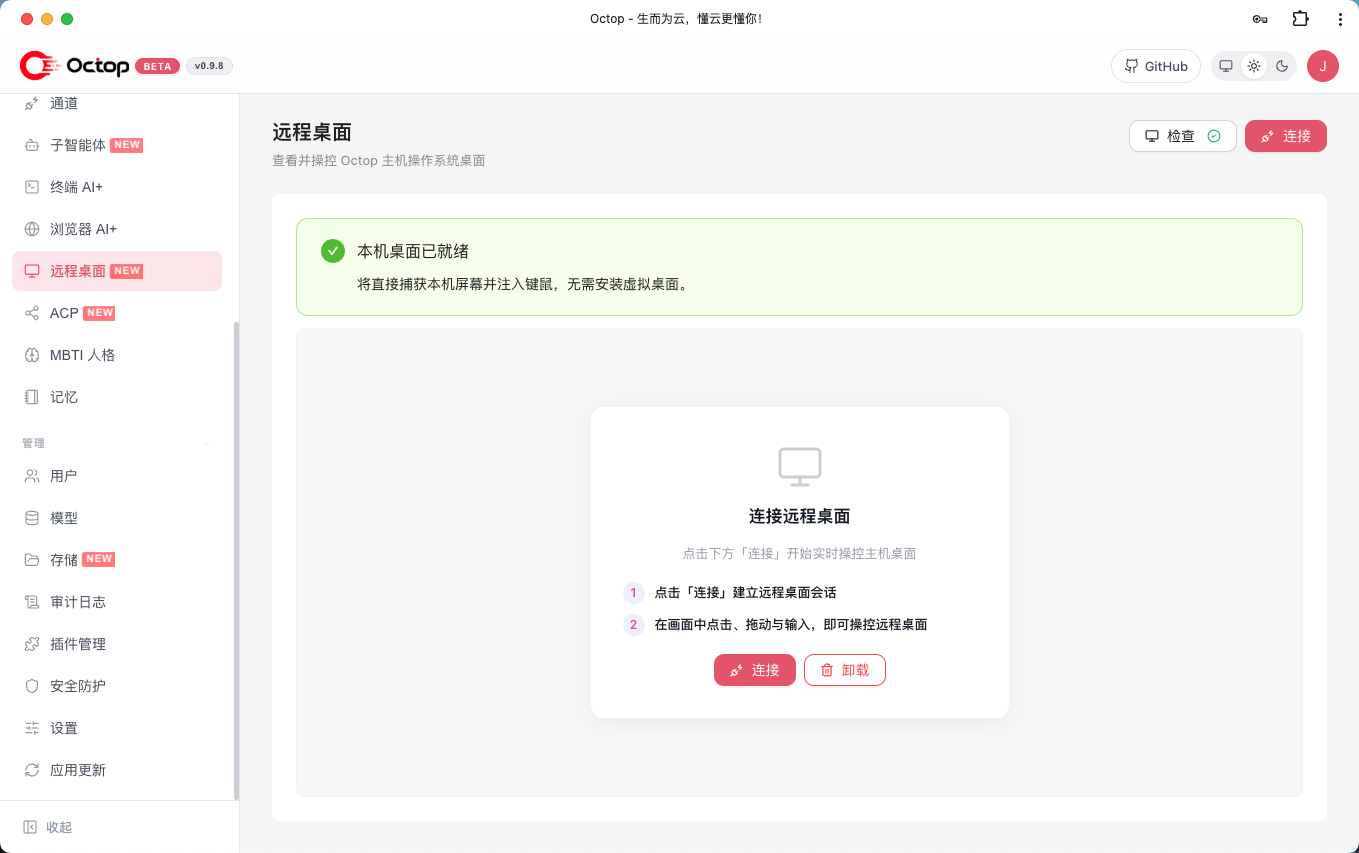
The browser is per user. Octop drives Chromium over CDP through its octop-browser library, with persistent profiles. The profile name comes from the user, not the agent (infra/utils/browser_media.py:34-41): user-<user_id>. All of a person's agents share one cookie jar. For chat bridges it is the agent owner's, and the code says so in a docstring worth quoting in full (infra/gateway/process/message_keys.py:86-91): "External IM subject ids belong to a platform-specific identity domain and may also be numeric, so those sessions always belong to the agent owner. Browser cookies follow this same id (user-<id>): IM members of one agent share the owner's profile, they are not isolated from each other." If you put an agent in a Discord group, everyone in the group drives it with your logins.
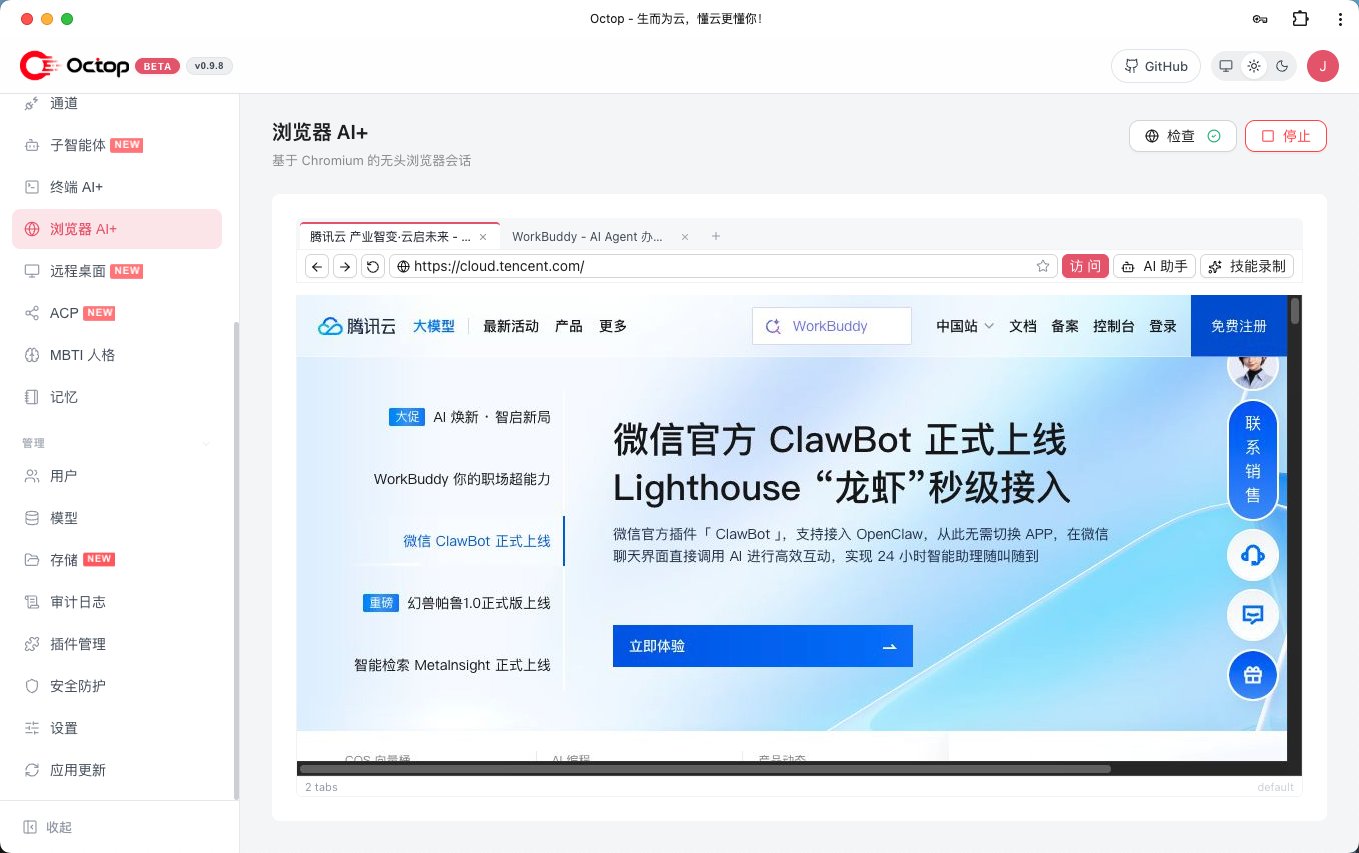
The desktop is the host's. Remote Desktop streams one screen. On a Linux server with no display, an admin installs a virtual desktop: TigerVNC's Xvnc on display :99, 1920x1080, VNC on port 5900 bound to localhost, with openbox and parts of XFCE (infra/desktop/scripts/linux/v1.0/start.sh:31-32). On a machine with a real session it captures that screen directly. Frames are captured with mss, encoded as JPEG (quality 80 and 10 fps by default, clamped to 1-30 fps), sent over a WebSocket, and input goes back through xdotool (api/routers/desktop/stream.py). There is one display and at most 3 concurrent viewers (measured, infra/desktop/session.py:17). When the virtual display is up, the browser launches headed onto it so you can watch the agent work (api/routers/browser/harness.py:140-144). That puts every account's agent browser windows on the same screen, visible to anyone holding the desktop permission.
Handing off to Claude Code, Codex and the rest
The hand-off is the Agent Client Protocol, JSON-RPC over stdio, in two directions. Inbound, octop acp --agent main makes an Octop agent the agent behind Zed or another ACP client. Outbound, an agent with the acp_runner tool enabled can start a session with an external coding agent. Seven runners are built in (measured): opencode, codebuddy, claude_code (npx -y @zed-industries/claude-agent-acp), codex (npx -y @zed-industries/codex-acp), kimi_code, cursor_cli and pi. Five come from octop-harness, one of which (qwen_code) Octop hides, and Octop adds three (infra/agents/settings/acp.py:17-38). Runner cards are stored once per user, under the settings key acp_runners:user:<id>.
Starting a session is a subprocess spawn (octop_harness/acp/service.py:224-235, trimmed):
spawn_env = overlay_env(os.environ, load_dotenv_path(os.path.join(cwd, ".env")), protect=True)
spawn_env = overlay_env(spawn_env, runner_config.env, protect=False)
conn, process = await exit_stack.enter_async_context(
    spawn_agent_process(
        client,
        runner_config.command,
        *runner_config.args,
        cwd=cwd,               # the agent's workspace unless the tool call names another
        env=spawn_env,
    ),
)
The coding agent runs as a child of the server, with the server's environment plus the workspace's .env, in the workspace directory. Like the Terminal, it does not go through the backend, so a jailed or containerised Octop agent hands its task to an unjailed one. What Octop controls is the permission flow. When the external agent asks for permission, the request is shown in chat and the user picks an option; before that, the adapter cancels requests whose command matches a short hard-block list of 4 patterns or whose paths resolve outside the working directory (acp/permissions.py:10-15, :191-206). That covers what the external agent asks about. What it does without asking is governed by its own settings, as it would be in your terminal. Each runner config also carries a trusted flag, true for every built-in; I found nothing in either repository that reads it (measured, by grep), so today it is a label.
That is the right shape for the feature: you already trust Claude Code on your machine, and Octop lets you call it from a chat. The hand-off inherits that trust, which is per machine, not per Octop account.
Chat bridges
Telegram, Discord and five Chinese platforms come in through octop-gateway, which turns a platform message into one InboundMessage for the same in-process processor the dashboard uses. A channel row belongs to one agent and one user. A bridge thread is keyed <agent_id>:<channel_kind>:<platform_session>:<dm|group> (message_keys.py:124-134), and every platform user maps to the agent's owner. The Discord bridge answers in every channel the bot can see unless you set allowlists (README). A group chat is a shared front door to one person's agent.
Swappable parts, and their scope
"Almost everything can be swapped" is accurate. What matters for isolation is the scope each swappable part lives at:
| Part | Scope | Where |
|---|---|---|
| Model providers (base URL, API key) | deployment | providers table; no user_id column; writes need the providers permission |
| Storage backends (local, Docker, OpenSandbox, PostgreSQL, S3, COS, OSS, OBS) | deployment, picked per agent | storage_backends table, referenced by name |
| Memory | per agent | memory.sqlite in the workspace, or a PostgreSQL schema on the control-plane DSN |
| Plugins | process | ~/.octop/plugins, loaded into the server; installing needs the plugins permission |
| ACP runners | per user | settings key acp_runners:user:<id> |
| IM channels | per agent | channels row with agent_id and user_id |
The provider row is the one I would want to know about before inviting a team. There is one table of keys for the whole deployment. Regular users can see the provider configuration, and in the version I read that view is not redacted the way the media-generation settings are (those report only whether a key is set). Treat every provider key as visible to every account on the deployment, and report anything sharper to the maintainers rather than reading it here. For a household sharing one OpenAI key that is fine. For a team where each person should pay for their own tokens, the schema has nowhere to put that. Per-user token quotas exist (token_quota policy); per-user keys do not.
Plugins are the other deployment-wide part: Python loaded into the server process, running with everything the server can touch, for every account. That is why installing one is a permission.
The isolation map
Alice owns an agent; Bob is a second account. For each thing Alice's agent owns or uses, the widget asks two questions: can Bob see it through Octop's API, and can a shell Bob controls reach it on disk. Toggle Bob's permissions, whether Alice shares her agent, and Bob's own backend.
planner. What can Bob, a second account on the same Octop, reach?| Alice's … | scope | Bob, through Octop's API | a shell Bob controls |
|---|---|---|---|
Chat threads threads table, key agent:dashboard:<user_id>:dm | per user | no · row check: agents.user_id must equal his id (agent.py:26-31) | yes · same OS user as the server, and the SQLite control-plane database is a file under ~/.octop (host_dirs.py:87-89) |
Workspace files ~/.octop/agents/<agent_id>/ | per agent | no · row check: agents.user_id must equal his id (agent.py:26-31) | yes · same OS user as the server, and her workspace is a file under ~/.octop (host_dirs.py:87-89) |
Memory namespace agent_<agent_id>; memory.sqlite in the workspace | per agent | no · row check: agents.user_id must equal his id (agent.py:26-31) | yes · same OS user as the server, and memory.sqlite is a file under ~/.octop (host_dirs.py:87-89) |
Browser profile profile user-<user_id>, shared by all her agents | per user | no · the profile name is derived from the caller's id (browser_media.py:34-41) | yes · same OS user as the server, and ~/.octop/browser-profiles is a file under ~/.octop (host_dirs.py:87-89) |
Coding-agent runners settings key acp_runners:user:<id> | per user | no · runner cards are stored per user (settings/acp.py:16) | yes · same OS user as the server, and the settings table is a file under ~/.octop (host_dirs.py:87-89) |
Model provider keys providers table, no user_id column | deployment | yes · one table for everyone; regular users can see the provider configuration, and it is not redacted | yes · same OS user as the server, and the providers table is a file under ~/.octop (host_dirs.py:87-89) |
Plugins ~/.octop/plugins, loaded into the server process | deployment | yes · loaded once for the whole process; installing needs the plugins permission | yes · same OS user as the server, and ~/.octop/plugins is a file under ~/.octop (host_dirs.py:87-89) |
Remote desktop one display: Xvnc :99 or the real screen | host | no · the desktop permission is not granted to new users (permissions.py) | n/a · not a file; the screen is reached through the desktop stream |
4b17f1c and octop-harness 14a1cd9, not from a run. The jail row assumes the admin pointed Bob's workspace_root_dir outside ~/.octop and that bwrap is installed; with Octop itself in Docker that policy is ignored. The shell column says what the operating system allows, not what any agent will do. Alice and planner are made up.The rows reduce to three observations.
- Through the API, the claim holds for a non-admin and an unshared agent. Threads, workspace, memory, browser profile and runner cards are all behind the row check. Provider keys, plugins and (with the permission) the desktop are deployment-wide by design.
- On disk, the default backend makes the OS user the only wall, and it is the same user for everyone. Every row that is a file under
~/.octopis within reach of a shell running as the server's user. - The jail and the container change that, but only for the agent's own commands. The Terminal and the coding-agent hand-off spawn on the host whatever backend the agent uses. Granting
terminalordesktopto an account puts it back on the host.
Where the trust boundaries are
Stated as plainly as I can, from the code:
- The OS user that runs
octop runis the only boundary the kernel enforces by default. Every account, agent, terminal and spawned coding agent is that user. - The JWT plus the
agents.user_idrow check separates accounts in the dashboard, the API and the IM bridges. The admin bypasses it.is_sharedopens an agent's workspace reads and its memory to every account. - Permission keys (
terminal,desktop,browser,plugins,providers) gate management pages and actions. Three of them,terminal,desktopandplugins, amount to access to the host, so treat them likesudo. Using an agent in chat is never gated by a permission; the module docstring says "Read access and agent use in chat are never gated" (infra/users/permissions.py:3-5). - The backend is the optional per-agent wall: bubblewrap (Linux, per-user root,
executeonly) or Docker (per agent, no network, no host mounts). It is chosen by the admin through a policy or per agent, not on by default. - The tool guard and the ACP hard-block list are review prompts, not walls.
"Nothing you say or save shows up in another account" rests on item 2. That is enough if everyone with an account is someone you would hand a shell on the box, which is the README's "One admin, shared household". For a team, configure items 3 and 4 before the first invite: a Docker backend or a policy root for every non-admin, and no terminal, desktop or plugins for them.
How it compares
Cloudflare OS, which I read this morning, starts from the opposite assumption. Agent code there is TypeScript the model wrote seconds ago, so it runs in a V8 isolate with globalOutbound: null and an env holding only the resources the user introduced. The wall is the isolate, enforced by the Workers runtime, and per-user separation is a Durable Object per workspace on Cloudflare's machines. Octop gives agents a real shell, a real browser and a real desktop on your machine. That is more capable and, by default, much less contained: in Cloudflare OS an agent cannot open a socket, and in Octop's default an agent's shell is the server.
OpenShell is the middle path made rigorous: a real shell, but Landlock on the filesystem, a seccomp supervisor on every connection and credentials injected by a trusted proxy the agent never sees. Octop's bubblewrap mode is a smaller version of the first third of that, a mount namespace without network mediation, and its Docker mode is closer in spirit to how DeepSeek's DSec gives every RL rollout its own sandbox, without DSec's per-sandbox eBPF network allowlist: Octop's choice is network on or off.
Prime Agent says outright that its process isolation is "not a security sandbox"; Octop's host_jail_enforced() docstring is the same honesty. TencentDB Agent Memory asks the same question one layer up, with an ACL over which agent may recall what. And the agent harness argument that durable state belongs in files is why the backend that owns those files is where isolation has to live.
| Octop (default) | Octop (Docker backend) | Cloudflare OS | OpenShell | |
|---|---|---|---|---|
| Agent code runs as | server's OS user, host / | container per agent | V8 isolate | sandboxed process |
| Network from agent code | host network | off by default | none (globalOutbound: null) | mediated per connection |
| Account separation | row check in one process | row check in one process | workspace per Durable Object | not a multi-user server |
| Credentials | deployment-wide provider table | same | held by gatekeepers | injected by supervisor |
What I could not check
I did not run Octop. Everything above is read from source, at the two commits named. I read octop-harness where Octop calls into it (backends, ACP, tool guard) and did not clone octop-gateway, octop-memory or octop-browser, so the bridge internals and the browser's profile handling are taken from Octop's call sites and docstrings. I did not test whether the dashboard hides the provider key on screen; the route returns it. Windows and macOS have their own paths (root_dir is rewritten to the workspace on Windows, and there is no bubblewrap), which I only skimmed. The roadmap lists "Project" workspaces and "Managed Agents"; neither exists in this commit.
Takeaway
Octop is a well-organised single process with a clear ownership model and unusually honest docstrings about its own limits. Its account separation is real at the API, and that is exactly where it stops by default: the agents share the server's OS user, its disk and, through the Terminal and the remote desktop, its shell and screen. The jail and the per-agent container are in the code and work the way a careful engineer would build them. Turn one of them on before you invite anyone you would not hand a shell to.