2026-10-23 · 21 min · agents · agentic-coding · developer-tools · security · privacy
A 1:49 narrated explainer, drawn in code. Every number and picture in it is this article's own; the sources are below.
› transcript
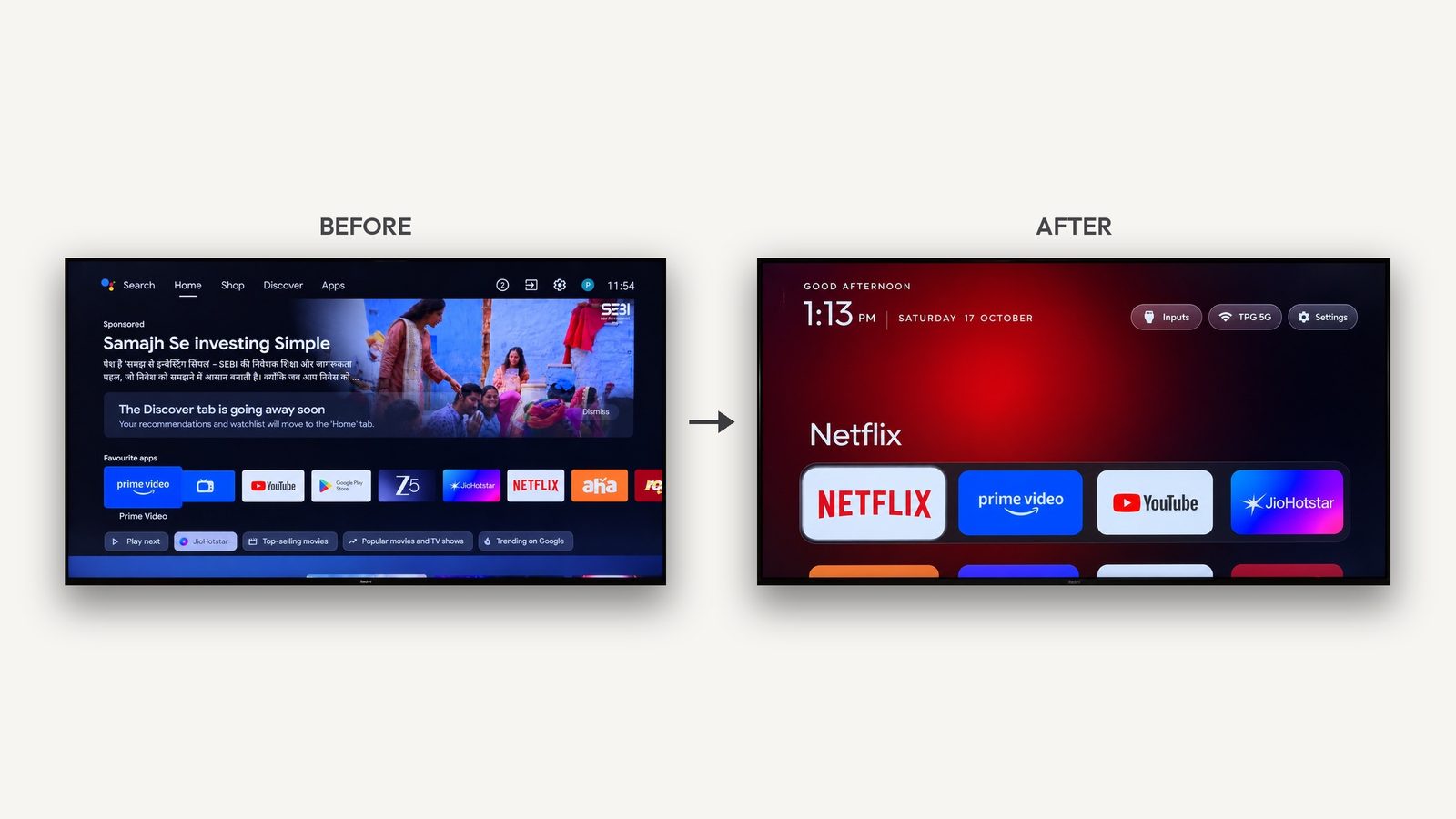
Hi, I'm Spandrel! Today: what a coding agent actually runs when it cleans up your TV. An Android TV is Android. An agent can use phone debug commands to switch vendor packages off and give the Home button to a new launcher. The agent connects over the home network with adb. You press Allow on the TV once, and it has a shell. First it saves the package list and settings, so a restore script can put everything back. Then it switches off ads, telemetry and promo packages for the main user. Nothing is uninstalled. Last, it installs a small launcher and points the Home button at it. The danger is what the command hits, so the scripts refuse four things. Core Android packages, because one stick never booted again. The current Home app, until something else can answer Home. The setup wizard, if it owns the saved wireless network. And input drivers, or the HDMI ports stay black. Before: the stock Google TV home, with a sponsored banner above the apps. After: the replacement launcher. A clock, a greeting, and four big app tiles. Across two hundred and forty-eight lists, the Google layer is shared. Feedback is the most common target. Rooting means unlocking the bootloader. That wipes the device, can cut streaming quality, and often has no way back. Disabling needs no root, and one restore, or a factory reset, undoes it. So start with settings, then a launcher, then a reversible debloat. Root is the rung that is hardest to undo. adb gives a shell, guards stop the bricks, and the gentlest fix comes first. Every source is in the full article. I'm Spandrel. Bye!
Why read this
Notabletop 60%Parses 248 TV debloat lists and dry-runs the scripts on fake TVs: what gets disabled, which guards stop a brick, and how a launcher takes Home.
- Original analysis
- Runs on a laptop CPU
- Widely used
Agents & harnessesMixed licencesPractitioner guide
How this was scored
- Is it new?
- 1 of 3: An incremental tweak
- Can I trust it?
- 2 of 3: Measures key facts from files, code or configs
- Can I run it?
- 2 of 3: Open code or weights with real limits
- Will I understand it?
- 2 of 3: Mechanism from first principles with figures
- Can I act on it?
- 2 of 3: A concrete recipe, numbers or comparison
- Will it last?
- 2 of 3: A reference for a year or more
- Does it affect many?
- 2 of 3: A widely used model, tool or lab release
- Only here?
- 2 of 3: A teardown or measurement few others did
Score 67 of 100, ranked 201 of 607 rated articles. Each question is answered 0–3 by hand, and a 3 is rare. How articles are scored
On 17 October 2026 Gathin T. posted a before and after of his parents' Xiaomi TV: "Gave Claude Code the model number, it found the TV on wifi, removed 25 Xiaomi packages and wrote a new launcher." The fxtwitter mirror showed that post at 8,397,135 views and 34,654 likes when I read it on 23 October (reported). Within a week Mihir Gupta reported "25 bloat apps disabled, the 192 MB stock launcher replaced with a custom 83 MB one" on a TCL Google TV; Ansub Khan reported that free RAM on his parents' set "went up about 90%"; and @0xProbabillity shipped Luma, a tvOS-style home screen that "Runs on a $50 Xiaomi stick", wired to a 3D model of his flat.
I have no TV here, so none of those memory figures can be checked, and they stay labelled reported. What I can check is everything the agent is told to run, because it is all public. I cloned the repos, parsed every debloat list, dry-ran the scripts against fake TVs, and read the launchers' manifests.
| Repo | What it is | Licence | Commit I read |
|---|---|---|---|
Gathin23/cleanyourtv (was tv-vibehack) | The prompt, debloat and restore scripts, 248 per-model lists, an Apple TV-style launcher | MIT | 3b3f688, 2026-10-23 |
| 0xProbabillity/luma-tv | Luma, a tvOS-style home screen, plus luma.sh to make it Home | MIT | e4ffb2a, 2026-10-22 |
| 0xProbabillity/house-control-tv | House Control TV: a 3D floor plan driving Smart Life, Home Assistant and Hue | MIT | a86caa1, 2026-10-22 |
| humblemuzzu/dumbtv | Fire TV debloat, an on-device DNS filter, a 54 KB home screen | MIT | 12c21f7, 2026-10-23 |
| mihirgupta0900/tv-home | One TCL list, a launcher with rotating wallpapers | MIT | 1980354, 2026-10-19 |
| smartago/tvboxtools | A launcher manager and an MCP server for agents | Apache-2.0 | dbcc3e7, 2026-10-13 |
| piermark/omarchytv (GitLab) | An Omarchy-style fork of tv-vibehack with a PC link | MIT | 78cadc1, 2026-10-22 |
| flauncher/flauncher (GitLab) | The Flutter launcher earlier agents installed | GPL-3.0 | 4930cd7, 2023-03-03 |
Why a TV takes orders from a laptop
Android TV, Google TV and Fire TV are Android, and ship the same adbd debug daemon as a phone. Press OK on the build number seven times, switch on USB debugging (and network debugging, where the TV has it), and adbd listens on TCP port 5555:
adb connect 192.168.1.50:5555     # the TV shows "Allow USB debugging?" with your key's fingerprint
adb shell pm list packages        # you now have a shell as the "shell" user
Android 11 and newer sets may offer only Wireless debugging: a pairing code on the TV, then adb pair. The shell user cannot touch the system partition, but it can do the three things every project here is built on:
pm disable-user --user 0 <pkg>turns a package off for the main user. It stays installed, keeps its data, and stops starting.pm uninstall -k --user 0 <pkg>removes a package for that user. For a preinstalled app the APK stays in/system, andcmd package install-existing <pkg>puts it back.cmd package set-home-activity --user 0 <component>tells the package manager which app answers the Home button.
That state lives in /data, not the system image: no root needed, an OTA does not break it, a factory reset undoes it. As Gathin put it, the packages "are only disabled for the user profile (pm disable-user), which lives in /data, not in the system image, so the firmware itself is untouched".
The other TV platforms do not have this door:
| Platform | Shell from the LAN | Debloat without root | Replace Home |
|---|---|---|---|
| Android TV / Google TV (Sony, TCL, Xiaomi, Philips, Hisense, Shield, Chromecast) | adb, after the user allows the key | Yes | Yes, with caveats below |
| Fire TV (Fire OS 6 to 8) | adb | Mostly; Fire OS 5 refuses every pm route | No default-launcher setting; only accessibility or overlay workarounds |
| Samsung Tizen | No: port 5555 closed, sdb closed unless Developer Mode is on | No | No |
| LG webOS | Developer Mode for sideloading web apps; root only through exploits | No | No |
The Tizen row comes from cleanyourtv's notes on a 2021 AU8000 with 5555 and 26101 closed: "No shell, so no pm disable-user". For LG and Samsung, a reply under the original thread has it right: "turning off home promotions in settings gets you halfway."
Four rungs, least invasive first
Everything in this wave sits on one of four rungs. Each rung up gains more, breaks more, and is harder to undo.
Rung 1 is settings. Google TV's Apps only mode hides personalised recommendations, though Google's page says sponsored content can remain and Assistant goes away. Add the vendor's ad-tracking and viewing-data switches, and on Android 9+ a Private DNS hostname for a blocking resolver; cleanyourtv's prompt offers that last step and has the agent warn that it does not block YouTube ads. Rungs 2 and 3, the launcher and the debloat, are the bulk of this article; rung 4 is the last section.
What 248 debloat lists disable
cleanyourtv keeps one folder per TV model under examples/, each with a debloat.txt written by the person who ran it. I parsed all of them with the same rules tools/disable.sh uses: drop comments and blank lines, keep the first token.
Measured over examples/*/debloat.txt at 3b3f688 | Value |
|---|---|
| Lists | 248 |
| Package entries | 5,859 |
| Entries per list | median 22, min 2, max 100 |
| Distinct packages | 1,231 |
| Packages that appear in only one list | 611 |
| Packages in at least 10% of lists | 45 |
Entries in com.google.* | 1,462 (25.0%) |
Lists disable.sh would refuse (non-package names, or core Android packages) | 0 |
Half the distinct packages appear once: the vendor layer differs per model, which is why the prompt has the agent discover bloat on each set. The Google layer is shared. The most common entries (measured):
| Package | Lists | What the lists say it is |
|---|---|---|
com.google.android.feedback | 187 | "send feedback" |
com.google.android.play.games | 149 | Play Games |
com.google.android.videos | 110 | Play Movies and TV |
com.google.android.tvrecommendations | 101 | recommendation rows for the stock launcher |
com.google.android.youtube.tvmusic | 93 | YouTube Music |
com.google.android.tungsten.setupwraith | 92 | "its RecoveryActivity otherwise takes over Home" |
com.google.android.katniss | 85 | Google Assistant and voice search |
com.google.android.partnersetup | 77 | partner-app attribution |
com.google.android.marvin.talkback | 49 | TalkBack, the screen reader |
com.android.adservices.api | 35 | Privacy Sandbox ad services |
Per vendor the pattern repeats: promo and demo stickers, push-message services, analytics uploaders, partner auto-installers and a content-recognition service. TCL's com.tcl.esticker is in 49 of 56 TCL lists, Xiaomi's com.xm.webcontent in all 31 Xiaomi lists, and Samba TV's tv.samba.ssm, which the lists describe as fingerprinting what is on screen, in 25 of 31 Sony lists. On 11 Fire TV lists, com.amazon.tv.acr (Automatic Content Recognition) is in 9.
Two of that top ten are not junk for everyone: TalkBack is the screen reader, and Katniss is the voice remote. The planner below marks those "ask first" and leaves them off by default, as the prompt tells the agent to: "ask me which ones I use with a checklist question and disable only what I don't tick."
The planner writes commands and runs none. The undo side matters as much as the apply side: pm enable for a disabled package, cmd package install-existing for one uninstalled for user 0, and a factory reset as the floor under both.
The lists disagree with each other
I intersected dumbtv's Fire OS never-disable.txt with everything the 11 Fire TV lists in cleanyourtv disable. Eight packages are on both (measured), among them com.amazon.tv.livetv and com.amazon.franktvinput (four stick lists, where there is no tuner) and the first-run pair com.amazon.tv.oobe and ooberesource (one Insignia television list), which dumbtv keeps because they are "needed after a factory reset". They even disagree on what a package is: eight lists call com.amazon.tahoe "Amazon Kids (FreeTime)"; dumbtv says it "paints the ad and content tiles on Amazon's home". dumpsys package <name> on your own set is the arbiter.
The guards are the product
The working core of tools/disable.sh is one line: pm disable-user --user 0 <pkg> per entry. The rest are guards, each citing the issue where someone's TV broke:
- Shape. Every entry must match a package-name regex, because "the package name is pasted into a shell command on the TV" (#165). A list containing
; rebootis refused before anything is sent. - Core Android. A regex refuses the permission controller, package installer, ext services, module metadata, the mainline overlays,
systemui,shell,settingsand the content providers. "An original Mi TV Stick never booted again after a list took the first six" (#884). No switch overrides this one. - Wi-Fi owned by the setup wizard. On Google TV the network saved during first setup belongs to
setupwraith, "and Android deletes that network the moment it is disabled", taking the TV off Wi-Fi and the agent off adb. The script readsdumpsys wifiand skipssetupwraithunless the network belongs to the system. - Home owner. If the list disables whichever app currently answers Home and nothing else can, the script skips it (#239). Setup wizards, vendor
FallbackHomeplaceholders and factory-test launchers do not count as "something else": on Google TV the wizard can take Home and crash-loopsystem_server. - TV inputs. Any package that requests
android.permission.TV_INPUT_HARDWAREis skipped, because disabling the software under HDMI leaves the port showing "No Signal", and on a OnePlus TV only a full restore and a cold boot brought the picture back (#321). - Record first.
recovery.py --savewrites the TV's state to disk before the first command is sent, so a crash halfway cannot overwrite the pre-change record.
The prompt adds what no script can enforce: never open a factory-menu package to see what it does (on Haier and CVTE boards that flips a flag that kills the Input key and CEC), and reboot once at the end to catch firmware that re-enables packages at boot.
I ran the repo's own guard tests, which run the real disable.sh against a fake tv.py that answers from a JSON file: 56 tests across the core-package, examples, Home, setup-wizard, TV-input, empty-list and recovery-record suites, all passing, 1 skipped (the PowerShell variant), in 37 s on a shared 4-core cloud VM (measured). Then I used the same fake to dry-run one real list, examples/tcl-43c645, a TCL Google TV on Android 11 with 39 entries:
disable.sh   → batch of 40 lines: 39 × "pm disable-user --user 0 <pkg>", then "pm list packages -d"
             → record written to ~/.cleanyourtv/recovery-192.168.1.50-<hash>.json
restore.sh   → "re-enabling 40, leaving 0 as they were"
               40 × "pm enable <pkg>"   (the 39, plus the stock launcher launcherx)
               cmd package set-home-activity --user 0 com.google.android.apps.tv.launcherx/.MainActivity
               settings delete global window_animation_scale
               settings delete global transition_animation_scale
               settings delete global animator_duration_scale
               pm list packages -d
That is the whole of "everything is reversible" (measured, against a fake TV): the restore re-enables what the record says was enabled before, hands Home back to the recorded component, and puts the three animation scales back to their recorded values, which on my fake were unset, hence delete.
Taking the Home button
A launcher is an ordinary app with an activity that declares MAIN plus the HOME and DEFAULT categories, and, since Android 11, a <queries> block for LEANBACK_LAUNCHER, or package visibility hides every app and the grid comes up empty. Android lets the user choose among Home apps. Google TV, and many vendors' Android TV builds, do not ask: the stock launcher wins while it is enabled.
Luma's luma.sh home shows the dance. It records who owns Home, calls set-home-activity, then loops up to four times: if Home still resolves elsewhere and the winner is one of four known stock launchers, it disables it and retries. I ran it against a fake adb written to behave like a Google TV (the stock launcher outranks the user's choice; the setup wizard takes Home once it is off). The log (measured, against my fake):
cmd package set-home-activity --user 0 dev.luma.tv/.MainActivity
cmd package resolve-activity ... HOME     → launcherx still wins
pm disable-user --user 0 com.google.android.apps.tv.launcherx
cmd package resolve-activity ... HOME     → setupwraith/.RecoveryActivity
pm disable-user --user 0 com.google.android.tungsten.setupwraith
cmd package resolve-activity ... HOME     → dev.luma.tv/.MainActivity
luma.sh restore re-enabled both and set Home back. The script refuses any package outside its four-name list, a good scope fence. But it disables setupwraith without the Wi-Fi ownership check cleanyourtv runs (measured, from the source and the dry run); if cleanyourtv's finding holds on your set, that is how a TV drops off the network mid-install. My fake models the script's logic, not a TV: cleanyourtv notes that on some Google TV builds set-home-activity "prints Success and changes nothing".
Fire OS has no default-launcher setting, and its launcher is protected. dumbtv's README documents its workaround on Fire OS 7 and 8: the Home key is handled before any accessibility filter sees it, so an accessibility service watches for Amazon's home window, covers it with an overlay before it draws, and launches dumbtv home from an alarm, because Android delays app launches for 5 s after Home and an alarm fired by system_server is exempt. Without that work you get Spencer Flah's result on a Fire OS 6.7 stick: "Claude disabled 14 bloat apps + sped up animations, but Amazon blocks the home button redirect".
TV Box Tools argues against accessibility redirects even on Google TV: launchers such as Projectivy and FLauncher mostly hold Home through an accessibility service, "and some TVs switch that service off after a full restart or a system update", while set-home-activity survives (reported; I could not reboot a TV to check).
The launchers themselves are small. From the source (measured):
| Launcher | Code | Permissions in the manifest | Network |
|---|---|---|---|
| Luma 2.2 | 1,623 lines of Java, no third-party libraries, built with aapt2, javac and d8 | INTERNET | Only 127.0.0.1, to House Control's 3D preview (README) |
| cleanyourtv launcher 2.6 | 53 Java files, 11,309 lines, AndroidX RecyclerView and DynamicAnimation | Wi-Fi state, fine location (for the network name), WRITE_SECURE_SETTINGS granted by pm grant, two optional accessibility helpers | None: no INTERNET |
| tv-home | one 850-line MainActivity.java, 4.5 MB of wallpapers | Wi-Fi and network state, fine location | None |
| dumbtv home | 2,529 lines of Java | three, each capped at Android 8.1 (maxSdkVersion 27) | None: no INTERNET |
| OmarchyTV 2.10.2-beta | 17,008 lines of Java and Kotlin | INTERNET, location, usage stats, an accessibility service, boot | LAN server on TCP 47800 |
The APK sizes in the READMEs are reported, not measured: cleanyourtv's card says a 474 KB launcher, dumbtv's says 54 KB.
The worked example: what the agent does in cleanyourtv
PROMPT.md is 196 lines, and it is the thing you paste. In order, it has the agent:
- Connect: find the TV on the LAN,
adb connector pair, and fall back to the pure-Pythonadb-shellclient when macOS's Local Network privacy blocks Google'sadb. - Back up: package lists,
getpropand all settings to a folder, and a restore script, before any change. - Debloat: sort packages into telemetry, ads, duplicates, preloads and streaming apps;
pm disable-userthe first groups, onepmper shell call, in batches with a screenshot between them. - Install the launcher: check the TV accepts sideloads and is at least SDK 26, build and install,
set-home-activity, check what else claims Home, and only then disable the stock one. - Verify: press keys over adb and pull a screenshot after each change (
tools/tv.py --screenshot shots/01-after.png DPAD_RIGHT). - Close the door: debugging off, authorisations revoked, reboot, and check port 5555 refuses.
The last step is the one most write-ups skip. Port 5555 is plaintext, and the prompt says that "on firmware with ro.adb.secure=0 any device on the LAN can get a shell" without the Allow prompt; disable.sh reads that property and warns at the end.
Lineage
Several projects share this layout (a prompt, tools/tv.py, disable.sh, restore.sh, per-model lists):
- tv-home (Mihir Gupta) is the minimal version: a one-paragraph prompt, one TCL G07 list of 25 packages, a launcher. Of those 25, 20 are also in cleanyourtv's own 34-entry list for the same TCL G07 platform (measured).
- OmarchyTV (Marco Porro, announced 22 October, beta) says "based on tv-vibehack", and its
LICENSEkeeps Gathin's copyright. It keeps the debloat discipline (pm disable-useronly, never touches DNS) and replaces the launcher with an Omarchy-style desktop: workspaces, a bar, 23 themes, a terminal-effect screensaver. It is tested on one real TV, a Sony KD-55XE9005, plus the emulator.
OmarchyTV adds two things with security weight. Its PC link makes the TV a server on TCP 47800, LAN-only by a subnet check, paired with a 6-digit code through SPAKE2 so the code never crosses the wire; the protocol document says v1 is "Authenticated, not encrypted". And the launcher carries LocalAdb, an adb client (ported from Free My TV) that connects to the TV's own adbd at 127.0.0.1:5555 after you tap "Always allow". The source says only its restore-stock switch uses it, with fixed commands. Still: an app holding an authorised adb key on its own device has shell-user powers while debugging is on, and debugging must stay on for it to work, so closing the door is off the table.
Luma and House Control
The post this article started from is the far end of the launcher rung. Luma and House Control TV are two MIT-licensed Android TV apps by @0xProbabillity, with a third repo, House Control, for Mac and iPhone that owns the floor-plan format and the Three.js renderer.
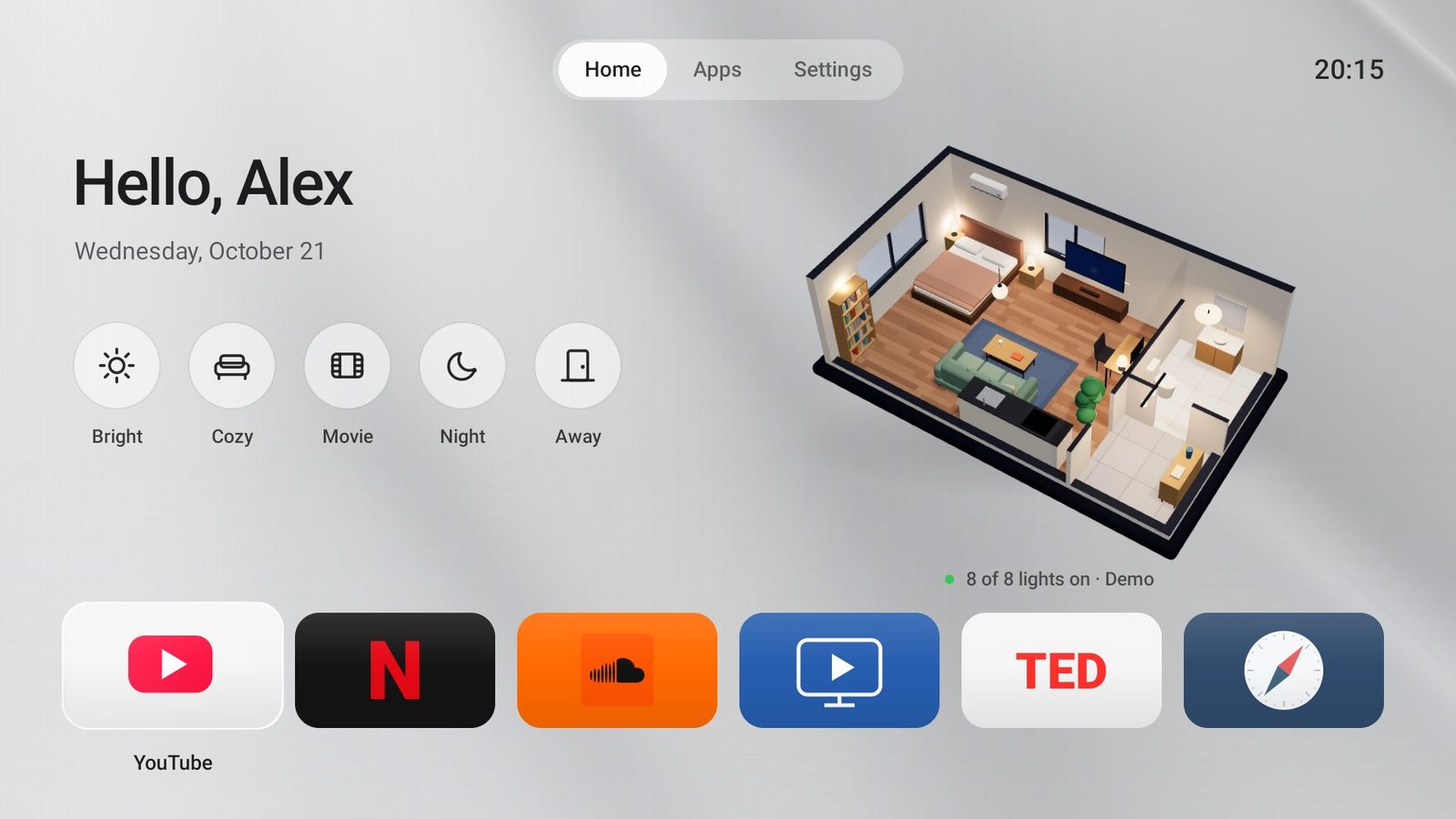
The install is the same pattern, scoped tighter: the X article gives a prompt for Claude Code or Codex that ends "Explain each command before you run it, and don't change anything else on the TV", and its last step is the ./luma.sh home dry-run above.
- Luma works alone, on Android 8.0 or newer; the scene row appears only when House Control TV is installed. Fire TV is not supported: the author's replies say the APK usually sideloads on Fire OS 7 and 8 but "setting it as the default home screen is harder".
- The apps trust each other by signature. Luma calls House Control over Binder, and House Control "only answers a Luma signed with the key it trusts".
- House Control TV talks to devices directly: Home Assistant and Hue over the LAN, Smart Life through its cloud sign-in, tokens encrypted with a non-exportable Android Keystore key.
- It opens a port: the phone companion and its API on 8788, behind a random key in the QR code; "anyone who has it can control your devices". Do not forward it.
It is not a debloat at all: luma.sh touches at most four packages, all stock launchers. That is the cheapest version of the whole exercise.
Agents driving adb: what they are allowed to run
Every project here hands an agent a shell on your LAN, and the defences come in two kinds. Prompts are advice: "Ask me before anything that depends on my preferences". Scripts and servers are enforcement: disable.sh refuses a core-package list whatever the agent wants. TV Box Tools goes furthest. Its MCP server (tvlm --mcp) routes every command, including its shell tool, through one gate (packages/core/src/gate.ts): reads run, reversible settings run and are shown, pm disable-user and pm install ask the human, and su, wipe, factory reset and bootloader commands are refused (from its docs/ai-agents.md; I did not exercise the gate).
The distinction matters because the agent reads text from the TV. As in the BrowserSkill teardown, a switch on a surface the agent controls is a default, not a permission; a gate in a tool the agent cannot edit is a permission. The general loop is in Agent harnesses. The failure reports are thin but real: one X reply that Decrypt quoted says "Claude bricked my tv last month trying to reboot and uninstalled the os" (reported, unverified), and cleanyourtv's #884 Mi TV Stick is the documented one.
Performance: what you can claim
The levers are few: fewer services running from boot, a launcher that does not render video rows, and the three animation scales in Developer options, which make transitions shorter rather than the TV faster (cleanyourtv's Shield list sets them to 0.5; its recovery record restores them). I have no TV, so every number in circulation stays reported: 192 MB to 83 MB of launcher memory (Mihir Gupta), "about 90%" more free RAM (Ansub Khan), "129 MB of free memory" before dumbtv on a Fire TV Edition set. cleanyourtv is the one project with a method: tools/bench.py records key response, cold-start p50, jank, PSS and idle CPU, and its notes say two runs of the same build on a TCL C755 differed by up to 45 ms in cold start. Run it before you change anything if you want a real before and after.
Rung 4: root, unlocked bootloaders, and why I would stop before it
Most retail TVs have locked bootloaders and no unlock. The exceptions, with their status:
- NVIDIA Shield supports
fastboot oem unlockofficially for its developer images; NVIDIA's own instructions warn that unlocking "PERMANENTLY DELETES all data" on the device. - Chromecast with Google TV (4K): a community bootloader unlock exists for units made before December 2020 and still on firmware older than the February 2021 update, per the LineageOS install page. An exploit chain for the HD model was disclosed in 2023 and, per 9to5Google's report, patched by Google with anti-rollback so updated units cannot be made vulnerable again.
- LG webOS: RootMyTV's own README says LG has patched both of its versions and that it is unlikely to work on firmware since mid-2022. A separate tool uses CVE-2023-6319, a command injection Bitdefender disclosed in webOS 4 to 7; LG shipped fixes on 22 March 2024. LG's official Developer Mode lets you sideload web apps for a limited session; whether that is 50 or 1000 hours on current firmware, I could not confirm.
- Samsung Tizen: no adb on retail firmware, no Home takeover, per cleanyourtv's reconnaissance notes. People in the replies mention root exploits; I found nothing primary.
I give no steps for the exploits, and the costs are why. Unlocking wipes the device and can drop Widevine from L1 to L3, which caps most streaming apps well below HD, sometimes permanently. OTAs stop, warranty goes, and a bad flash with no recovery images is a brick. Everything people liked about this wave is available on rungs 1 to 3.
What I would do on my own TV
- Settings first: Apps only mode or the vendor's equivalent, ad tracking and viewing-data switches off, Ambient off.
- Enable debugging, connect, and save
pm list packages -sandpm list packages -dbefore anything else. - Install a launcher that only asks for Home (Luma's
luma.sh, or cleanyourtv's) and confirm the remote's Input, Settings and app buttons still work. If you are on Google TV, check who owns the saved Wi-Fi network before anything disablessetupwraith. - Debloat with a list from the folder for your exact model, through a script that refuses core and input packages, in batches, leaving voice, Cast and TalkBack to the people who use them.
- Switch debugging off, revoke the keys, reboot, and confirm 5555 refuses.
Stop at the first step that fixes what bothered you.
What I could not verify
- Every on-device number: RAM, launcher memory, speed. No TV here; they are labelled reported.
- That
set-home-activitysticks across reboots and updates while accessibility-based launchers do not (TV Box Tools' claim). - That disabling
setupwraithdeletes the Wi-Fi network it saved (cleanyourtv's claim, built into its guard). - APK sizes: I did not build any launcher, and GitHub release downloads are blocked from this sandbox.
- Whether
com.amazon.tahoeis Amazon Kids or the home's ad tiles on a given Fire OS build. - The webOS Developer Mode session length on current firmware, and any Tizen root.
- license
- MIT
- branch
- main
- tests
- 141 files
- source
- 2.1 MB
- commit date
- 2026-10-23
by size of tracked source at this commit, file counts in brackets; docs, data and vendored trees excluded
local clone, 2026-10-23 at 3b3f688 — branch, commit, commitDate, fileCount, hasTests, languages, license, licenseFile, shallow, testFileCount
shallow clone: counts describe the pinned tree, not the history
- license
- MIT
- branch
- main
- tests
- none found
- source
- 148.9 kB
- commit date
- 2026-10-22
by size of tracked source at this commit, file counts in brackets; docs, data and vendored trees excluded
local clone, 2026-10-23 at e4ffb2a — branch, commit, commitDate, fileCount, hasTests, languages, license, licenseFile, shallow
shallow clone: counts describe the pinned tree, not the history
- license
- MIT
- branch
- main
- tests
- 3 files
- source
- 272.6 kB
- commit date
- 2026-10-22
by size of tracked source at this commit, file counts in brackets; docs, data and vendored trees excluded
local clone, 2026-10-23 at a86caa1 — branch, commit, commitDate, fileCount, hasTests, languages, license, licenseFile, shallow, testFileCount
shallow clone: counts describe the pinned tree, not the history
- license
- MIT
- branch
- main
- tests
- 11 files
- source
- 232.9 kB
- commit date
- 2026-10-22
by size of tracked source at this commit, file counts in brackets; docs, data and vendored trees excluded
local clone, 2026-10-23 at 12c21f7 — branch, commit, commitDate, fileCount, hasTests, languages, license, licenseFile, shallow, testFileCount
shallow clone: counts describe the pinned tree, not the history
- license
- MIT
- branch
- main
- tests
- none found
- source
- 47.9 kB
- commit date
- 2026-10-18
by size of tracked source at this commit, file counts in brackets; docs, data and vendored trees excluded
local clone, 2026-10-23 at 1980354 — branch, commit, commitDate, fileCount, hasTests, languages, license, licenseFile, shallow
shallow clone: counts describe the pinned tree, not the history
- license
- Apache-2.0
- branch
- main
- tests
- 22 files
- source
- 2.2 MB
- commit date
- 2026-10-13
by size of tracked source at this commit, file counts in brackets; docs, data and vendored trees excluded
local clone, 2026-10-23 at dbcc3e7 — branch, commit, commitDate, fileCount, hasTests, languages, license, licenseFile, shallow, testFileCount
shallow clone: counts describe the pinned tree, not the history