2026-10-08 · 28 min · on-device · agentic-coding · llama-cpp · quantization · speculative-decoding · gguf · security · microsoft
Why read this
Notabletop 60%Separates what shipped from what was announced, reads the WindowsML, MXC and llama.cpp code, and lines up three conflicting specs for the local MAI model.
- Original analysis
- Widely used
- Concrete numbers to act on
Inference & servingNeeds a workstation GPUMixed licencesPractitioner roundup
How this was scored
- Is it new?
- 1 of 3: An incremental tweak
- Can I trust it?
- 2 of 3: Measures key facts from files, code or configs
- Can I run it?
- 1 of 3: API-only, gated or restrictive licence
- Will I understand it?
- 2 of 3: Mechanism from first principles with figures
- Can I act on it?
- 2 of 3: A concrete recipe, numbers or comparison
- Will it last?
- 1 of 3: Relevant for months
- Does it affect many?
- 2 of 3: A widely used model, tool or lab release
- Only here?
- 2 of 3: A teardown or measurement few others did
Score 59 of 100, ranked 279 of 476 rated articles. Each question is answered 0–3 by hand, and a 3 is rare. How articles are scored
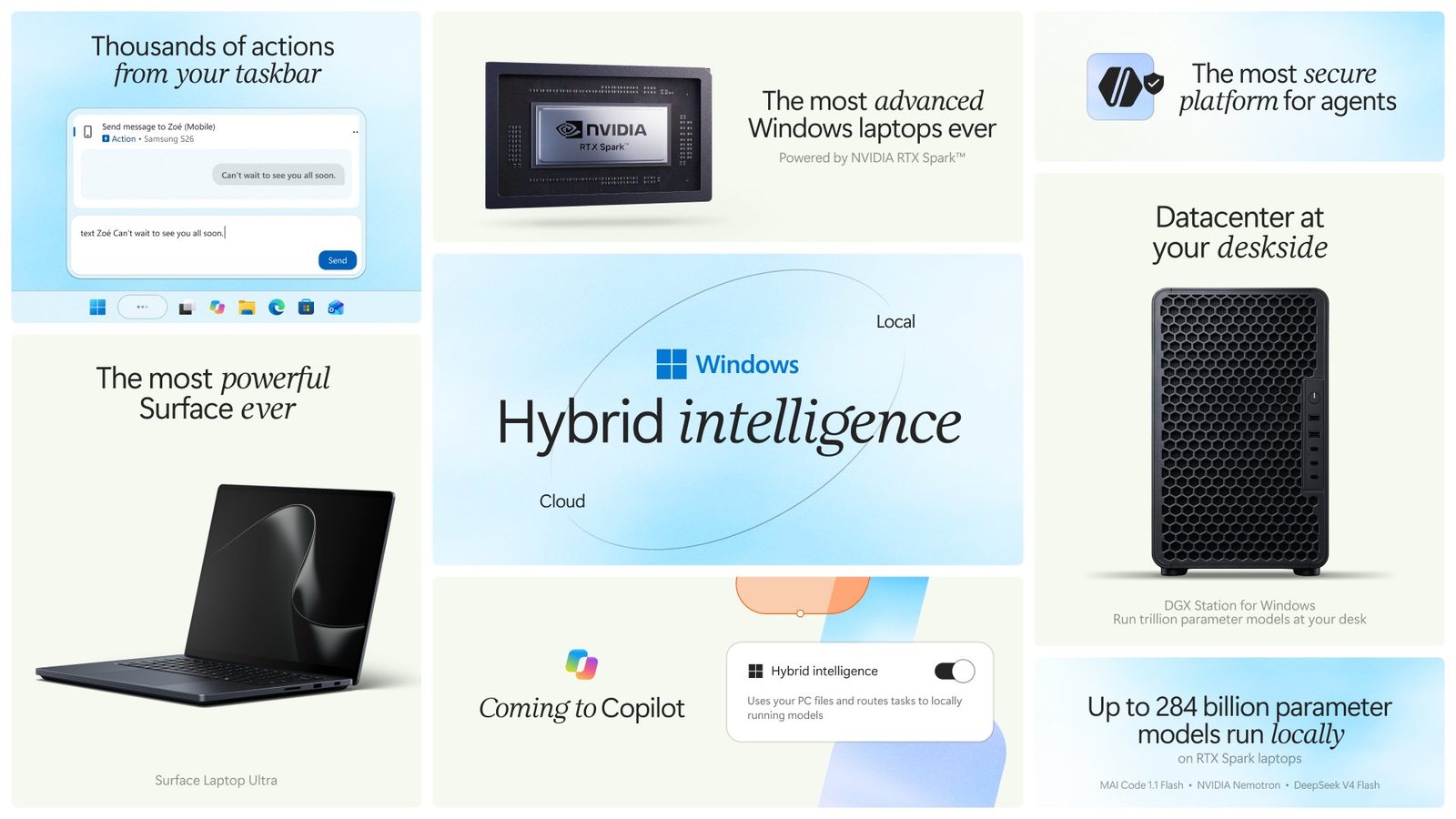
Two posts landed on my timeline within two hours of each other on 7 October. @windowsdev listed six things under the banner "hybrid intelligence": MXC going GA, frontier coding models running locally, GitHub Copilot HydraFusion, llama.cpp plus Windows ML, Surface preorders and new RTX Spark PCs. Then @MicrosoftAI said MAI-Code-1.1-Flash is "going local with on-device model calls inside GitHub Copilot", with "no inference charge for local model calls".
I wanted the boring answers. How big is the model, what does it run on, who decides whether a request goes to my GPU or to Azure, and what is actually downloadable today. The replies under the MicrosoftAI post were asking the same things ("Where can we download the weights?", "how big is the local model?"), and one of them had already noticed something odd: the demo video and the engineering post disagree about the model's size.
They do. So does a third page. That turned out to be the most useful thread to pull.
What exists today, and what is a date
Before any mechanism, the status. Microsoft's posts mix "generally available", "available for pre-order", "experimental preview later in October" and "in the coming months" in adjacent paragraphs, and the tweets flatten all of it into one list. Below is each item with the wording of its own primary source.
| Item | Status on 7 October 2026 | Source |
|---|---|---|
| Microsoft Execution Containers (MXC) | Generally available on Windows 11; open-source SDK | Windows Developer blog |
| Local sandboxing in GitHub Copilot (built on MXC) | Generally available in Copilot CLI, the Copilot app and VS Code Agent Host sessions | GitHub changelog |
| Local model discovery in Copilot CLI | Shipped in CLI 1.0.94-0, for models in a running Ollama instance | GitHub changelog |
| llama.cpp in Windows ML | Experimental; Runtime and Text Generation APIs in 2.7.2021-experimental, not for Store apps | Foundry on Windows blog, Learn docs |
| MAI-Code-1.1-Flash in the cloud | In production in GitHub Copilot | Microsoft AI blog |
| MAI-Code-1.1-Flash on the device | "Experimental access" in the Copilot app, CLI and VS Code "by end of the month" | same |
| HydraFusion routing to local models | "Experimental preview later in October" | Windows Experience blog |
| HydraFusion itself (cloud only) | Research preview since 4 September, via /experimental in Copilot CLI | GitHub blog |
| Surface Laptop Ultra, RTX Spark laptops | Pre-order; shipping from 16 October | Windows Experience blog |
| Surface RTX Spark Dev Box | Pre-order; shipping in the U.S. in November | same |
| DGX Station for Windows | "Later this year" | same |
| Copilot (the consumer app) using local models | "Expected to begin rolling out on Copilot+ PCs in the coming months" | same |
So the security half of the story is real software you can install. The local-model half is three weeks away at best, and labelled experimental when it arrives. Neither is a criticism; it is just not what "Frontier coding models running locally" sounds like on a phone screen.
The model: what Microsoft says it is
MAI-Code-1.1-Flash is Microsoft AI's in-house coding model, the second release of the line that started as MAI-Code-1-Flash at Build in June. (I covered MAI's earlier image and voice models in MAI-Image-2.5-Pro and MAI-Voice-2-Flash; the strategy is the same one, applied to code.)
It is a sparse mixture-of-experts transformer. The Windows and Command Line posts both give it 137 billion total and 6.8 billion active parameters, and a 256K-token context that the Windows post and the Microsoft AI post both say is kept on the device. The model card for the June model describes the lineage: trained from MAI-Thinking-1's mid-training checkpoint, then a "mid2" phase of roughly 2 million synthetic agentic tasks and an RL stage over more than 150,000 environments, all inside the Copilot harness. That training-in-the-harness choice is the model's whole pitch; it is tuned to Copilot's tools rather than to a generic benchmark setup.
Version 1.1, per the MAI blog, brings a 22% improvement on Terminal-Bench 2.1 in Copilot CLI, 15% on .NET tasks, 25% faster token streaming, 25% fewer tokens per task, and a price of one quarter of 1.0. The MAI-Code repository README adds that 1.1 takes image inputs.
One number does not line up. The June model card lists MAI-Code-1-Flash at "137B total, 5B active". The October posts give 1.1 the same 137B total but 6.8B active. That could be a real architecture change between versions (more experts per token, or a bigger shared expert), or one of the two documents is wrong. There is no config to read, so I can't tell you which.
Open weights? No.
The model card's licence line reads "Various product and service terms where the model is deployed, such as those for Visual Studio Code." The microsoft/MAI-Code repository on GitHub is MIT-licensed, but it holds a README, a security policy and a licence file, nothing else; it exists for issues and feedback. I queried the Hugging Face API for every model under the microsoft author with "MAI" in the name and got MAI-DS-R1, MAI-DS-R1-FP8 and the MAIRA radiology models. No MAI-Code.
The MAI blog does say "MAI-Code-1.1-Flash is available to download and run locally", and the demo video shows Copilot offering to download it. The download is a Copilot feature, not a weights release. You get the model as part of using Copilot, under Copilot's terms, and the "no inference charge" applies to Copilot's metering of local calls. The video's install dialog does label the model "MIT", which contradicts the model card; I would not build anything on that label until a model card for 1.1 says the same.
Three spec sheets
The size question is where the pages part ways.
The Command Line engineering post by GitHub's Patrick Nikoletich and Windows' Stuart Schaefer is the most specific. It says the on-device build is mixed-precision quantization at "approximately 3.3 bits per weight", comes in at 53GB ("an 80% reduction in size" from the BF16 cloud variant), runs with DFlash2 sliding-window speculative decoding on "a Windows ARM64 llama.cpp CUDA runtime", and peaks at 75.5GB of memory at 256k context on a Surface Laptop Ultra.
The Microsoft AI post says "3-bit quantization", "a full 256K context window", and "we recommend devices with more than 120GB of RAM".
The demo video attached to the MicrosoftAI tweet shows a Copilot CLI model picker in which MAI-Code-1.1-Flash appears under "Local models" with a 128K context, and an install dialog that reads like this:
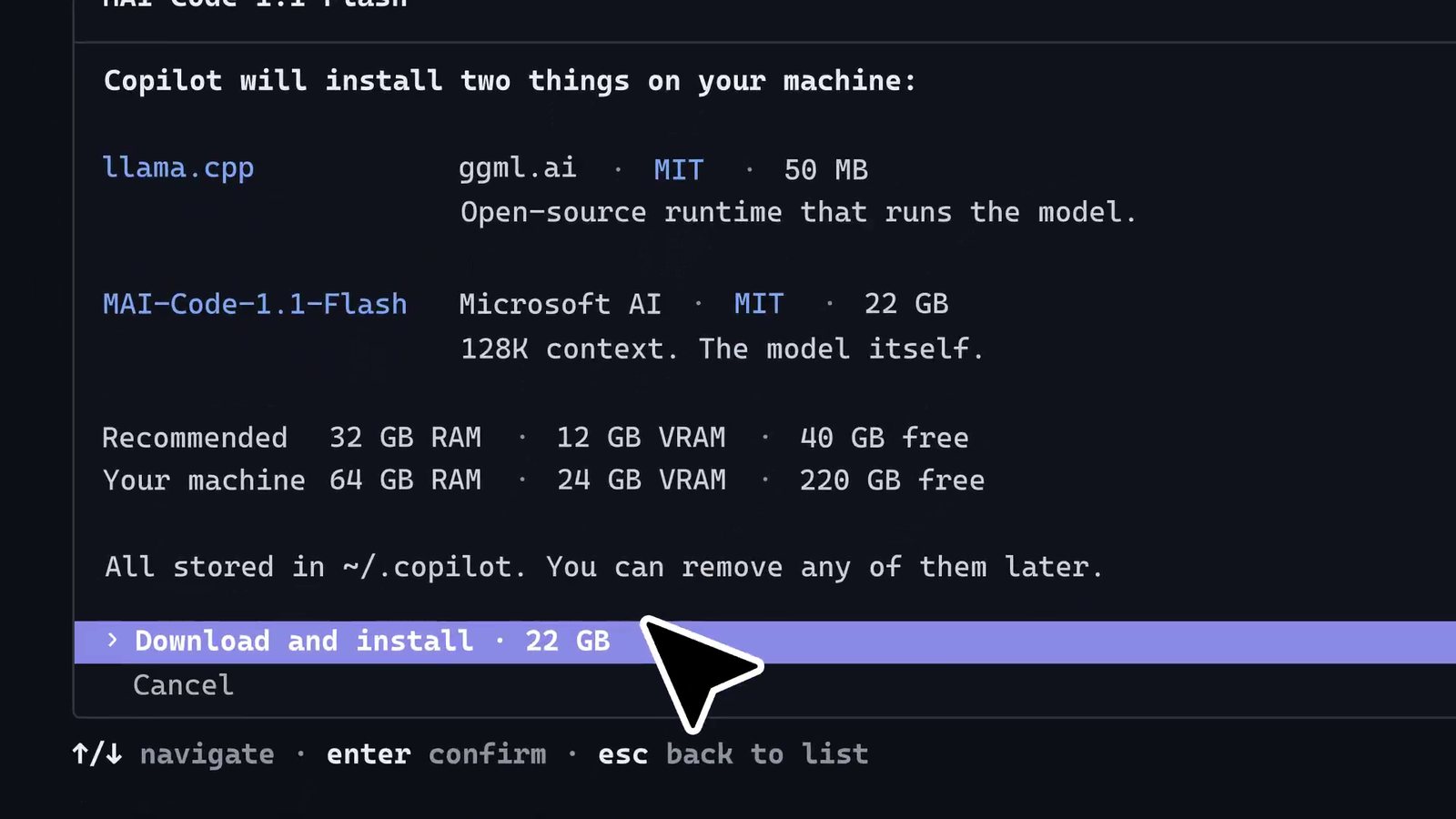
Those cannot all describe the same file. The arithmetic is short. Weight bytes are parameters times bits per weight over eight:
So "53GB" is 3.3 bits per weight measured in binary gigabytes, which is what Windows Explorer shows. BF16 is 16 bits, 274 billion bytes or about 255 GiB, and 53 out of 255 is a 79% cut: "nearly 80%" checks out. Now run it backwards for the video. 22 GB of weights for 137 billion parameters is bits per weight. I know of no agentic coding model shipped at 1.3 bits, and nothing on any of the pages hints at one.
My reading, and it is only a reading: the video is a product-design mock (its model list also includes "GPT-6 Astra" and "Gemini 3.7 Flash") made before the engineering numbers settled, or it shows a different, smaller artifact that has not been described anywhere. The engineering post is dated, has a test date of 5 October, names the runtime and the hardware, and its numbers are internally consistent with each other and with the Microsoft AI post's 120 GB recommendation. I would plan on 53 GB of weights and 75.5 GB at peak. The widget below does the same arithmetic for any bit width and for the other two models the Windows post names.
Two things fall out of playing with it. DeepSeek V4 Flash at 284 billion parameters does not fit in the 110 GB the GPU can see on a 128 GB machine unless you go below about 3.1 bits; the announcement card's "up to 284 billion parameter models" is a 2-to-3-bit claim. And on a 64 GB RTX Spark machine, MAI Code 1.1 Flash's 53 GB of weights leave about 11 GB for everything else, before the GPU-addressable limit even enters. Microsoft's own 75.5 GB peak rules that tier out at long context. The machine you want for this is the 128 GB one.
What the quantized model costs you in quality
The Command Line post has the only quality numbers for the on-device build:
| Benchmark | Tasks | MAI Code 1.1 Flash (BF16, cloud) | GPT OSS 120B (Unsloth GGUF) | MAI Code 1.1 Flash, quantized on device |
|---|---|---|---|---|
| SWE-Bench Verified | 500 | 72.6% | 32.0% | 70.80% |
| Terminal-Bench 2.1 | 89 | 62.9% | 23.6% | 66.29% |
Convert the percentages back to task counts and they become easier to read. On SWE-Bench Verified the quantized model solves 354 of 500 against the full model's 363: nine tasks fewer, a 1.8-point drop. On Terminal-Bench 2.1, 66.29% of 89 is 59 tasks and 62.9% is 56, so the quantized model solved three more. One task is worth 1.12 points on an 89-task set, and a single agentic run on 89 tasks is noisy at that scale. I would read that row as "no measurable loss", not as quantization helping.
The GPT OSS 120B column is the one I would not quote. 32.0% on SWE-Bench Verified is far below what that model usually scores, and the footnote says the comparison used Unsloth's GGUF. It was evidently run in Microsoft's own harness under conditions the post does not describe. It tells you how a different local model behaved in their setup, nothing more.
Speed: the number that decides whether you'd use it
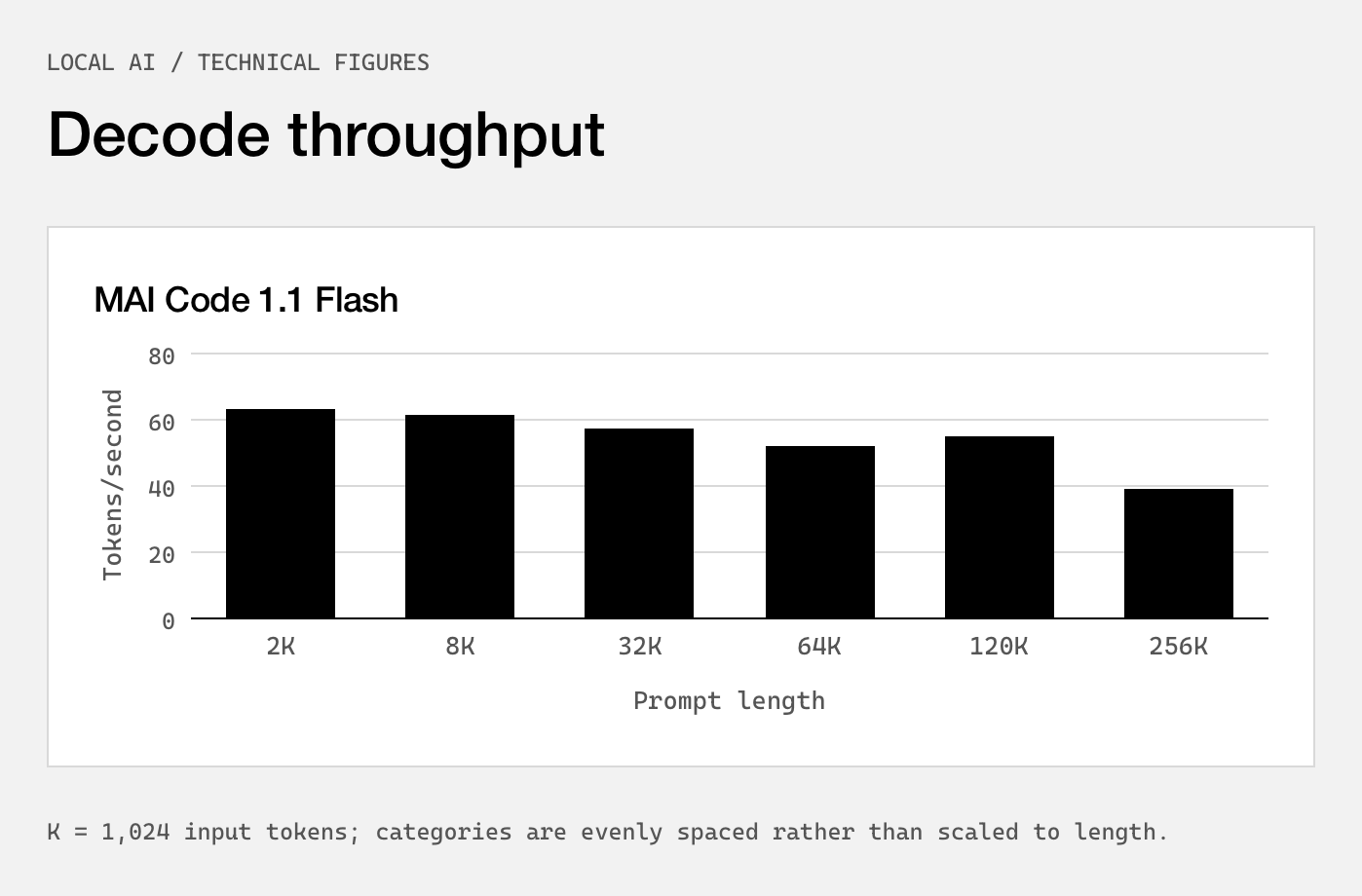
Decode at 40 to 60 tokens per second is fine for an agent. Reading the chart, it goes from about 63 tokens per second at a 2K prompt to about 39 at 256K, with an odd bump at 120K over 64K. With only 6.8 billion active parameters per token the GPU reads a small slice of the 53 GB per step, which is why a 137B model decodes at a usable rate at all, and DFlash2 multiplies that by accepting several drafted tokens per verification pass. (The DFlash 2 article explains how its path selector picks among the drafter's candidates.)
The number that matters more for coding agents is in the text, not the chart: prompt processing at 923.5 tokens per second at 64k context and 769.8 at 128k. An agent's context grows with every file it reads and every tool result. At those rates, ingesting a 64K-token context from scratch takes about 71 seconds, and 128K takes about 170 seconds, close to three minutes. Decode speed is what a demo shows; prefill time is what you feel the first time an agent reads your repository.
This also explains a phrase in the routing description that I skipped past at first: Copilot's Auto mode "can consider task context and cache state as it routes work". If the local llama.cpp server already holds 100K tokens of KV cache for this session, sending the next turn to the cloud means paying for those 100K input tokens again, and sending a cloud session's next turn to the laptop means three minutes of prefill. Cache locality is a first-order input to any sane router here. Microsoft says it is one of the inputs. It does not say how it is weighted.
Memory, and where the NPU went
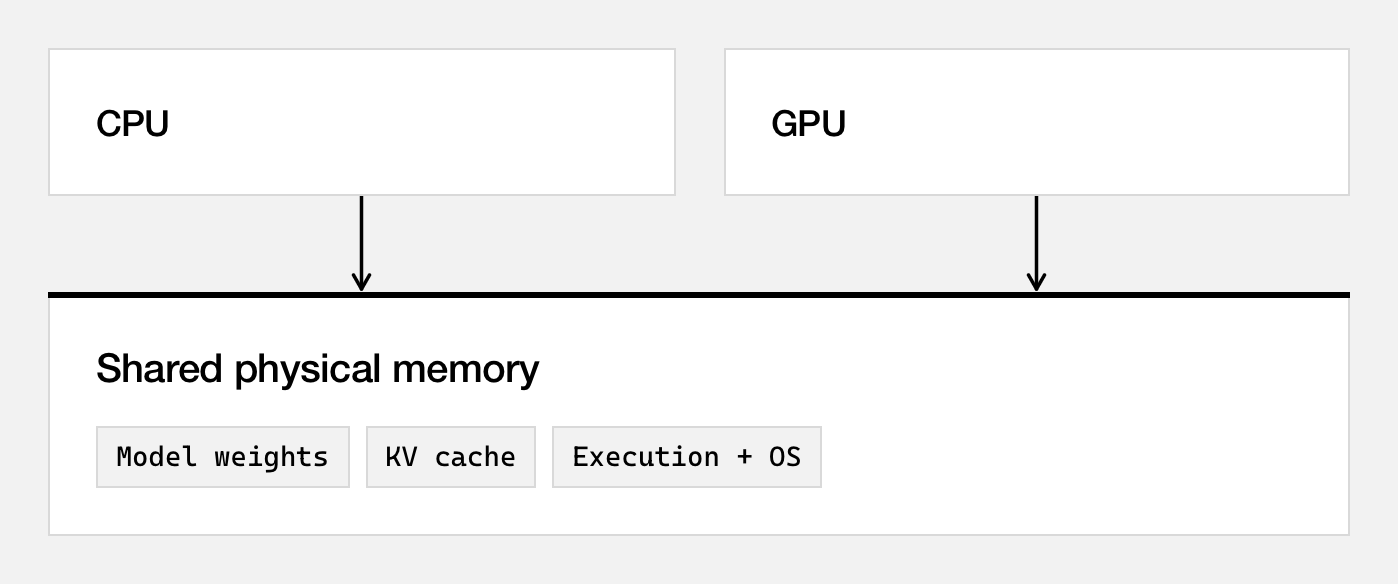
RTX Spark is NVIDIA's laptop superchip: a Blackwell RTX GPU, a Grace CPU of up to 20 cores, and up to 128 GB of memory shared between them, with "up to 1 petaflop of AI compute" (the Surface page footnotes that as theoretical FP4 with sparsity). It is Arm, so this is Windows on Arm, and it is the same Grace-plus-Blackwell pairing as the GB10 in the DGX Spark, which I looked at as a 64-user vLLM server. Unified memory removes the PCIe copy that sinks large models on discrete GPUs. It does not make all 128 GB available to the model, and Microsoft's Task Manager screenshot shows by how much.
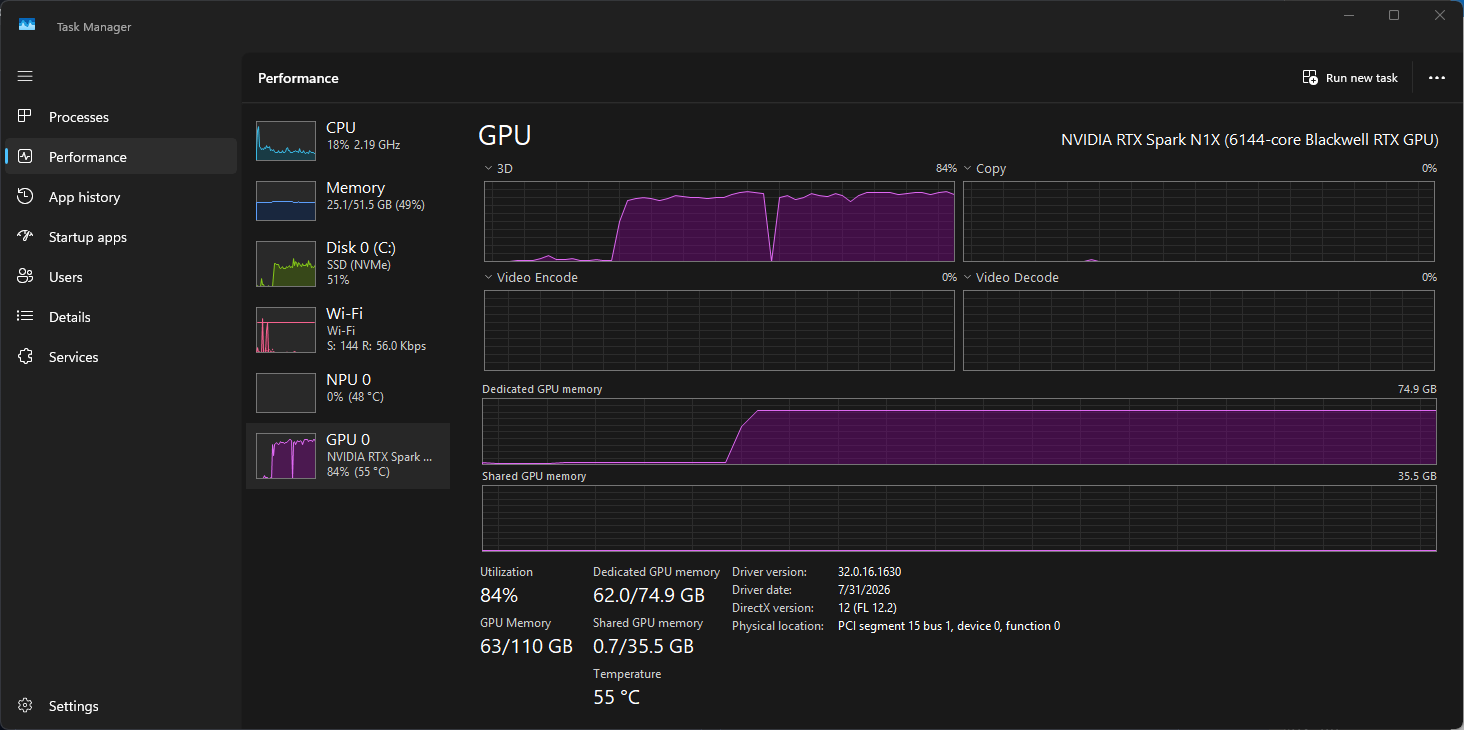
Three readings from that screenshot. The chip identifies itself as "NVIDIA RTX Spark N1X (6144-core Blackwell RTX GPU)". Windows has carved 74.9 GB out as dedicated GPU memory, leaving 51.5 GB visible as system memory, and the GPU can address 110 GB in total once the shared window is counted. The model is using 62.0 GB of the dedicated pool at that moment.
And the NPU is at 0%. The tweet thread says "hybrid intelligence" and Copilot+ PCs are sold on their NPUs, so I went looking for the NPU in this pipeline. It isn't there. The Windows ML Runtime docs say it plainly for GGUF models: the llama.cpp backend "doesn't support NPU targets", and an NPU target returns ERROR_NOT_SUPPORTED. Local Copilot inference on these machines is CUDA on the integrated Blackwell GPU. The NPU matters for Windows' own small models (Phi Silica and the like), not for this.
On price, the Surface Laptop Ultra starts at $2,599.99 and the Surface RTX Spark Dev Box at $5,999.99. The Surface pages say "up to 128 GB" without telling me which configuration the starting price buys, so I can't say what the 128 GB laptop costs. The performance claim against a MacBook Pro with M5 Pro (2.1x faster time to first token) was measured in llama.cpp on Qwen3.5 27B at Q4K-Medium with an 8,192-token prompt, on 64 GB preproduction machines, in Microsoft-commissioned testing. Time to first token on an 8K prompt is a prefill benchmark, which is compute-bound; a Blackwell GPU should win it. It says nothing about decode.
How the routing works
There are two ways to use a local model in Copilot, and they are worth keeping apart.
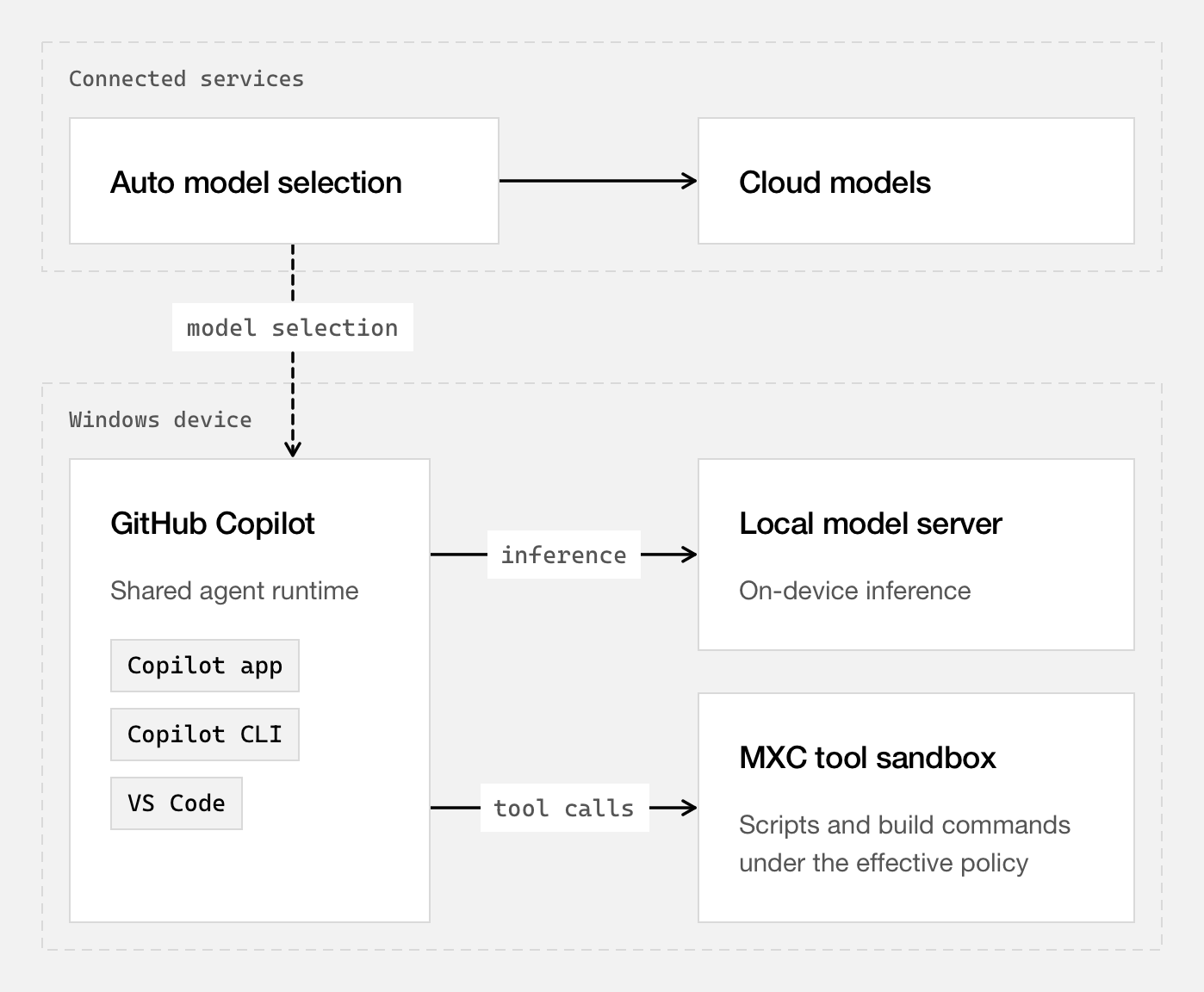
Explicit selection is the simple one. You pick a local model in the picker: MAI Code 1.1 Flash "through the Windows ML provider", or any OpenAI-compatible local endpoint and the models it exposes. The Ollama discovery that shipped in Copilot CLI 1.0.94-0 is the first piece of this you can use now: /model lists tool-calling, streaming models from a running Ollama instance alongside your cloud models, and you confirm each one before it is added. It doesn't install a runtime or download a model.
Auto is the HydraFusion extension. To understand it you need HydraFusion as it shipped in September, which had nothing to do with local models.
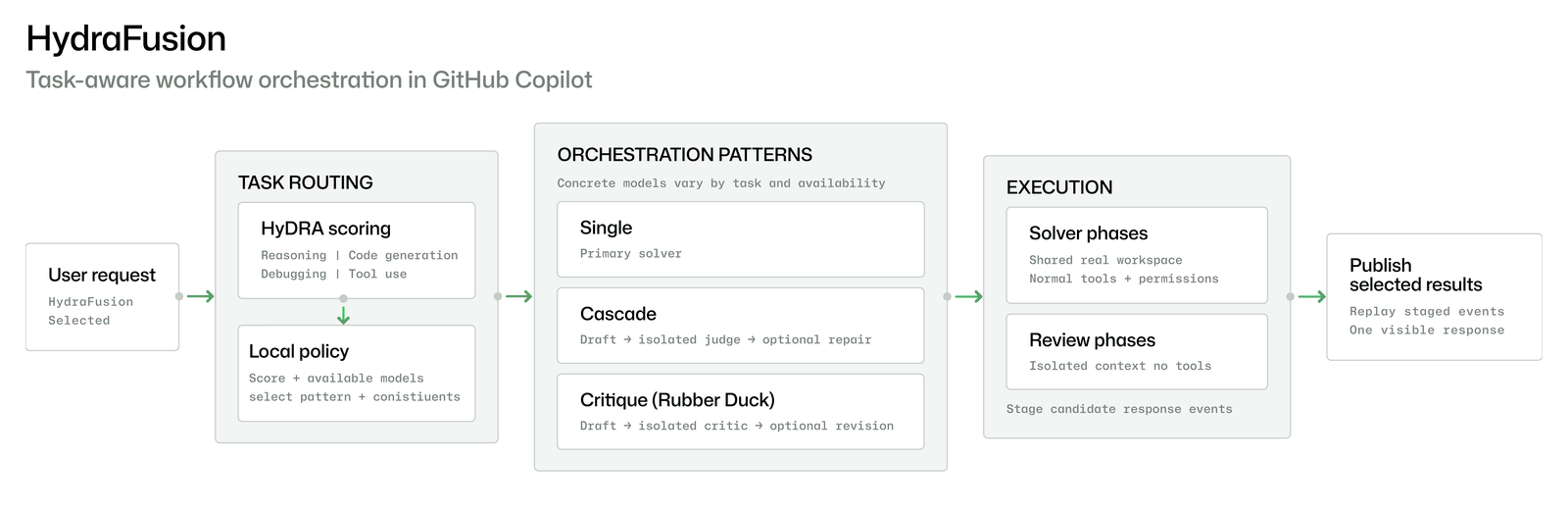
HydraFusion scores each request on four capabilities (reasoning, code generation, debugging, tool use) and picks one of three execution patterns. Single sends the task to one model. Cascade lets an efficient model draft, runs an isolated judge, and escalates to a stronger model if the draft fails the gate. Critique has a model from a different family review the draft in a tool-less context, and the drafter revises once. GitHub tuned the decision policy with beam search over candidate routing policies rather than hand-set thresholds. Its offline numbers against Claude Opus 5: on Terminal-Bench 2.1, +4.9 points at 67% lower estimated cost; on DeepSWE, -1.5 points at 36% lower cost; on CheckpointBench, its internal benchmark built from real Copilot sessions, -0.1 points at 65% lower cost. Those are GitHub's offline evaluations of the best tuned configuration, priced at list rates. I have no way to rerun them.
What the October posts add is one sentence: HydraFusion can now "tap into models running locally on device". They do not say which pattern a local model plays in, or what "eligible coding work" means. My guess, and I want to be clear it is a guess, is that a local model fits most naturally as the drafter in Cascade: free to call, good enough to pass the gate on routine work, with a cloud model behind it when the judge says no. It is also the only arrangement in which "helping your tokens go further" works out arithmetically, because Critique and Cascade-with-escalation both add cloud calls rather than removing them.
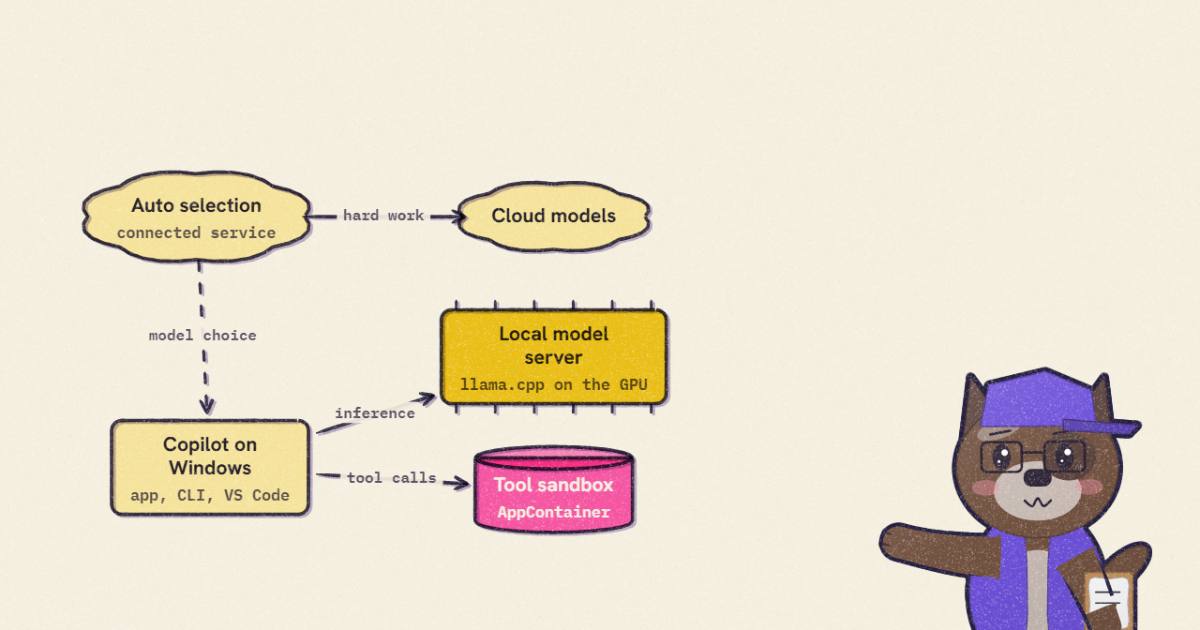
The piece I found most interesting is in the diagram above. Auto model selection is drawn under "Connected services". The decision about where your request runs is made by a GitHub service, not on your laptop. Add the changelog's sentence that "choosing a local model doesn't turn on offline mode or disable GitHub telemetry", and the Command Line post's "local inference does not make the session offline", and the shape is clear: a local model moves the token generation onto your GPU. It does not move the session off GitHub. If you want offline, COPILOT_OFFLINE=true is the explicit switch, and the changelog warns that a remote provider "can still receive prompts and code context over the network, even in offline mode".
The widget walks through a session part by part for each mode. The thing to notice is how few rows change when you switch from cloud to local.
4 of 7 rows are not plain cloud in this setting. Switching between local and cloud changes only the first two rows; the sandbox switch changes two others.
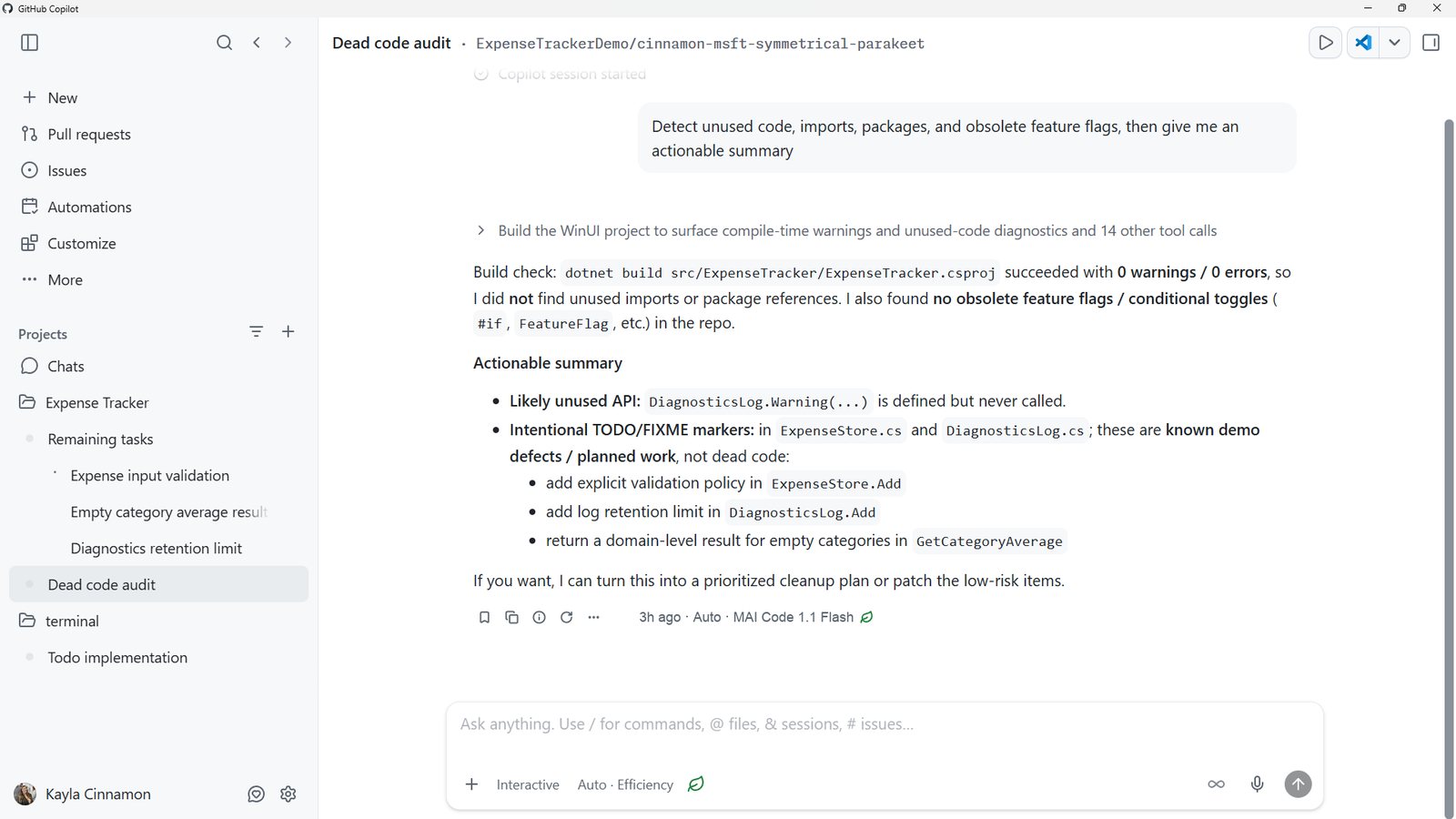
That screenshot hints at one more control: an "Auto · Efficiency" setting in the input bar, with a leaf icon that also appears beside the reply that ran locally. Nothing in the text describes it. I'd guess it biases the router toward the cheap path.
llama.cpp in Windows ML, precisely
"llama.cpp + Windows ML" could mean several things: a new ONNX Runtime execution provider, a DirectML port, a fork. It is none of those. I read the Windows ML docs and the microsoft/WindowsML repository at af42ad3.
Windows ML now has two inference paths side by side: the ONNX Runtime APIs it already had, and a new, experimental, Windows-native Runtime API (C++ and Python only; no C# yet). In the Runtime API, LoadModelFromFile picks the backend from the file extension. .onnx and .ort go to ONNX Runtime and its execution providers. .gguf goes to llama.cpp. Your application uses the same objects either way: a model, an execution target, a pipeline builder, stages, tensors, Run.
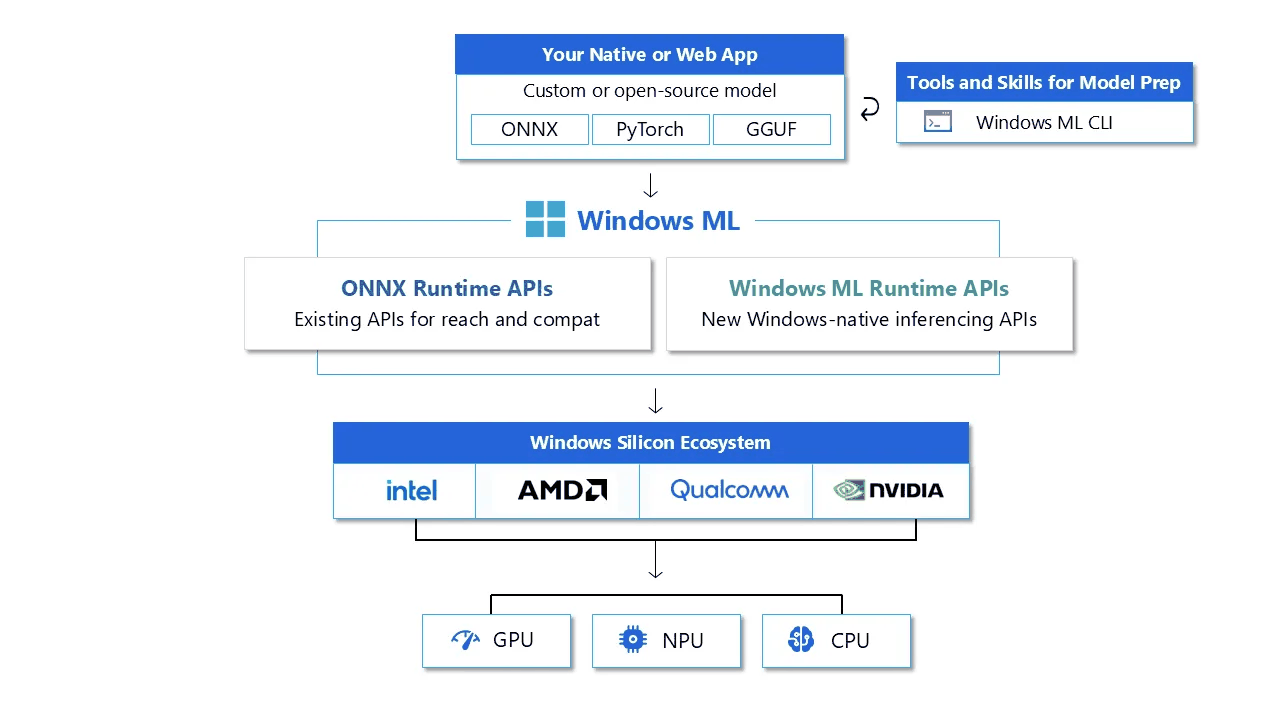
The llama.cpp copy is not a fork, and it is not shipped with GPU support. The repository's tool README is explicit:
// microsoft/WindowsML  Tools/llama/README.md:5-16
Windows ML ships only the llama.cpp CPU backend, in
`Microsoft.Windows.AI.MachineLearning.LibLlama.Core` and the
`windowsml-llama-core` wheel. It doesn't ship or redistribute GPU backends or
vendor runtimes, including NVIDIA CUDA components. The language samples run on
the CPU with that package alone. To run a GGUF model on a GPU, build a backend
with this folder's script.

`Build-LlamaBackend.ps1` builds a standard upstream `ggml-<family>.dll`, such as
`cuda` for NVIDIA GPUs, `vulkan`, or `opencl`, that matches the Core package.
The output is loaded by `WinMLRuntimeLlama.dll`; it is not a WinML-specific
backend fork.
So the GPU path is a stock upstream ggml CUDA backend that you compile yourself, against your own CUDA Toolkit, at the exact llama.cpp commit the NuGet package pins in its manifest; the script reads that commit from the manifest and checks it out. The script is honest about the licensing reason: NVIDIA's redistribution terms are yours to accept, not Microsoft's. Lines 35 to 39 of the same README note the flow "was exercised on Windows ARM64 with Toolkit 13.4", which is the RTX Spark configuration.
The one modification the build makes to llama.cpp is to rename its output DLLs:
# microsoft/WindowsML  Tools/llama/Build-LlamaBackend.ps1:596-607
if (WINML_LLAMA_NAMESPACED_CORE)
    set_target_properties(ggml-base PROPERTIES OUTPUT_NAME "WinMLggml-base")
    set_target_properties(ggml PROPERTIES OUTPUT_NAME "WinMLggml")
endif()
...
if (WINML_LLAMA_NAMESPACED_CORE)
    set_target_properties(llama PROPERTIES OUTPUT_NAME "WinMLllama")
endif()
A small detail, with a real reason behind it. Every local-AI app on Windows (LM Studio, Ollama, Jan, a game with a chatbot) ships its own ggml.dll at its own commit. Loading two different ggml.dll builds into one process, or picking up the wrong one from the search path, is a classic Windows DLL failure. Prefixing the names lets Windows ML's copy coexist with whatever else is on the machine, and the script then checks that the CUDA backend it built imports WinMLggml-base.dll and no upstream core.
The limits matter if you are deciding whether to build on this today. Per the docs, the llama.cpp backend supports CPU and CUDA only in this release, one decoder stage per GGUF file, and no NPU. The higher-level Text Generation API does greedy decoding only: no sampling, no speculative decoding, no chat templates, no structured output. That last list is interesting next to the Command Line post, whose MAI numbers depend on DFlash2 speculative decoding. Whatever Copilot runs on the device, it is not the public Text Generation API as documented today. The demo video shows Copilot installing llama.cpp itself ("ggml.ai, MIT, 50 MB"), which fits.
DFlash2 support is in upstream llama.cpp, so the speculative half of the stack is public even if the model isn't. At 71ad059 the draft architecture lives in src/models/dflash.cpp, and the selector the DFlash 2 paper introduced is built as its own graph:
// ggml-org/llama.cpp  src/models/dflash.cpp:471-473
// DFlash2 selector: top-k candidates per block position plus the pairwise
// transition scores, packed into the nextn output slot for the CPU-side walk.
static void build_dflash2_selector(llm_graph_context & g, const llama_model & model, ggml_tensor * tokens) {
and --spec-type draft-dflash is a documented option of llama-server. I found no MAI architecture in llama.cpp's model list, which is consistent with MAI's weights not being public: whatever runtime build Copilot downloads either maps MAI onto an existing architecture or carries code that is not upstream. I can't tell which.
The last piece of Windows ML that matters for agents is the server. WinMLServer.exe model.gguf serves an OpenAI-compatible Chat Completions endpoint, and its security model is more careful than most local servers:
// microsoft/WindowsML  Samples/Server/README.md:36-45
- It listens only on the loopback addresses `127.0.0.1` and `[::1]`, so other
  computers cannot connect to it.
- Each time it starts, it creates a new random access key. Every request must
  send the key as `Authorization: Bearer <key>`. The server rejects a request
  without it before reading the request body.
- Every request must name a loopback address in its `Host` header and must not
  carry an `Origin` header, so web pages cannot reach the server through a
  browser.
- The server never runs tools. When the model calls a tool, the client runs it
  and sends the result in its next request.
The Origin check is the one I'd single out. A server on localhost with no key can be reached by a web page you happen to visit, through a browser request or DNS rebinding. A random per-start key plus refusing browser-originated requests closes that. Whatever local endpoint you point Copilot at, check it for the same two things.
- license
- MIT / CC-BY-SA-4.0
- branch
- main
- tests
- none found
- source
- 899.4 kB
- commit date
- 2026-10-07
by size of tracked source at this commit, file counts in brackets; docs, data and vendored trees excluded
local clone, 2026-10-08 at af42ad3 — branch, commit, commitDate, fileCount, hasTests, languages, license, licenseFile, shallow
shallow clone: counts describe the pinned tree, not the history
MXC: the part that shipped
Moving inference onto the laptop doesn't change what the agent's shell commands can do. They still run as you. So the sandbox and the local model arrived in the same post, and of the two the sandbox is the more consequential release.
MXC (the blog calls it Microsoft Execution Containers, the repository README "Microsoft eXecution Container") is an MIT-licensed SDK, in Rust, .NET and Node, that takes a JSON policy and launches a workload in a platform container that enforces it. The policy covers the containment type, the process, filesystem paths that are writable, read-only or denied, network ingress and egress, and UI access. On Windows the default backend is processcontainer; others are WSL containers, a session container that runs the agent under a separate Windows account and desktop, and experimental microVM, Windows Sandbox and Hyperlight backends. On Linux it is bubblewrap, on macOS Seatbelt.
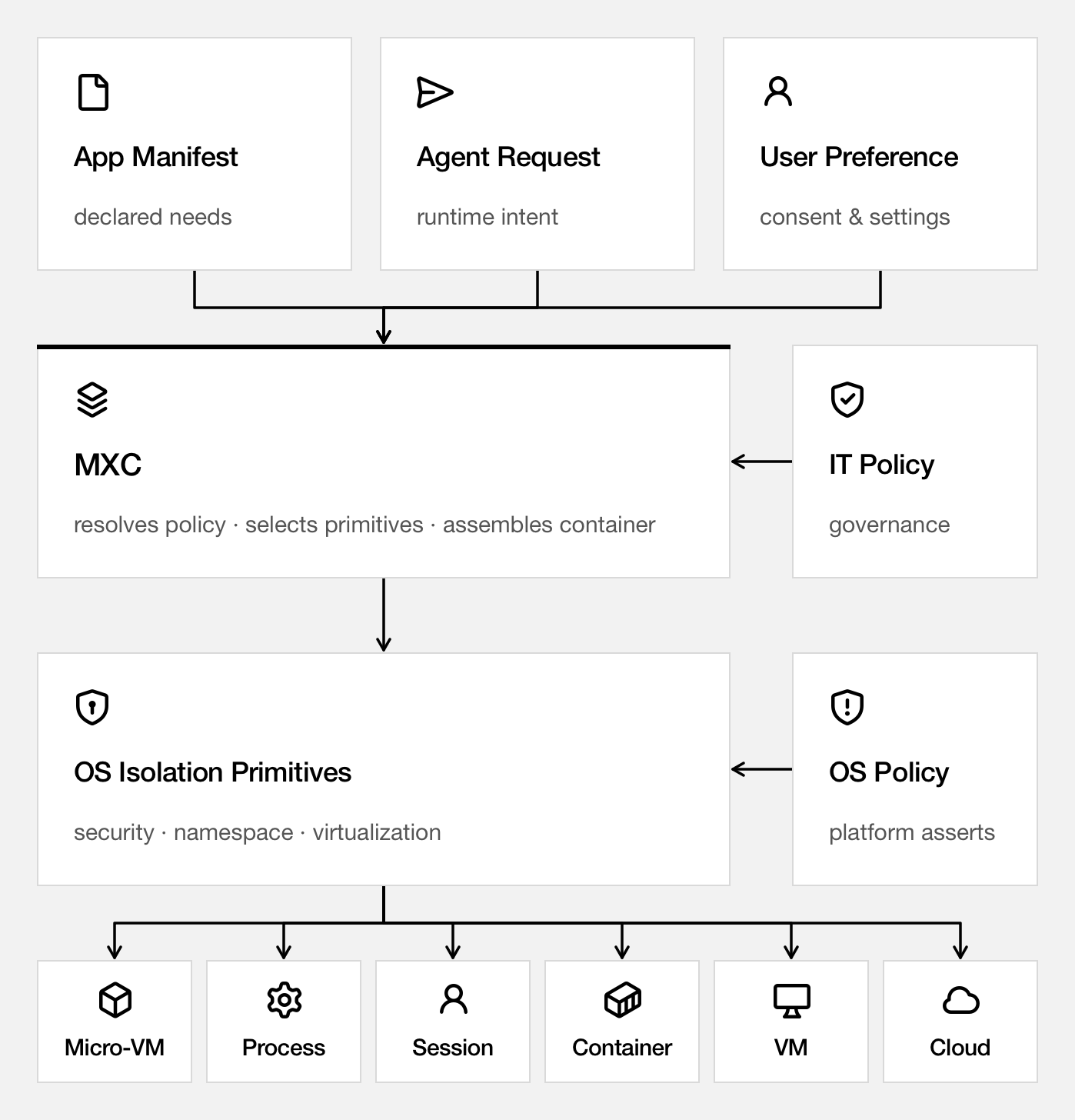
Copilot on Windows uses the "BaseContainer tier of the ProcessContainer backend". In the source, a ProcessContainer is an AppContainer launch: CreateAppContainerProfile, then a SECURITY_CAPABILITIES process attribute, optionally hardened to a less-privileged AppContainer and with Win32k disabled when the policy forbids UI:
// microsoft/mxc  src/mxc-sdk/src/backends/process_container/common/appcontainer_runner.rs:376-379
/// Always at least 1 (`SECURITY_CAPABILITIES`). LPAC adds one
/// (`ALL_APPLICATION_PACKAGES_POLICY`); UI-disable adds one
/// (`MITIGATION_POLICY` for Win32k disable).
fn compute_attr_count(least_privilege_mode: bool, ui_disable: bool, pipe_mode: bool) -> u32 {
AppContainer is the same mechanism that sandboxes UWP apps and Edge's renderers, so this is a well-understood boundary, not a new one. What MXC adds is the policy layer and the authoring tools around it: a Learning mode that enforces and records every denial to a JSON report, and a Permissive mode that records without blocking, so you can find out what a build actually touches before you lock it down. Intune management of MXC policy is "soon"; per the changelog, enterprise-managed settings that developers cannot weaken already work in Copilot.
Read the Command Line post's caveats before you trust it with everything. Shell commands and, by default, local MCP and language servers run inside the boundary. Copilot's built-in file tools do not: they run inside the Copilot process, and the harness checks their requests against policy, "but those checks aren't OS-enforced child-process isolation". Remote MCP servers are outside the sandbox altogether. A prompt-injected agent that wants to write outside the project has to get there through the file tool, and then the question is whether the harness's check is right. The attack surface is smaller than before. It is not zero.
- license
- MIT
- branch
- main
- tests
- 1478 files
- source
- 12.1 MB
- commit date
- 2026-10-08
by size of tracked source at this commit, file counts in brackets; docs, data and vendored trees excluded
local clone, 2026-10-08 at e157fa4 — branch, commit, commitDate, fileCount, hasTests, languages, license, licenseFile, shallow, testFileCount
shallow clone: counts describe the pinned tree, not the history
What I'd actually do with this
If you write agents on Windows, turn on Copilot's local sandbox now (/sandbox in the CLI, or "Sandbox new sessions" per project in the app). It is GA, costs nothing, and does not care which model you use. If you build your own agent, the MXC SDK's Learning mode is the cheapest way I know to find out what your tool calls really need.
If you want a local model in Copilot today, the supported route is Ollama plus CLI 1.0.94-0, with any tool-calling model that fits your GPU. The Windows ML server is a reasonable endpoint to experiment with if you are already on Windows and want its loopback protections, but it is experimental, greedy-only, and CPU-only unless you build the CUDA backend yourself.
If you are thinking about buying an RTX Spark machine for local MAI Code 1.1 Flash, wait for two things: the end-of-October preview, so you can see what Auto actually routes locally, and a straight answer on memory. Everything Microsoft has published that is internally consistent says 53 GB of weights and 75.5 GB at 256K, which means the 128 GB configuration, not the 64 GB one. The 22 GB in the demo is the number I would not plan around.
The model is not open. "No inference charge" means Copilot does not meter calls that run on your hardware; you are still paying for Copilot, for the hardware, and for the electricity. The economics only work if the router sends enough routine work local without getting the hard cases wrong, and the router's rules are the one thing nobody has published.
How I checked
I resolved both posts' short links and read the X threads and replies through the fxtwitter mirror. I read the Windows Experience, Windows Developer (MXC), Foundry on Windows, Microsoft AI and Command Line posts in full, GitHub's HydraFusion post and the two 7 October changelog entries, the Windows ML Runtime, concepts and Text Generation pages on Learn, and the June MAI-Code-1-Flash model card PDF. I shallow-cloned microsoft/WindowsML (af42ad3), microsoft/mxc (e157fa4), microsoft/MAI-Code (506a383) and ggml-org/llama.cpp (71ad059) and read the files quoted above; I did not build or run any of them. I searched the Hugging Face API for MAI models under the microsoft author. I extracted frames from the MicrosoftAI demo video with ffmpeg to read the install dialog. The weight sizes, task counts and prefill times are my own arithmetic from Microsoft's numbers; the decode figures are read off Microsoft's chart. I could not check the 6.8B active parameter count, the benchmark scores, the HydraFusion cost numbers or anything about the router's policy, because none of those come with artifacts.