2026-11-01 · 15 min · 3d · blender · rigging · comfyui · diffusion
Why read this
Notabletop 60%Reads the add-on's pipeline and licences, runs its retargeting maths without Blender, and checks the SkinTokens paper's numbers against its own tables.
- Original analysis
- Runs on a consumer GPU
- Widely used
3D & spatialMixed licencesPractitioner tool
How this was scored
- Is it new?
- 1 of 3: An incremental tweak
- Can I trust it?
- 2 of 3: Measures key facts from files, code or configs
- Can I run it?
- 2 of 3: Open code or weights with real limits
- Will I understand it?
- 2 of 3: Mechanism from first principles with figures
- Can I act on it?
- 2 of 3: A concrete recipe, numbers or comparison
- Will it last?
- 1 of 3: Relevant for months
- Does it affect many?
- 2 of 3: A widely used model, tool or lab release
- Only here?
- 2 of 3: A teardown or measurement few others did
Score 62 of 100, ranked 323 of 666 rated articles. Each question is answered 0–3 by hand, and a 3 is rare. How articles are scored
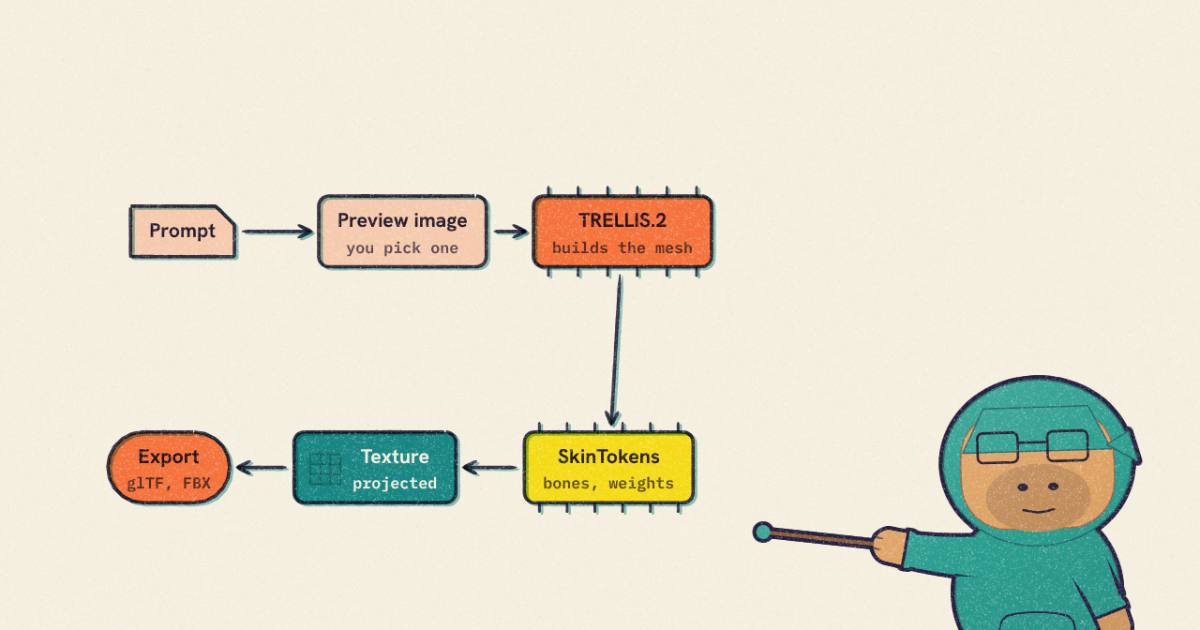
A post on 31 October by @hasantoxr said that "Blender just got a free AI that builds rigged 3D characters from 1 prompt". It names the add-on, StableGen, and lists the stages: "TRELLIS.2 builds the mesh", "SkinTokens adds the skeleton and skin weights", and images generated around the model "get projected onto it as the texture". Then Mixamo animations, glTF for Godot, FBX for Unreal and Unity, and "At least 8 GB of VRAM for SDXL texturing".
The repository is real: sakalond/StableGen, by Ondrej Sakala, which began as a bachelor's thesis at Czech Technical University in Prague. The SkinTokens rigger it calls is a separate paper and repository. I read StableGen at commit f494e5f (28 October 2026) and the SkinTokens paper (arXiv 2602.04805, v1), and I ran the parts that run without a GPU. This article is about what those parts are, what is left on the GPU side, and where the viral summary is looser than the code.
- license
- GPL-3.0
- branch
- main
- tests
- none found
- source
- 3.6 MB
- commit date
- 2026-10-28
by size of tracked source at this commit, file counts in brackets; docs, data and vendored trees excluded
local clone, 2026-11-01 at f494e5f — branch, commit, commitDate, fileCount, hasTests, languages, license, licenseFile, shallow
shallow clone: counts describe the pinned tree, not the history
- license
- MIT
- branch
- main
- tests
- none found
- source
- 423.3 kB
- commit date
- 2026-05-12
by size of tracked source at this commit, file counts in brackets; docs, data and vendored trees excluded
local clone, 2026-11-01 at 273b691 — branch, commit, commitDate, fileCount, hasTests, languages, license, licenseFile, shallow
shallow clone: counts describe the pinned tree, not the history
Labels: measured is something I computed from code or a file, or from a run on this machine, a shared 4-core VM with no GPU and no Blender. Reported is a claim by the authors that I did not re-run. Reasoned is my arithmetic on those. I did not run TRELLIS.2, SkinTokens, ComfyUI, or Blender, and I did not generate a character.
What "one prompt" means
The flow the README describes has a human step in the middle. You describe a character and enable Preview gallery. The add-on asks ComfyUI for several images. You pick one. Only then does the mesh stage start. So it is one prompt and one choice (reported, README quick start). The code agrees: the gallery has a configurable count per batch, and the run proceeds from the picked image.
After the pick, the add-on builds one ComfyUI prompt graph. In stablegen/mesh_gen/workflows.py the mesh graph uses the TRELLIS.2 nodes from the community node pack ComfyUI-TRELLIS2: background removal, conditioning, image-to-shape, simplify, export. The installer's check list names them: LoadTrellis2Models, Trellis2ImageToShape, Trellis2GetConditioning, Trellis2RemoveBackground, Trellis2ExportTrimesh, Trellis2Simplify, Trellis2ShapeToTexturedMesh, Trellis2RasterizePBR, Trellis2ProcessMesh (measured, installer.py). If auto-rig is on, one more node, StableGenSkinTokensAutoRig, is appended to the same graph and its output replaces the exported file (measured, workflows.py lines near 1362 to 1387).
My earlier piece on 3D reconstruction roundups mentions TRELLIS.2 as a generative mesh model that fills in what photos miss. StableGen uses it the other way round, from an image the diffusion model made up.
The run, stage by stage
The widget copies the eight layouts the operator keeps in _PHASE_LAYOUTS. With every stage on, the progress bar gives 15 to the preview image, 45 to TRELLIS.2, 15 to rigging and 25 to texturing. Turn rigging off and the weights become 15, 50 and 35. These are shares of a progress bar that the author chose. The add-on never times a phase (measured: the only clock in mesh_gen/trellis2.py and mesh_gen/workflows.py is a five-second deadline on a websocket wait). So "rigging is 15 percent of the work" is not a claim the code makes, and I would not read it as one.
What the code does settle is where each stage runs.
| Stage | Runs in | Needs a GPU? |
|---|---|---|
| Preview image | ComfyUI, SDXL or Qwen Image | Yes |
| TRELLIS.2 mesh | ComfyUI custom node | Yes (the README: "preferably with an NVIDIA GPU") |
| SkinTokens rig | ComfyUI custom node, in its own Python environment | Yes in practice (a 0.6B-class language model decoding with 10 beams by default) |
| Texture projection | Diffusion views from ComfyUI, projected and baked in Blender | Yes for the views |
| Retargeting a Mixamo clip | Blender, Python | No |
| glTF or FBX export | Blender | No |
The SkinTokens row is reasoned: the add-on's own defaults are num_beams = 10, top_k = 5, top_p = 0.95, temperature = 1.0, repetition_penalty = 2.0 (measured, core/properties.py), and the paper builds TokenRig on the Qwen3-0.6B architecture (reported). I have no timing for it on a CPU, and I did not try.
The 8 GB figure
The viral post ends with "At least 8 GB of VRAM for SDXL texturing". The README says "about 8 GB of VRAM for SDXL, and 16 GB or more for Qwen Image" (measured, README line 118). Both statements are about the texture stage's image model. I found no VRAM figure for TRELLIS.2 or for SkinTokens in the README, the Rigging and animation wiki page or the installer (I did not read the TRELLIS.2 wiki page). The mesh stage has a resolution setting with three values, 512, 1024_cascade (the default) and 1536_cascade, and its description says higher values "require more GPU memory" (measured). So the reader who has an 8 GB card has an answer for the texture stage and no answer for the stage that makes the character.
Decimation defaults to a 100,000 polygon target, server-side, and the UV texture to 4096 px (measured). With auto-rig on, local decimation, remeshing and Solidify are skipped and the server does the decimation (reported, wiki).
What SkinTokens does
Classical auto-riggers predict a skeleton and then regress an N by J skinning matrix, one weight per vertex per bone. The SkinTokens paper (Zhang, Pu, Guo, Cao, Hu; ACM Transactions on Graphics 2026) argues that this matrix is the wrong thing to regress, because it is almost all zeros. Its Table 1 reports, per dataset, the average vertex count N, joint count J, and the number of non-zero weights.
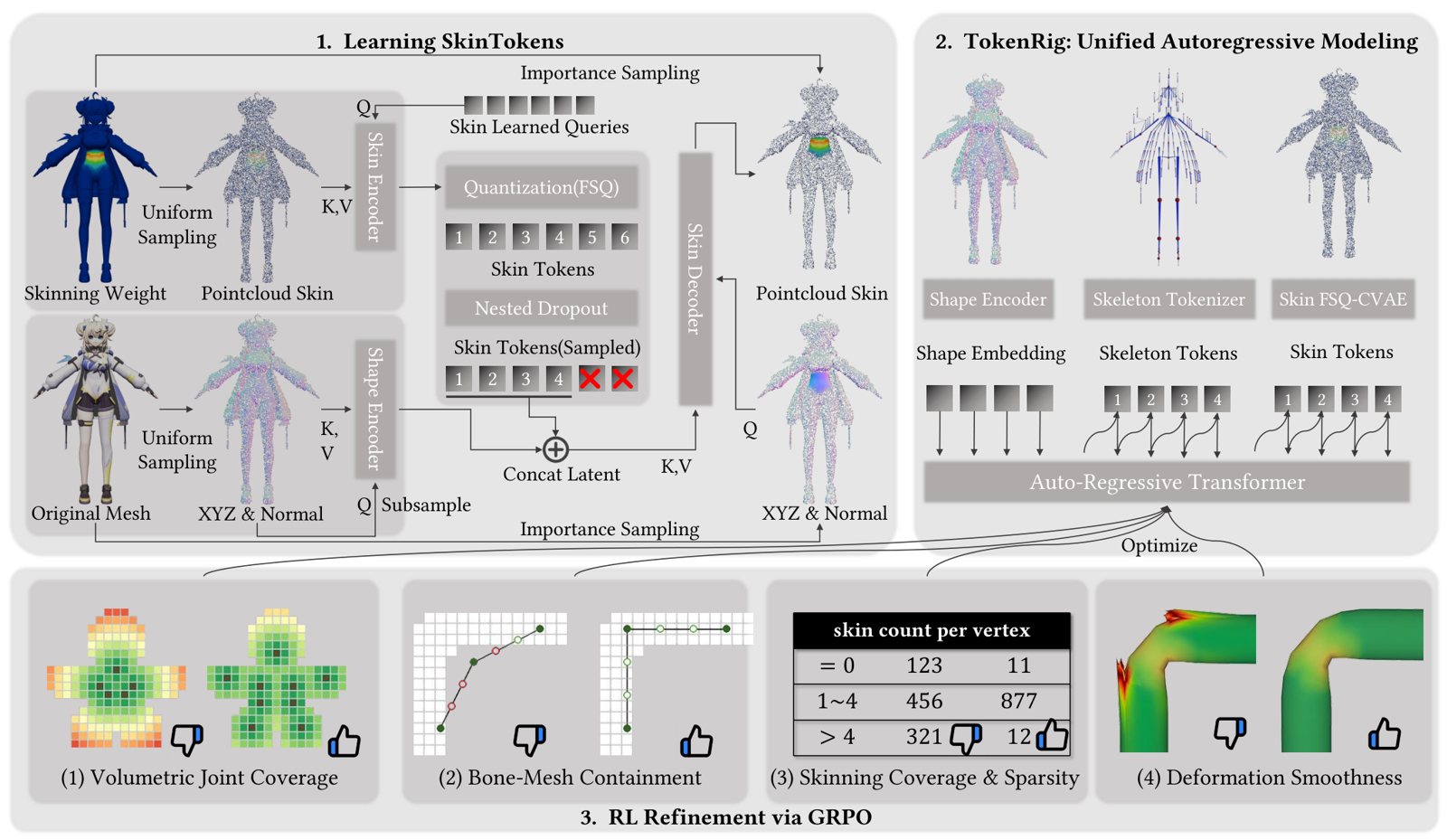
The method has three parts (reported). An FSQ-CVAE compresses each bone's weight column into a short run of discrete tokens. TokenRig, an autoregressive model with the Qwen3-0.6B architecture, then emits the skeleton and the skin tokens as one interleaved sequence. A final stage trains with GRPO on rewards for joint coverage, bone containment, skinning sparsity and deformation smoothness, to cope with odd shapes, the paper says, such as tails, horns and wings.
Three checks of the paper against itself.
Sparsity. From Table 1, divide the average count of non-zero weights by N times J. I get 6.59 percent for VRoid and 1.76 percent for Articulation 2.0 (measured, arithmetic on the table). The table prints 7.40 and 2.43. The difference is the usual one between a ratio of averages and an average of ratios, and the paper presumably means the second. I could not reconcile the third column, "avg.": the same arithmetic gives 5.88 against a printed 9.38. The point of the table survives all of this. The weights are at most a tenth non-zero, and the average vertex carries 1.3 to 2.0 non-zero weights (measured, from the same rows), well under the four a standard skinning pipeline allows.
Compression. Table 2 compares three FSQ codebooks. The prose example gives a 6,247-vertex mesh, 12,494 bytes at half precision for one bone's weights, and 32 tokens at 2 bytes each, 64 bytes. That is 195.22 times, which is the number in the table's second row, the 32,768-entry codebook, not the 64,000-entry one the text says it selected in Section 4.2.2. I computed the bytes each row implies:
| Codebook | Entries | Bits needed | 32 tokens in bytes | Ratio I compute | Ratio in Table 2 |
|---|---|---|---|---|---|
| [8,8,8,6,5] | 15,360 | 14 | 56 | 223.11 | 208.23 |
| [8,8,8,8,8] | 32,768 | 15 | 60 | 208.23 | 195.22 |
| [8,8,8,5,5,5] | 64,000 | 16 | 64 | 195.22 | 183.74 |
Every printed ratio is the one for the next row's bit width, so each implies one more bit per token than the codebook needs (measured, arithmetic). One reading is that tokens are stored with a padding bit. Another is a typo that propagated down the column. Either way, the figure caption for the codebook sweep names [8,8,8,6,5] as the selected configuration, the text of 4.2.2 names [8,8,8,5,5,5], and the worked example matches neither. This does not change what the method does. It does mean the headline compression ratio is not something I would quote.
The 98 to 133 percent. The abstract says SkinTokens improves skinning accuracy "by 98%–133%" over the state of the art. Table 4 has the skin L1 error on two datasets. Taking baseline error over TokenRig's best error, minus one:
| Dataset | vs RigNet | vs Puppeteer | vs UniRig |
|---|---|---|---|
| ModelsResource | 252% | 97% | 134% |
| Articulation 2.0 | 187% | 85% | 98% |
(measured, arithmetic on Table 4, TokenRig with 6 skin tokens and GRPO against each baseline). The abstract's range is roughly the Puppeteer and UniRig cells, without the 85. The paper's own sentence beside Table 4 compares against RigNet, the weakest baseline. The reduction is large either way, and 85 percent is not a small gain. But "98 to 133 percent over the state of the art" is a rounding of a spread of 85 to 134 against the two strongest baselines.
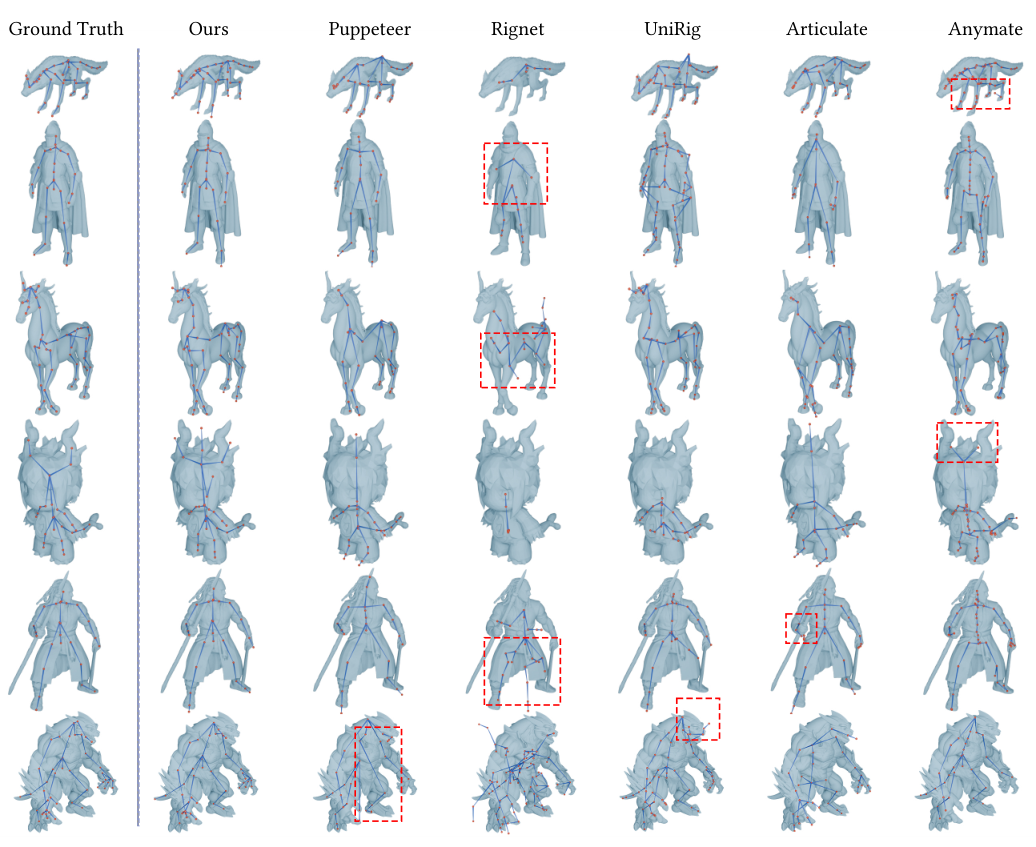
One caution on the qualitative figure: the red boxes are the authors'. The numbers behind it are Table 3's Chamfer distances. For skeletons the gap to the best baseline is smaller than for skinning, from about 5 to 31 percent across the joint-to-joint and bone-to-bone columns (measured, best baseline over TokenRig's best, from Table 3).
What StableGen adds: after the rig
SkinTokens ends at a GLB with a skeleton and a weight per vertex per bone. StableGen imports it, builds an armature, and does the part the paper does not: making that rig usable with animation clips made for a different skeleton.
The retargeting module is 6,841 lines in stablegen/animation/retargeting.py, the largest file in the add-on, which is a measure of where the work is. Its docstring says it "intentionally treats generated armatures as arbitrary skeletons: bone names may be generic (bone_0)", so the first step is to infer a semantic profile (left arm, right leg, spine, pelvis) from the rest pose and store it on the armature. Only when names are useful does it use them.
I ran that name path. The functions _norm_name, _named_bone and _standard_name_profile need no Blender at all, only objects with .name and .data.bones. I extracted them from the source with Python's ast module and ran them against mock armatures built from the standard 65-bone Mixamo list.
The standard Mixamo names resolve cleanly into five chains. Four edge cases do not, all measured on the real code:
- If the importer turns
mixamorig:intomixamorig_, the prefix is not stripped. The exact-name pass fails and a substring fallback runs. The right arm's last bone then resolves toLeftHandRing1, because the candidatehandris a substring of the left ring finger's normalised name and the left side comes first in the bone list. I believe Blender's FBX importer keeps the colon, so a Mixamo FBX imported straight into Blender should not hit this, but I did not test an importer, and a glTF round trip is another matter. - A rig with
Spine1andSpine2but noSpinelistsSpine1twice in the spine chain. - A rig without
HeadgetsHeadTop_Endas its head. - A generic
bone_0 ... bone_23rig returnsNone, and the geometry profile takes over. That path needs a mesh in Blender, and I could not run it.
None of these is a verdict on the add-on, which is under active development (version 0.4.0 in blender_manifest.toml). They are what reading the fallback logic with a test harness turns up. The profile has a version constant (_PROFILE_VERSION = 14) and the code comments describe the algorithm being revised repeatedly, which tells me this is the part the author keeps fixing.
The twist maths
The retargeter builds twist helper bones so that a forearm roll does not collapse at the wrist, and it needs the twist component of a rotation about a bone axis. _quaternion_twist_about_axis does the standard swing-twist split: keep the scalar part, project the vector part onto the axis, renormalise. I ran the real function (extracted, with a small stand-in for mathutils.Vector and Quaternion) on a grid of swings from 0 to 179 degrees about axes perpendicular to the bone, composed with twists of 0, 20, 45 and 90 degrees. The recovered twist was exact to about 1e-14 degrees in every cell, in both composition orders. On 20,000 uniformly random rotations it returned a twist every time, and the remaining swing had no component along the axis (largest, 1.1e-16).
The one place it gives up is a swing of exactly 180 degrees. The length of the twist part is cos(swing / 2), so it reaches the code's 1e-8 cut-off only there, and the function returns None rather than a wrong angle (measured: 179.9 degrees still recovers 40.000, 180 does not; reasoned: the closed form). That is the correct behaviour. The twist is genuinely undefined at that point, and the caller has a path for None.
Collision proxies
To keep a retargeted forearm from sliding through the body, the add-on builds capsule collision proxies per bone. Their radii are fractions of the character's height. For a 1.8 m character, running the extracted functions gives these default radii and limits.
| Role | Bone length | Default radius | Allowed range |
|---|---|---|---|
| Head | 0.25 m | 0.1125 m | 0.045 to 0.216 m |
| Body | 0.45 m | 0.1440 m | 0.063 to 0.360 m |
| Arm | 0.28 m | 0.0448 m | 0.018 to 0.135 m |
| Limb | 0.42 m | 0.0672 m | 0.018 to 0.176 m |
(measured, _default_proxy_radius and _proxy_radius_limits). The numbers are heuristics keyed to proportions. A stylised character with a head a third of its height does not have a 0.2 m head, and a chibi proportion is outside what these constants were chosen for. I reasoned that from the constants; I did not run it on a mesh.
What this costs you
Installing the whole thing means ComfyUI, a pinned TRELLIS.2 node pack (the installer pins commit 9b87851, with four patches applied after clone), the SkinTokens node built into its own Python environment, and model downloads the README puts at "10 GB to over 50 GB". The add-on ships wheels for Windows, Linux and Apple Silicon macOS (measured, manifest).
The licence picture is not a single licence:
- StableGen is GPL-3.0-or-later (measured,
LICENSEand the manifest's SPDX line). - The SkinTokens ComfyUI node is GPL-3.0, and the installer annotates "SkinTokens code and weights: MIT" (reported; I did not read the upstream licence file).
- ComfyUI-TRELLIS2 is MIT per the installer's licence field, with a note in the installer that the textured pipeline uses NVIDIA non-commercial libraries. The README is specific: only the TRELLIS.2 Native texture mode uses nvdiffrast and nvdiffrec.
- Qwen Image 2.1 is under the Qwen Research License, and Bria FIBO 2.0 is CC BY-NC 4.0. Both are non-commercial. SDXL and Qwen Image Edit are not listed as affected.
- I did not check Mixamo's terms for animations, and the README does not state them. If you ship a game, read them yourself.
So for a commercial game, the safe path in the README is the one that avoids the non-commercial pieces: SDXL for textures, the projected texture modes rather than Native, and your own check of every model's licence at the version you install.
What I could not run
Everything that touches a model. There is no GPU here and no Blender in the sandbox, so I did not run TRELLIS.2, SkinTokens, a diffusion model, ComfyUI, or the add-on's registration in Blender. I did not see a character generated, rigged or retargeted by this software, and nothing in this article tells you how good the output is. The sampling controls (top-k, beams, temperature) change which skeleton you get, and the wiki says they "shape the generated skeleton"; I have no sample of how much.
What I did run is narrow and honest about its edge: pure-Python helpers extracted by ast from the add-on, with stand-ins for Blender's vector types; and arithmetic on the paper's printed tables. If a result looks cleaner here than in Blender, that is the reason.
What I would do with it
Two things. If I wanted a rigged prop for a game today, I would run the stages separately, because they fail separately: pick the mesh, rig it from the Tools page, look at the weights in Blender's weight paint view, and only then retarget. The wiki says the standalone auto-rig works with any mesh, which also makes StableGen a front end for SkinTokens on meshes from other sources.
And I would treat the paper's numbers as direction, not ruler. The skinning error is lower than the baselines' by a large margin on its test sets, and the skeleton error by a smaller one. That fits the Figure 6 pattern, where the baselines miss limbs and add stray joints. But the compression table needs a fix, the headline range is a rounding, and the datasets it names are VRoid Hub, Models-Resource and Articulation 2.0, so how it does on your own assets is a separate question.
The viral post is accurate about the shape of the pipeline. It is looser about the hardware. The 8 GB covers the texture stage; the stages that make the character have no published figure, and I would find that out before buying a card for it.
For other Blender-and-AI pipelines on this site, see BlenderWorld, which grades agent-built Blender projects, and 3D Model Anything, where an agent writes the scene as code instead of generating a mesh.