2026-10-23 · 18 min · agents · computer-use · infrastructure · mcp
A 1:44 narrated explainer, drawn in code. Every number and picture in it is this article's own; the sources are below.
› transcript
Hi, I'm Bowsprit! Cua Spaces gives an agent its own desktop on a computer you own. The idea: every computer runs one small daemon, and any agent reaches it through the same SDK. Your agent, say Claude Code, calls the cua SDK. The Space's id picks the path: an address and a token, or the relay. Inside the computer, one daemon answers: shell, files, screenshots, windows and video. It never moves the mouse itself. Input goes through cua driver, linked right in. To start an agent in a Space, the SDK does four things. Install the harness, pinned and checked. Write the run as files in the guest, so any client can pick it up. Drive the harness over the agent client protocol. And give it the Space's own tools. On the relay's web path, encryption ends at the relay, so it can read the session. The default mesh encrypts end to end. The relay only forwards ciphertext. I ran the daemon on a virtual desktop and drove it from a script: type, then press save. Reading the window again showed exactly the change. Every click took over a second, mostly the driver watching for a dialog. Cut that watch and the click halves. Each Space is its own connection, so jobs on all of them overlap almost completely. The takeaway: Cua stopped owning the agent. Whichever agent you already use drives the computer. One daemon per computer. Any agent. And a click is mostly waiting. Every source is in the full article. I'm Bowsprit. Bye!
Why read this
Notabletop 60%Cua Spaces read from source and run on three Xvfb desktops: where a click's 1.35 s goes, what the relay can read, and what the Space sandbox really isolates.
- Original analysis
- Runs on a laptop CPU
- Concrete numbers to act on
Agents & harnessesMixed licencesPractitioner tool
How this was scored
- Is it new?
- 1 of 3: An incremental tweak
- Can I trust it?
- 2 of 3: Measures key facts from files, code or configs
- Can I run it?
- 2 of 3: Open code or weights with real limits
- Will I understand it?
- 2 of 3: Mechanism from first principles with figures
- Can I act on it?
- 2 of 3: A concrete recipe, numbers or comparison
- Will it last?
- 1 of 3: Relevant for months
- Does it affect many?
- 1 of 3: A specialist community
- Only here?
- 2 of 3: A teardown or measurement few others did
Score 60 of 100, ranked 353 of 607 rated articles. Each question is answered 0–3 by hand, and a 3 is rare. How articles are scored
On 19 October trycua posted a thread introducing the Cua Spaces SDK. Its pitch is
that every big lab now ships a bot with its own computer, and "None let you bring
your own. With Cua Spaces, now you can. Put Claude Code, Codex or any agent on
compute you choose, and run jobs across all your computers at once." The thread
names the places a Space can live: your laptop, the office Mac mini, your own AWS,
Google Cloud or Azure account, or a sandbox provider like E2B, Daytona or Modal.
Its third post says ten lines start a bot, and that changing on: "local" to the
name of another computer moves the job there (all reported).
The site has touched cua twice. cua-s1-forms took apart the team's 706,048-parameter form model, and arc-driver read cua-driver's macOS source to explain a benchmark. This piece is about the platform itself: what a Space is, what runs inside one, how your agent reaches it, and what it costs per action. Satyajit asked for a version you can try, so I also ran it.
I read trycua/cua at commit cdda707
(2026-10-23), installed cua 0.7.0 from PyPI, downloaded the cua-spacesd 0.7.0
Linux release (sha256 checked against the published .sha256), and drove three
local desktops with a script. No model, no API key, no account.
- license
- MIT
- branch
- HEAD
- tests
- 1907 files
- source
- 85.6 MB
- commit date
- 2026-10-23
by size of tracked source at this commit, file counts in brackets; docs, data and vendored trees excluded
local clone, 2026-10-23 at cdda707 — branch, commit, commitDate, fileCount, hasTests, languages, license, licenseFile, testFileCount
The stack moved under its own name
If you last looked at cua a year ago, you remember three pillars: desktop
sandboxes, a Computer framework talking to a computer-server inside each VM,
and an Agent framework with prebuilt loops for many vision-language models.
That is still the diagram in the repository's img/ folder.
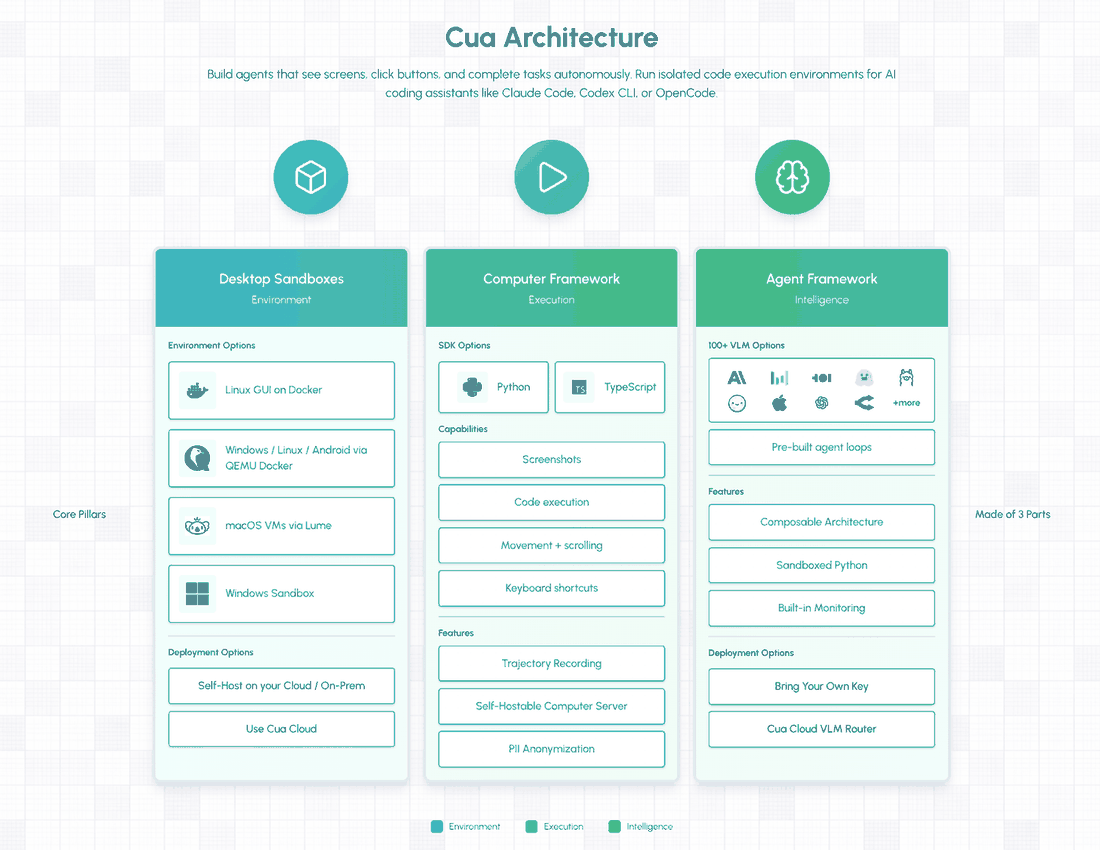
Most of that has been replaced. The cua-spacesd README says it "replaces the
former in-image services (computer-server on 8000, the rcdp daemons, and the
supergateway-wrapped cua-driver MCP) and is not wire-compatible with them." The
Python cua-agent package now opens with a deprecation banner that sends you to
cua-driver over MCP and to the cua SDK. Hosted Cua Cloud has ended.
The agent framework is still worth one paragraph, because its design is the
opposite of what replaced it. cua_agent/loops/ registers 19 loops (measured,
counting register_agent decorators), each claimed by a regex over the model
name: .*claude-.* gets the Anthropic computer-use loop, computer-use-preview
gets OpenAI's, UI-TARS, OpenCUA, Holo, GTA1, InternVL and others get their own
parsers, and a catch-all VLM loop sits at priority -100. A model string with a
+ in it, such as a grounder plus a planner, matches the composed loop at
priority 1: one model describes the target element in words, the other turns the
words into coordinates. OmniParser's loop is still there, but its omni extra was
removed because cua-som is AGPL-3.0. That framework owned the model. The new
stack refuses to.
What a Space is
The docs define it in one line: a computer is a Mac, Windows or Linux machine you own or rent, and a Space is one desktop on it, "set up for a task. A Space is a container or a VM, or the computer's own desktop." Cua does not rent compute; you bring it, and your cloud bills you for any VM (reported).
Every Space has an id that says how it is reached:
| Id | Comes from | Reached how |
|---|---|---|
local:<name> | spaces.create(options) | A container (gVisor runsc when present) or a VM (QEMU, or Lume on a Mac) on this machine |
direct:<host:port> | spaces.add(url, token) | Straight to a running cua-spacesd, by address and token |
relay:<machine-id> | cua host setup on that machine | Through relay.cua.ai, by your cua.ai account |
The app, the cua CLI, the SDKs and the cua daemon share one registry,
~/.cua/spaces.json. When I added three Spaces, their tokens went to a separate
~/.cua/spaces-credentials.json with mode 600, and the registry itself held
none (measured).
The diagram below is built from the crates. Pick a path to see what the relay can read, click a box for what it does, and slide the computer count to see the fan-out: each Space is its own connection.
Read it left to right. Your agent calls the SDK, either directly or through the
cua MCP server, whose generated contract lists 86 tools in version 0.7.0
(measured from spaces-contract/manifest.json; the README's table still says
33). The SDK is one Rust crate, cua-sdk, exported through UniFFI to Python,
TypeScript, Swift and Kotlin, so every binding has the same calls. It runs inside
your process (cua.embedded()) or behind a shared cua daemon on a Unix socket.
On the far side, in every computer, is one process.
Inside a computer: cua-spacesd on 3211
cua-spacesd is a single Rust binary that serves the cua.env.v1 contract on one
port. The .proto files define 13 services and 88 RPCs in that package
(measured): System, Process, Filesystem, Computer, Windows,
Accessibility, Driver, Stream, Presence, Teleport, Tunnel, Volume
and HostSpaces. Native gRPC and gRPC-Web share the port. gRPC-Web cannot carry client streams,
so bidirectional RPCs are forbidden and every client-streaming RPC has a chunked
unary fallback. Alongside the RPCs it serves /mcp (streamable-HTTP MCP over the
driver's tools), /files (HMAC-signed upload and download URLs), and /media
for H.264 video and Opus audio, with QUIC on 3212 when allowed.
Auth is a bearer token, required for any non-loopback bind; without one the
daemon listens on 127.0.0.1 only (reported). A wrong token got me
Unauthenticated: missing or invalid bearer token (measured, by accident, after
I rotated tokens and forgot to re-add a Space). Each daemon also kept an
access.log in its data directory, one JSON line per remote call, each line
carrying the hash of the one before it. After my runs the first daemon's log had
54 lines (measured).
The daemon never injects input itself. It links cua-driver in-process, and the
driver's tools are what /mcp and DriverService.CallTool expose. My Linux build
listed 63 of them (measured): click, type_text, press_key, scroll,
get_window_state, list_windows, get_desktop_state, launch_app, browser
tools, recording, run_steps and more. Two of their rules matter for anyone
writing a harness.
Coordinates must come from a capture. My first pixel clicks all failed with
screenshot_context_missing: "Call get_window_state(pid, window_id) with the
default screenshot and take x,y from that image" (measured, 20 of 20). The
driver binds x and y to the last screenshot of that window, so a stale or
invented coordinate is refused rather than clicked.
Prefer element tokens. get_window_state walks the accessibility tree and
tags each actionable element [N]; snapshot_id:N is a token you can click,
type into or diff against later. On my test page the whole tree was 14 elements
and 1,236 bytes of Markdown, against 27,082 bytes for a 1280x800 PNG of the same
desktop (both measured).
System.GetCapabilities reports what the guest can actually do, and an
unsupported feature carries a limitation string instead of failing silently.
That turned out to be the most useful thing in the box, as the next section shows.
Bring any agent: harnesses over ACP
The Spaces SDK does not ship an agent loop. It ships a way to start someone
else's inside a Space. agent_start takes a harness id (claude-code,
openai-codex, gemini-cli, google-antigravity, goose, hermes,
openclaw, opencode or pi), a prompt and optional repo, model and endpoint.
From the cua-agents crate:
- It installs what the harness needs, each piece pinned and verified: release archives by sha256, npm tarballs by their pinned sha512, git sources by commit.
- It writes the run into
~/.cua/agents/<run>/in the guest:meta.json,run.json,secrets.json(mode 0600),launch.sh, thenevents.jsonlandstate.jsonas the run goes. - It starts a detached, tagged spacesd process that runs
acp-runner.mjs, which drives the harness over the Agent Client Protocol and normalizes its output into one event vocabulary for every harness. - It hands the harness the Space's own MCP tools, so Claude Code inside the Space sees the same 63 driver tools I called from outside.
Because every fact about a run is a file in the guest, a different client can list, read, continue or stop a run it never started.
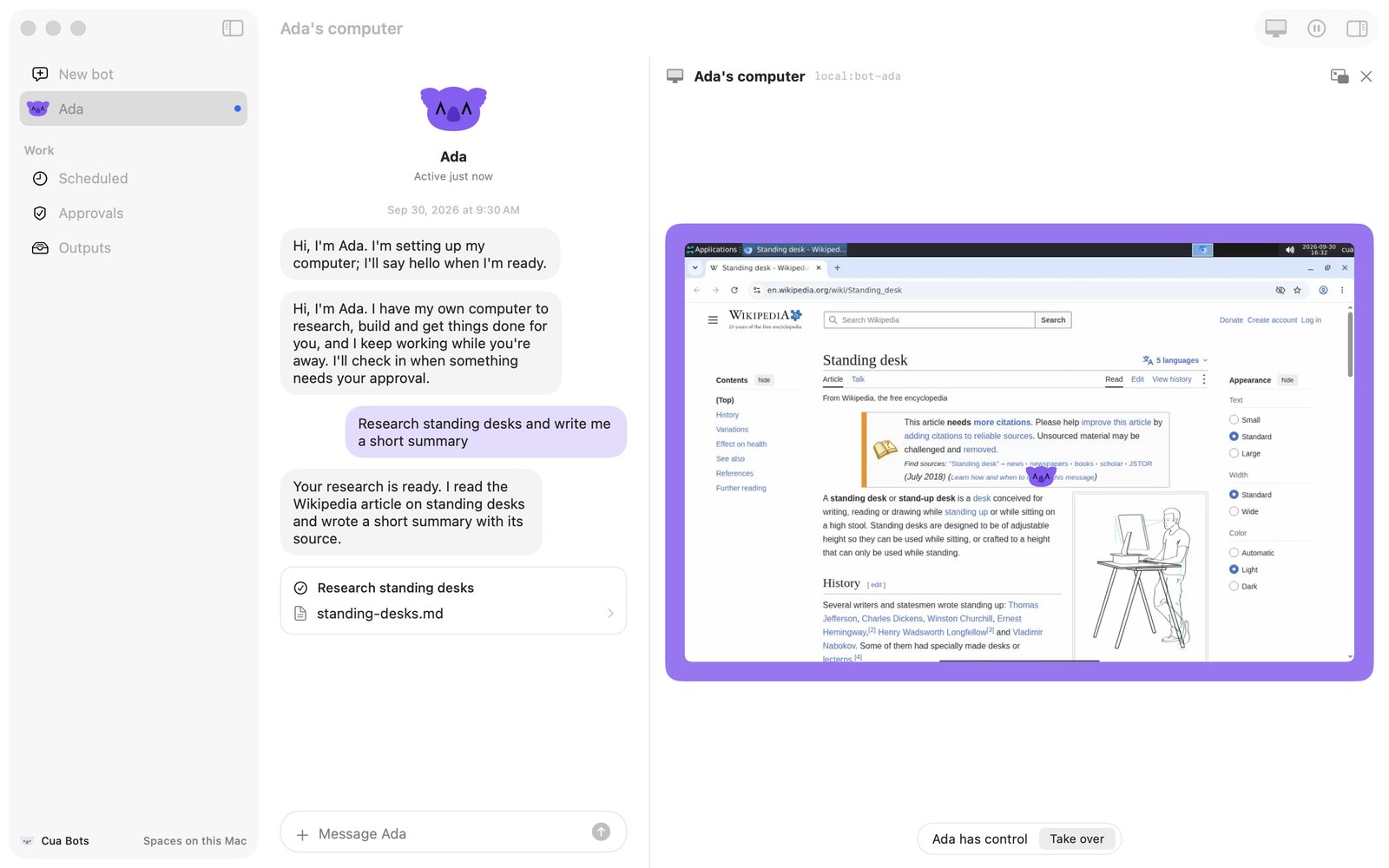
The permission model is stated plainly in the contract: runs are "auto-approved:
the Space is the sandbox, which is why approvalsAreEnforced is false." Keys reach
a run only as explicit environment, named in env_from_host or saved in the app,
and the runner redacts them from the event log. The crate's own doc comment says
"Host credential files are never copied". The connect-your-agent guide
still says the daemon copies ~/.claude/.credentials.json into the Space at
start. The code and the generated tool reference agree with each other, so I
believe the code; the guide is stale.
Persistent agents add a home in Cua Volume (agents/<name>/), restored before
each run and saved after each turn, so a bot remembers across Spaces.
Bring your own compute: direct, relay, mesh
A computer behind NAT runs cua host setup, which installs cua-spacesd as a
service that holds one outbound WSS connection to the relay, multiplexed with
yamux. Nothing listens on the open internet. What the relay can see depends on
the path, and the relay-security page is unusually candid about it:
- HTTPS path. relay.cua.ai is "a trusted, TLS-terminating proxy, not a blind relay." It parses every request to route and authorize it, so it can read shell output, file contents, the desktop stream and keystrokes in flight. It does not store traffic, and in account mode it strips your token and forwards a short-lived signed assertion that the computer checks against its own policy.
- Mesh path, on by default. When both ends support it, a
relay:Space is reached over a WireGuard mesh that runs inside Cua (Cloudflare's boringtun), with no system VPN. The relay coordinates it but holds no session key and forwards only ciphertext.CUA_MESH=requirerefuses any path the relay could read. - Direct. No relay at all: address and token. This is what I ran.
Secrets get extra care. Teleport bundles (a signed-in Chrome's cookies, say) are
sealed to the guest's own X25519 key, pinned on first use, so even the HTTPS path
carries ciphertext. My daemons each generated that key on first start, mode 600
(measured). A saved site password typed into a page through a relay: Space is
the exception the page names: gated behind a per-sign-in acknowledgement, not yet
sealed.
The "your own cloud" placement covers AWS, Google Cloud and Modal in the docs. The thread's list (Azure, E2B, Daytona) is longer, and a follow-up on 22 October announced early access for Hetzner and AWS accounts and E2B and Daytona code running unchanged. I did not test any cloud placement.
Try it yourself
The documented quickstart creates a local: Space from ghcr.io/trycua/linux:24.04
in Docker or Podman and needs about 4 GB of free memory. My sandbox has a Docker
client but no daemon, and no KVM, so I took the other route the design allows: run
cua-spacesd directly on a desktop and add it as a direct: Space. Hardware: a
shared 4-core cloud VM, CPU only, with load averages between 9 and 20 from other
jobs during every run. Treat every number below as measured on a busy machine.
Each "computer" was an Xvfb display at 1280x800, a Chromium window showing a
small editor page, and one cua-spacesd on its own loopback port with its own
token. Getting it to drive Chromium took three fixes, each found by reading what the daemon reported rather than guessing:
a11ycame back unsupported with "AT-SPI needs a D-Bus session bus (start the desktop with dbus-run-session)". I gave each display a session bus and an accessibility bus with the AT-SPI registry. The tree then read correctly.background_inputcarried the limitation that it "uses XSendEvent, which GTK3/GTK4 and Chromium ignore". Background clicks were refused with a message asking fordelivery_mode:"foreground".- Foreground needs a window manager to confirm activation. With none, every
action failed with
foreground_unavailable. A minimal WM (matchbox) fixed it.
The reference image ships XFCE on Xvfb, PipeWire and the driver as a desktop session, which is why it should need none of this plumbing. The SDK side is short. This is the scripted sequence, trimmed, against one Space:
# drive.py: cua 0.7.0, no model
import asyncio, json, cua

async def main():
    spaces = cua.embedded().spaces()
    await spaces.add("http://127.0.0.1:3311", open("token1").read().strip(), "xvfb1")
    sp = await spaces.space("xvfb1")

    async def tool(name, **args):
        return await sp.call_tool(name, json.dumps(args), None, None)

    win = json.loads((await tool("list_windows", app="chrom")).structured_json)["windows"][0]
    pid, wid = win["pid"], win["window_id"]
    tree = json.loads((await tool("get_window_state", pid=pid, window_id=wid,
                                  include_screenshot=False)).structured_json)
    snap = tree["snapshot_id"]                     # rows: [10] entry "Note", [11] button "Save"
    await tool("click", pid=pid, element_token=f"{snap}:10", delivery_mode="foreground")
    await tool("type_text", pid=pid, window_id=wid, text="Hello from a scripted cua run.",
               delivery_mode="foreground")
    # re-read before clicking Save: tokens go stale after the next read
    snap = json.loads((await tool("get_window_state", pid=pid, window_id=wid,
                                  include_screenshot=False)).structured_json)["snapshot_id"]
    await tool("click", pid=pid, element_token=f"{snap}:11", delivery_mode="foreground")
    shot = await sp.screenshot(None)               # PNG bytes over ComputerService
    print((await sp.bash("uname -sr", None)).stdout)

asyncio.run(main())
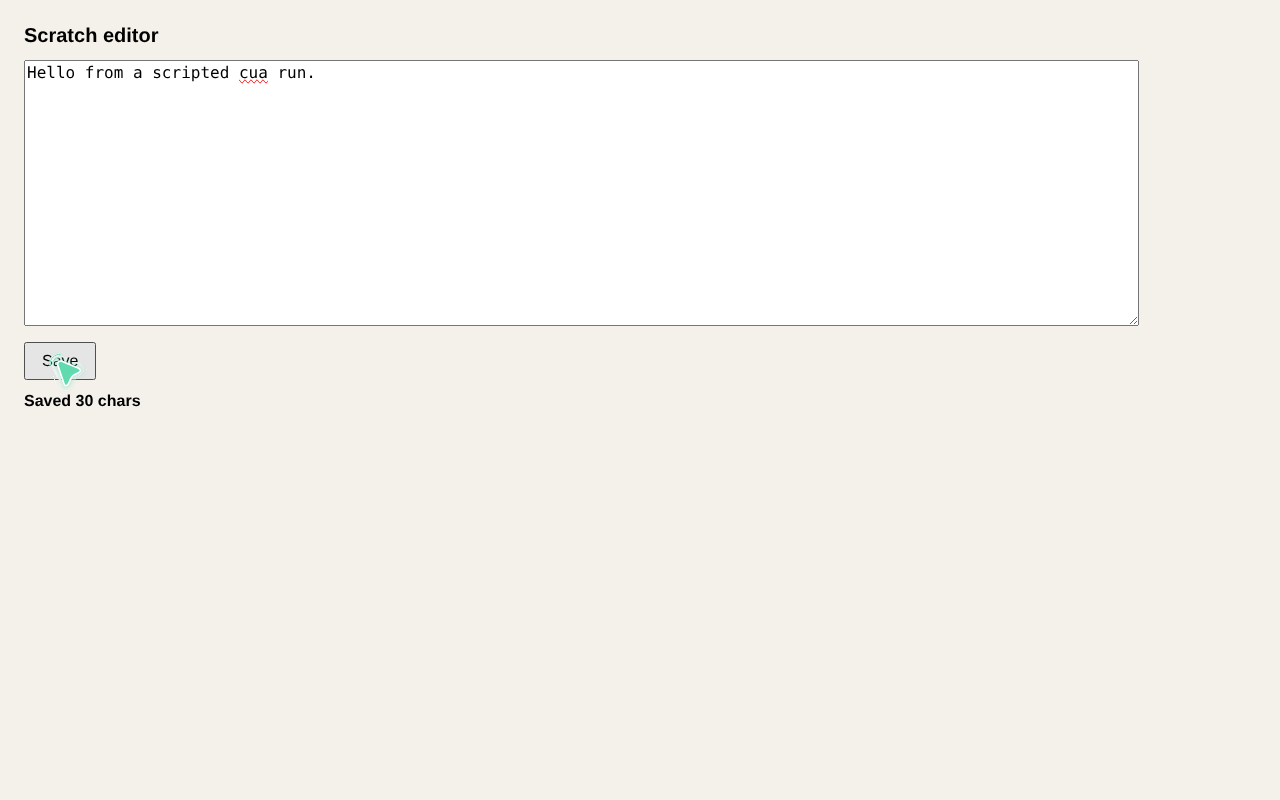
A diff read afterwards (since: <snapshot>) returned exactly the change: a new
section reading "Saved 30 chars". The green arrow in the screenshot is the
driver's agent cursor overlay, which it draws so a human watching knows who is
moving.
What each action costs
I then timed every action type 20 times after a warm-up. The chart has the medians and the p10 to p90 spread, and a second condition I explain below.
Computer.Screenshot over gRPC returned a 27 KB PNG in
8.4 ms median, and bash true round-tripped in tens of milliseconds (both
measured). Reads that walk the window system cost more: list_windows 0.46 s,
an accessibility read of a 14-element window 0.65 s, get_desktop_state 0.77 s
(medians, measured). That last one returns the same pixels as the 8 ms
screenshot, plus window metadata and a capture id the driver will accept clicks
against; I did not profile where its extra time goes.
Every input action cost more than a second: a foreground click 1.35 s, ten
characters of type_text 1.37 s, one press_key 1.21 s (medians, measured).
The source says why. After a foreground action, the Linux driver watches the
target process's window set for up to WINDOW_CHANGE_DEADLINE, 800 ms, so it can
report a menu or dialog the action opened; activation adds its own settle and the
focus guard a 220 ms watch. It is the same design that the arc-driver
piece found on macOS as a one-second poll. The deadline is an
environment variable, CUA_DRIVER_WINDOW_CHANGE_TIMEOUT_MS, read by the daemon.
I restarted one computer with it set to 100 and reran: click 0.66 s, type 0.60 s,
key 0.55 s (measured). Each input action got about 0.7 s faster, which is what
800 minus 100 predicts (reasoned). The reads did not change beyond noise. The trade: a dialog that maps 300 ms after a click is no longer reported in that
click's result.
Fanning a job across computers
The thread's second promise is jobs across all your computers at once. In the SDK
that is not a scheduler; it is that every Space is an independent handle, so
asyncio.gather is the fan-out. My job per Space: find the window, read the
tree, select the text area, type job on <space>, re-read, press Save, take a
screenshot and run a shell command.

| Spaces | One after another | All at once | Rounds |
|---|---|---|---|
| 2 | 15.1 s | 8.0 s | 5 |
| 3 | 22.2 s | 8.9 s | 4 |
Medians, measured. A single job took 7 to 9 s, and almost all of it is the driver's settle and watch windows, which are waits rather than CPU, so three jobs overlap almost completely: 2.5 times faster with 3 Spaces (reasoned from the medians). On a real fleet the Spaces are separate machines and nothing contends at all; on my one VM they shared four busy cores and still overlapped.
What the agent can touch
"The Space is the sandbox" is the whole security argument, so it is worth being exact about when it holds.
On a local: Space it is a gVisor container or a VM, and the harness inside
runs with auto-approved permissions against that guest. On a direct: or
relay: computer that is the machine's own desktop, the agent is a process on
that machine. My bare-host daemons proved it: get_accessibility_tree, a
read-only discovery call, listed 184 running processes on the VM, mine and
everything else's (measured). The harness installer goes further: it installs a
harness's OS dependencies through apt when it runs as root or has passwordless
sudo (read in installables.rs). That is a fine thing to do in a disposable
container and a surprising one on your workstation. It is also why I did not run
agent_start here: on my bare host it would have run apt as root on a shared
machine, and every ready harness needed a provider key I was not going to supply.
The controls that do exist are good ones. Tokens never leave the host in account
mode. The MCP server takes permission scopes, so an agent that only needs to
look can be given spaces:readonly. Sharing a Space has viewer and editor roles.
The audit trail is hash-chained. The relay is honest about reading plaintext on
its HTTPS path, and the default mesh removes it from the session.
What I ran, and what I did not
Ran: everything in the previous section. Did not run, and why:
- The Docker image and
local:Spaces. No Docker daemon and no KVM here. - Lume and macOS Spaces. Lume runs macOS VMs on Apple's Virtualization framework; it needs Apple silicon.
- Windows Sandbox and Windows guests. No Windows host.
- The relay and the mesh. Both need a cua.ai account, which this exercise ruled out.
agent_startwith any harness. It needs a provider key, or a custom endpoint. The repository has a scripted mock provider,cua-mock-llm, built for exactly this test, but the installer would have run apt as root on a shared host, so I stopped there.- The Spaces app, teleport and Cua Volume. These need the desktop app (the Mac build wants macOS 26 or later) and, for teleport, a signed-in app to move.
Licences matter if you plan to self-host. The SDK, the cua CLI, cua-driver and
Lume are MIT. The Spaces apps, cua-spacesd, the relay, Keyvault, teleport and
Cua Volume are FSL-1.1-MIT: free to use and self-host, no competing hosted
service, each release becoming MIT two years after it ships (reported).
What to take from it
The interesting decision in Cua Spaces is that the team stopped owning the agent. The old stack had a loop per model; the new one has a daemon per computer and an ACP runner that starts whichever agent you already pay for and hands it the same 63 tools.
Per action, the time is in the driver's waiting, not the wire: 8 ms to see the screen, 1.35 s to click it, 0.7 s of that the window watch. If you build a harness on it, read the capability report first, ground every pixel action on a capture, prefer element tokens, and decide how long you are willing to wait for a dialog that might never open.
For the models that drive these desktops, see Qwen-CUA, Holo4 and Fara 1.5. For the other way to build the box, see DeepSeek DSec and Strands Box; for the loop around the model, agent harnesses.